

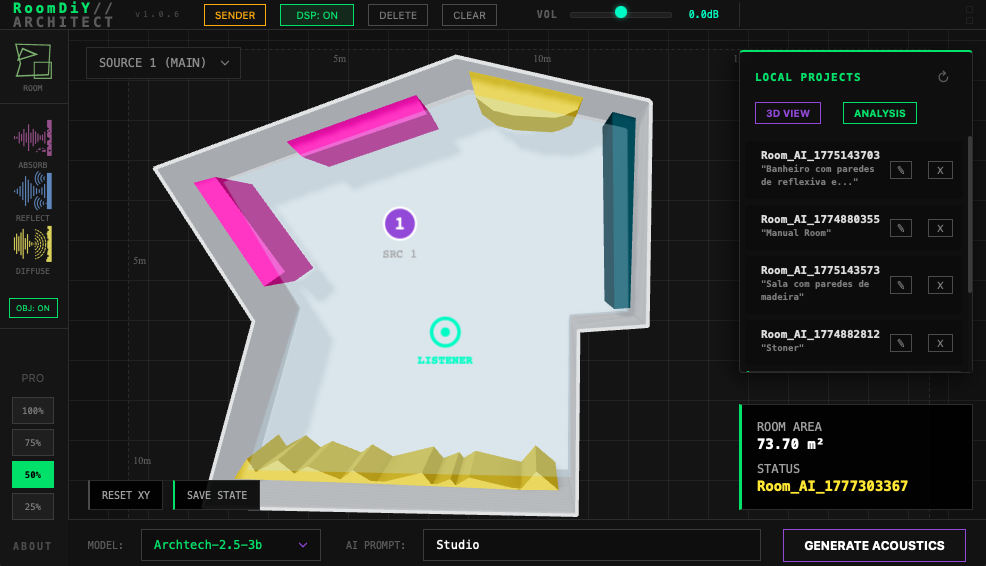
AudioFB has released RoomDiY, a real-time room simulation plugin that lets you sketch your acoustic space on a 2D canvas and listen to the result instantly. Unlike convolution reverbs that rely on pre-recorded impulse responses, RoomDiY generates the acoustic space on the fly from the room’s geometry, surface materials, and source/listener positions. The free edition is genuinely free — no signup, no time limit — with one active room slot and a maximum room area of 100 m².
What makes RoomDiY different
RoomDiY ships with an offline neural network — a small embedded LLM that runs 100% locally — to translate plain-language room descriptions (“small dry studio with foam walls”, “large concrete hall”) into a full acoustic profile. The engine derives RT60, high-frequency damping, and diffusion automatically from the room’s dimensions, surface materials, and volume. You can then drop absorbers, reflectors, and diffusers onto the 2D plan and the DSP reverb engine reflects the change in real time.
Feature highlights
- Custom 2D room builder — draw the room layout on a dynamic canvas and place absorbers / reflectors / diffusers visually
- 100% offline AI acoustics engine that turns natural-language room descriptions into an acoustic report
- RT60 analysis broken down by low, mid, and high frequency bands
- Room mode detection that flags standing-wave resonances based on room dimensions
- Full-spectrum frequency response display
- AI-driven problem-frequency detection, treatment placement suggestions, and listening-position evaluation
- Visual mixing of depth, distance, and pan with acoustic accuracy
How to download and get started
Head to the official AudioFB product page and grab the macOS or Windows installer from the “Get RoomDiY Free” section. Once installed, RoomDiY is designed around the idea that you build a room first, then listen — so on first launch, delete any default room that’s already in the slot before drawing your own (the draw and prompt controls stay greyed out until the slot is empty). To create a room: click the Draw button at the top-left, click around the 2D canvas to place vertices (four points for a rectangle), and double-click to close the floor. Then type a description into the prompt field and hit Generate Acoustics. From there, drop absorbers, reflectors, and diffusers and place the source / listener anywhere on the XY plane.