

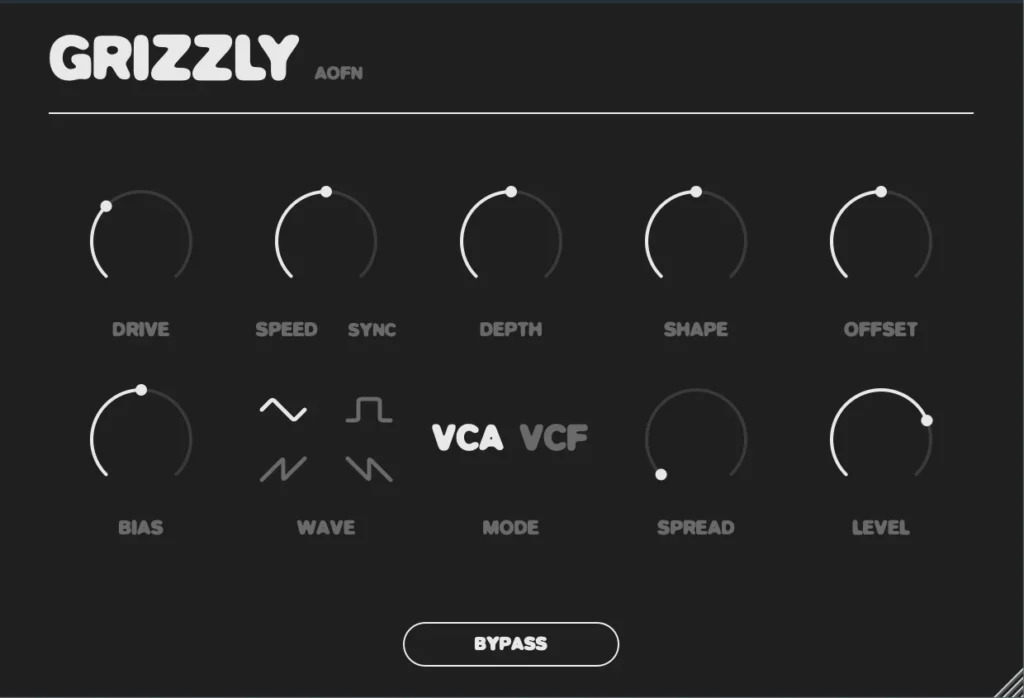
AOFN Audio is giving away Grizzly, a stereo modulation plugin inspired by a classic 1979 effect pedal circuit, completely free of charge.
In this article we cover what Grizzly does, its main features, and how to download and install it.
What Is AOFN Audio Grizzly?
Grizzly is a stereo modulation effect plugin inspired by the Gristleizer, a classic effect pedal circuit from 1979 designed by David Simpson and published in Electronics & Music Maker. It works on just about any source you throw at it, including drums, guitars, synths, vocals and full busses.
An internal LFO offering triangle, square, saw up and saw down shapes drives a modelled JFET stage. From there you can switch between two modes: VCA mode, which ducks the amplitude of the incoming signal, and VCF mode, which opens and closes a low-pass filter.
VCA mode covers tremolo, rhythmic gating, eighth-note pumping and slow swells, and once you push the rate above roughly 20 Hz it moves into gritty, ring-modulator-like territory. VCF mode handles auto-wah, filter sweeps and dub-style cutoff pulses.
Key Features
- Stereo modulation effect modelled on the 1979 Gristleizer circuit
- Switchable VCA mode (amplitude) and VCF mode (filter)
- LFO waveforms: triangle, square, saw up and saw down
- SPEED: 0.01 Hz to 30 Hz, or host sync with note divisions from 1/1 to 1/32
- DRIVE: -12 dB to +24 dB of pre-gain for the warmth and grit of the original circuit
- SPREAD: offsets the LFO phase between left and right channels for wider stereo images and auto-panning
- Additional controls: DEPTH, SHAPE, OFFSET, BIAS, LEVEL and BYPASS
| Specification | Details |
|---|---|
| Product | AOFN Audio Grizzly |
| Type | Stereo modulation effect (VCA / VCF) |
| Inspiration | 1979 Gristleizer pedal circuit |
| LFO waveforms | Triangle, Square, Saw Up, Saw Down |
| Speed range | 0.01 Hz – 30 Hz, or host sync (1/1 to 1/32) |
| Drive range | -12 dB to +24 dB pre-gain |
| Price | Free (name-your-price, enter 0) |
Samples Used in the Video | Splice Sounds
- 91V_DIY_150_electric_guitar_yesterdays_lead_F#m
- NH_ESG_150_drum_break_dime
- PHT_loop_snare_roll_fill_07_150
How to Download and Install Grizzly
Grizzly is offered as a name-your-price download, so simply enter 0 to get it for free. Once downloaded, move the plugin files into a folder your DAW scans for plugins.
Windows
- VST folder: C:\Program Files\VSTPlugins
- VST3 folder: C:\Program Files\Common Files\VST3
macOS
- VST folder: Macintosh HD/Library/Audio/Plug-ins/VST/
- VST3 folder: Macintosh HD/Library/Audio/Plug-ins/VST3/
- AU folder: Macintosh HD/Library/Audio/Plug-ins/Components/
That wraps up the free giveaway details for AOFN Audio Grizzly. If you are after a characterful tremolo, auto-wah and filter modulation tool with genuine vintage circuit flavour, it is well worth grabbing while it is free.