

Nolvra’s talkbox plugin PRISM MINI is currently available as a free download.
In this article we cover the giveaway details and an overview of what PRISM MINI does.
1. What Is Nolvra PRISM MINI?
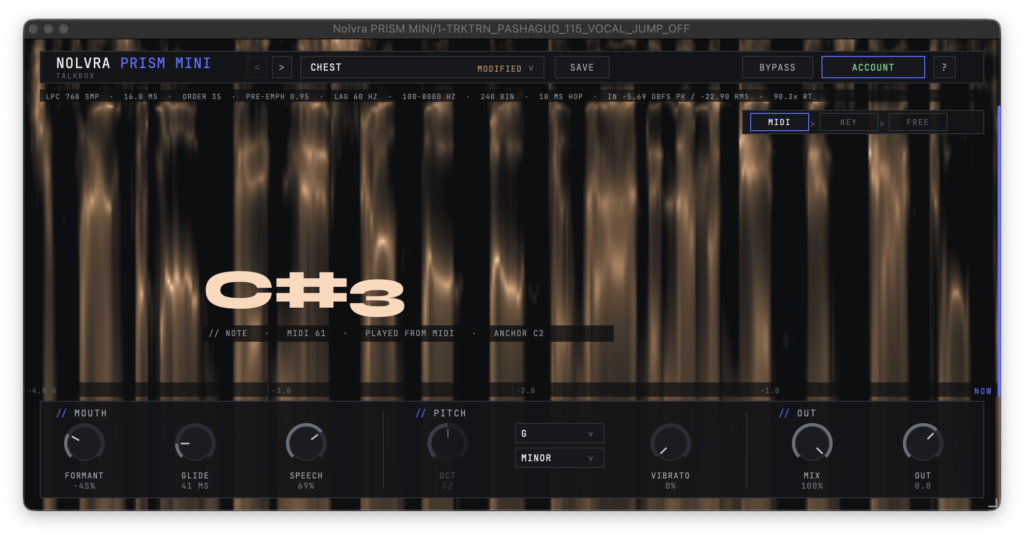
PRISM MINI is a talkbox plugin with a built-in carrier synth: insert it on a vocal track, sing, and it works. Unlike typical talkbox/vocoder plugins, there is no need to prepare a synth on a second track and route it in — PRISM MINI detects the pitch of the incoming voice and drives its internal carrier from it. Rather than a vocoder, it uses a true talkbox approach in which the carrier is sounded through the resonance of your voice.
Key Features
- Built-in carrier: no second track or bus routing required — a single insert on the vocal track is all you need
- Pitch detection works in priority order: MIDI input → manually set key → voice only
- FORMANT (mouth shape shift), GLIDE (slide time to the next note), SPEECH (how much consonant detail is preserved)
- OCT (sets the register of the internal carrier by note), KEY (manually set the root plus major/minor), VIBRATO
- MIX (balance against the dry voice), OUT (output level), and bypass in the header
- 4 factory presets (CHEST / CRY / TEETH / TUBE) plus user preset saving
Samples Used in the Video | Splice Sounds
- TRKTRN_PASHAGUD_115_VOCAL_JUMP_OFF
- FRANCMOODY_115_clavinet_loop_wah_F#maj
- TS_DTP_115_drum_percussion_punch
2. How to Download and Install PRISM MINI
Download and install the dedicated installer manager app “Nolvra Hub”. Launch Nolvra Hub after installation, enter your email address to complete registration, and you will then be able to install PRISM MINI. Updates are also delivered through Nolvra Hub.
Nolvra’s lo-fi effect RELIC — which packs tape, vinyl, VHS and radio into a single plugin — can be installed from Nolvra Hub as well.
That is the free giveaway info for Nolvra PRISM MINI — a talkbox that follows pitch from three sources: MIDI, a manually set key, or your voice.