
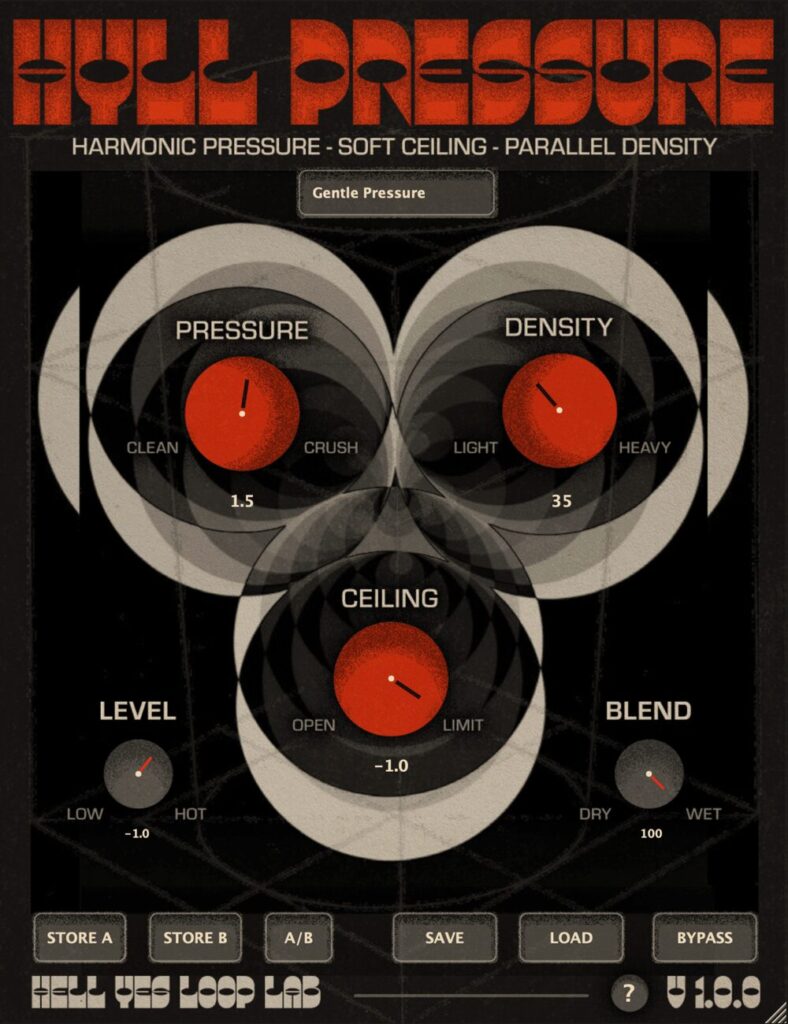
The clipper plugin “HYLL Pressure” developed by Hell Yes Loop Lab is now available for free!
In this article, we introduce the distribution details and an overview of HYLL Pressure.
Please use it as a reference.
1. What is Hell Yes Loop Lab “HYLL Pressure”?
HYLL Pressure is a clipper plugin that rounds off sharp transients and adds density to drums, bass, vocals and more, handling everything from gentle saturation to heavy clipping. It is distributed on a pay-what-you-want basis, so you can get it at any price you like, including free. Instead of technical jargon, the controls use more intuitive names.
Main Features
- Pressure: a control that adjusts the input gain
- Density: a control that morphs from soft clip to hard clip
- Ceiling: sets the clipping ceiling (threshold)
- Level: a control to match the output level
- Blend: a mix control for parallel processing
- Presets such as Gentle Kiss, Master Glue, Warm Density, Drum Crush, and Tape Push
2. How to Install and Download HYLL Pressure
For HYLL Pressure, you can check out using only your email address by entering 0 as the price. Download the plugin file from the link in the email you receive, copy it into the appropriate plugin folder for your environment, and rescan in your DAW if necessary. On macOS, depending on your security settings, you may need to manually allow or unblock the plugin.
Windows
- VST folder: C:\Program Files\VST
- VST3 folder: C:\Program Files\Common Files\VST3
macOS
- VST folder: Macintosh HD/Library/Audio/Plug-ins/VST/
- VST3 folder: Macintosh HD/Library/Audio/Plug-ins/VST3/
- AU folder: Macintosh HD/Library/Audio/Plug-ins/Components/