

DE Productions’ plugin management and loading utility “Plugindex” is currently available for free!
In this article, we introduce Plugindex’s download information and an overview of the software. Be sure to check it out.
What Is DE Productions “Plugindex”?
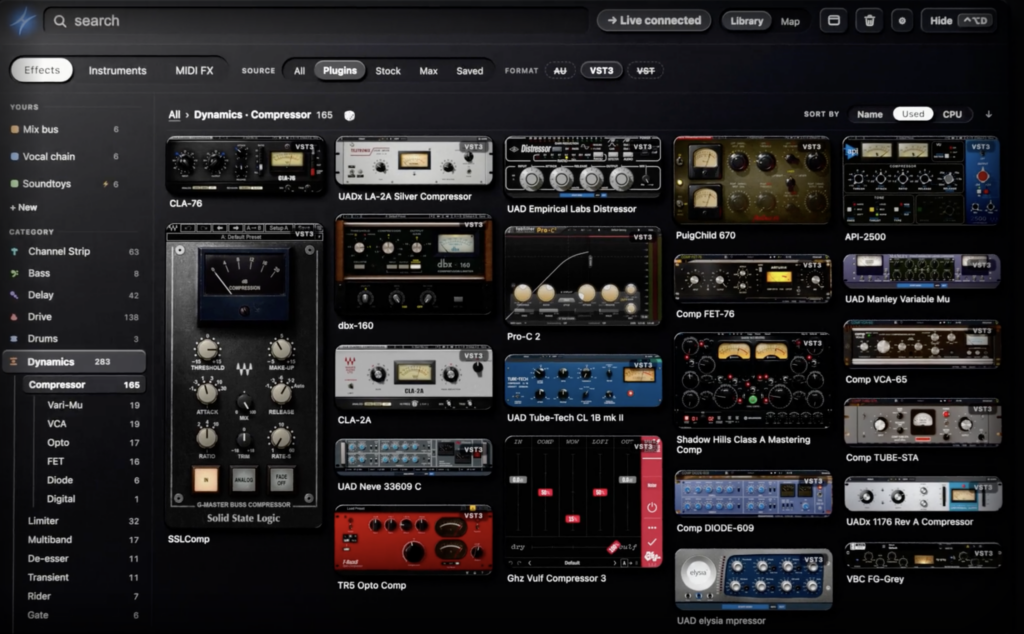
Plugindex is a plugin library manager that displays all of your installed plugins with images and lets you load them onto the selected track with a single click or key press. Because it runs as an app outside your DAW, it does not sit in your session’s signal path or affect the CPU meter like a plugin would. You can use all Pro features for 14 days after downloading, and after that it continues as a Free version with limits on usage such as the number of loads.
Key Features
- Scans the plugins on your computer and automatically categorizes and lists the ones your DAW can load, complete with images
- Filter by typing a few letters of the manufacturer name, or by category, format and source
- Load a plugin into the next free slot of the selected track with a click or an assigned key
- Drag a card onto the keyboard to assign a key (also shows whether it works in all of the DAWs you use)
- Automatically detects the running DAW and shows only the plugins that DAW can load
- Supports AU, VST, VST3 and AAX, as well as DAW built-in devices, Max for Live, racks and saved presets
- Checks your plugin folders once a month and shows plugins that cannot be loaded, duplicate files and the disk space you can free up. It also shows which plugins are in use or missing in your Ableton Live sets
- Free version: unlimited indexing and search, 50 plugin loads per week (resets every Monday), and up to 3 key assignments
- Supported DAWs (Mac): Ableton Live 11/12, Logic Pro, Pro Tools, FL Studio, Cubase/Nuendo 15 or later, Bitwig Studio, REAPER, Fender Studio Pro 8
- Supported DAWs (Windows): Ableton Live, Cubase/Nuendo 15 or later, FL Studio, Bitwig Studio, REAPER, Fender Studio Pro 8 (Pro Tools support is in progress)
- System requirements: macOS 13 Ventura or later (Apple silicon/Intel), Windows 10/11 (64-bit)
How to Download and Install Plugindex
You can download the Mac or Windows version via “Download Free” on the official page. No account or credit card registration is required.
Initial Setup
After installing, open “Setup & connection…” from the Plugindex icon in the menu bar (system tray on Windows), and the steps required for your DAW will be shown one by one. Follow the on-screen instructions and, at the end, press “Index” under “Build your index”. Plugindex will then load each plugin and capture its screen to build an image-based library.
Main Settings for Each DAW
- Ableton Live: Install the dedicated script and select “Plugindex” under Live › Settings › Tempo & MIDI › Control Surface
- Logic Pro: Allow Accessibility and turn on “Open plug-in window on insertion” under Logic Pro › Settings › View › Mixer
- Pro Tools: Allow Accessibility and open a session with at least one track (Windows version is in progress)
- FL Studio: Install the script, enable “Plugindex” as an Input in the MIDI settings (F10) and set Controller type to “Plugindex”. Plugindex must be launched before FL Studio, so turn on auto-start at login
- Cubase/Nuendo (15 or later): The script is installed automatically, so just restart the DAW
- Bitwig Studio: Under Settings › Controllers › Add Controller, set Hardware Vendor to “Plugindex” and add it
- REAPER: No additional setup is required
- Fender Studio Pro 8: Add “Plugindex” under Preferences › External Devices › Add, and set Receive From to “Plugindex Studio Pro”
On Windows, FL Studio, Cubase, Nuendo and Studio Pro require you to create a MIDI port named “Plugindex” with the free app “loopMIDI” (Studio Pro also needs a port named “Plugindex Studio Pro”).
Permissions Required on Mac
Plugindex uses several system permissions to work. Turn on the “Plugindex” row for each of them under System Settings › Privacy & Security.
- Screen Recording (called “Screen & System Audio Recording” on macOS 15 and later): Required for all DAWs. Used to capture each plugin’s window to create the images. Plugindex must be restarted after you grant it
- Accessibility: Used to load plugins onto tracks in Logic Pro and Pro Tools. In Ableton Live, it is requested to close Live’s popups while building the library
- System Events / Finder control: A one-time prompt appears for closing plugin popups, opening FL Studio’s MIDI settings, and showing files in Finder
No permissions are needed on Windows. If images do not appear or show up blank, removing Plugindex from the permission list with “−”, re-adding it with “+” and restarting Plugindex may fix the problem.
About the Free Version
You can use all Pro features for 14 days after downloading, and the app then automatically switches to the Free version. Your library and settings are kept, and searching remains unlimited, but plugin loads from Plugindex are limited to 50 per week (resets every Monday) and key assignments to 3. The unlimited Pro version is a one-time purchase of $99.
That was the free distribution information for Plugindex.