

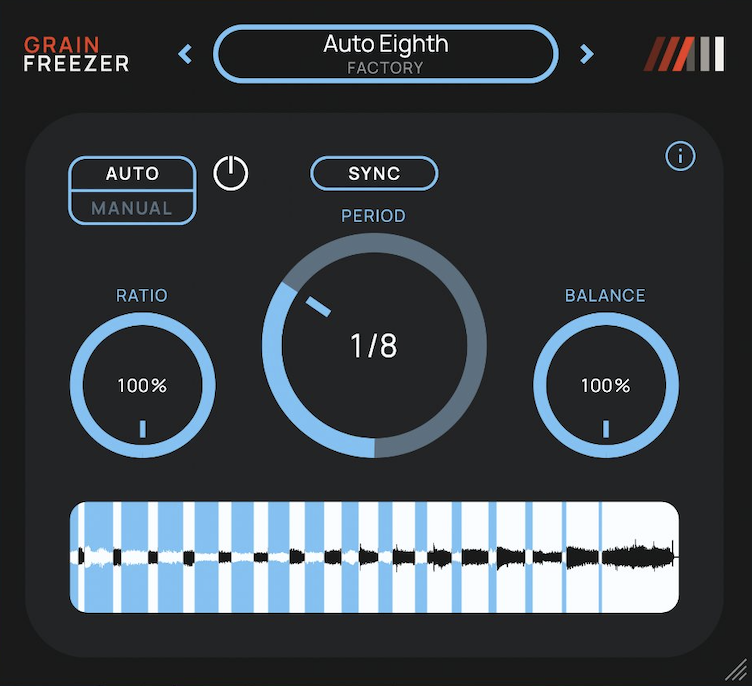
Amazing Noises’ granular freeze effect Grain Freezer is now available for free! This article covers the download information and an overview of the plugin. Be sure to check it out.
What Is Amazing Noises “Grain Freezer”?
Grain Freezer is a granular effect that captures a moment of your track’s audio (a 150 millisecond snippet) and sustains it as a texture made of up to 64 overlapping grains. It lets you blend the original sound with the texture, and also includes an Auto mode that automatically refreshes the snippet while your DAW is playing.
Key Features
- Manual mode: Hold a moment with the Freeze button (Toggle holds until you click again; Hold keeps it only while the mouse button is pressed)
- Preload: Set the ratio of how much of the snippet is captured from just before versus just after the click
- Auto mode: Automatically refreshes the snippet at intervals of up to 16 seconds, or synced to the DAW from 1/64 bar to 8 bars
- Ratio: Sets how much of each cycle the texture is audible (at a time of 0, it continuously follows the input)
- Balance: Blends from the original sound only to the texture only
- Supports stereo and mono tracks. With stereo output, mono material is spread across the stereo field grain by grain
- Freeze can be automated from your DAW
- 9 factory presets, plus user preset support
- Formats: macOS AU and VST3 (Universal/Intel: macOS 10.13 or later; Apple Silicon: macOS 11 or later), Windows 10 or later VST3 (x64)
The demo video uses samples from Splice Sounds: BOS_SLF3_75_Guitar_Electric_Loop_Pretzel_Bm and SO_ISD_75_drum_loop_microlimiter_basil.
Grain Freezer Download and Installation
You can easily download and install it from the official page using the “Download for macOS” or “Download for Windows” buttons.
That’s the free distribution information for Grain Freezer. Enjoy freezing your sounds into evolving textures!