

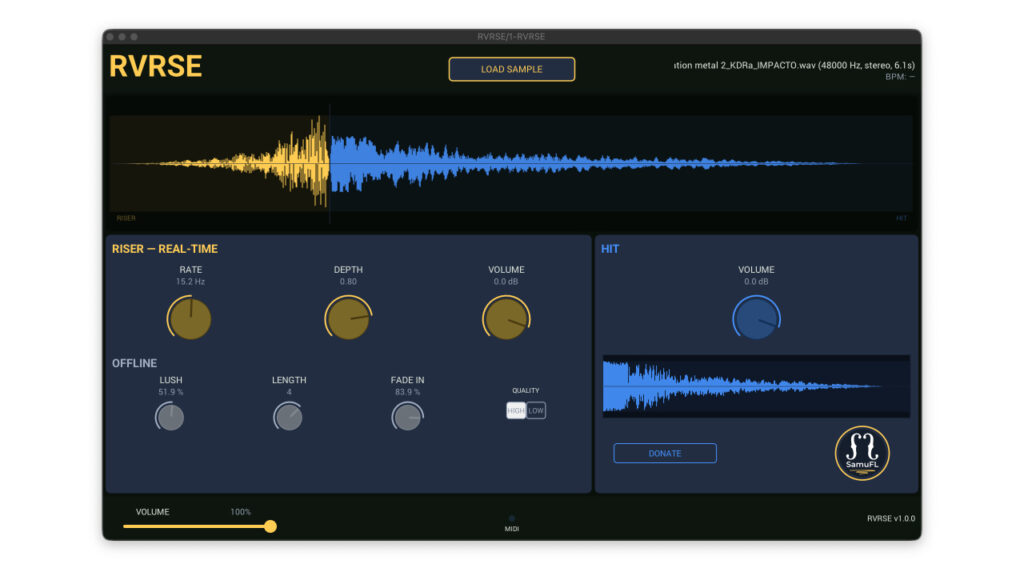
RVRSE by Samuel Ferraz-Leite is a free reverse reverb and riser generator that instantly creates tempo-synced build-ups from any one-shot sample. What used to require a complex multi-step workflow in your DAW can now be achieved with a single plugin in seconds. Simply drag in a cymbal, drum hit, piano chord, or any one-shot sample, and RVRSE automatically generates a reverse reverb sweep that leads naturally into the original hit, perfectly locked to your project’s tempo.
Key Features
Instant reverse reverb riser generation: Load any one-shot sample (WAV, AIFF, MP3, or FLAC) and RVRSE immediately generates a tempo-synced reverse reverb riser that builds up naturally into the original transient hit.
3 intuitive controls: The entire plugin is controlled with just three main knobs — Lush (reverb amount/density), Length (riser duration, from 1/4 beat to 16 beats), and Fade In (shape of the volume fade-in curve).
Built-in stutter effect: A dedicated stutter section with Rate and Depth parameters adds rhythmic gating and glitch-style textures to the riser, enabling more complex build-up designs without leaving the plugin.
Independent level control: The volume of the original hit and the generated riser tail can be adjusted separately, giving you full control over the balance between the transient and the build-up.
Two-stage time stretch quality: A quality toggle lets you switch between standard and high-quality time stretching modes. High quality is recommended for final renders to ensure the smoothest possible output.
Formats: VST3, AU, and standalone application. Compatible with macOS and Windows.
How to Download RVRSE (Step by Step)
1. Visit the official download page: Download RVRSE for free
2. Set the price to €0 and click “Add to Cart” → “Proceed to Checkout”
3. Complete checkout to receive the download link
4. Download and extract the ZIP file (separate versions for Mac and Windows are provided)
5. Place the plugin file in your DAW’s plugin folder:
Windows: VST3 → C:\Program Files\Common Files\VST3
macOS: VST3 → /Library/Audio/Plug-ins/VST3 | AU → /Library/Audio/Plug-ins/Components
6. Rescan plugins in your DAW — RVRSE will appear in your plugin list
How to Use RVRSE
Drag and drop any one-shot sample (cymbal crash, snare hit, vocal chop, piano chord, etc.) directly onto the RVRSE interface. The plugin reads the sample and generates a reverse reverb riser automatically. Adjust Length to set how many beats the build-up lasts, tweak Lush to control density, and shape the entry with Fade In. Enable the stutter section for more complex, rhythmically interesting risers. The output naturally resolves into your original sample hit.
About Samuel Ferraz-Leite
Samuel Ferraz-Leite is an independent plugin developer who creates free and affordable tools for music producers. RVRSE is part of a growing catalog of practical utility plugins designed to speed up common studio tasks.