

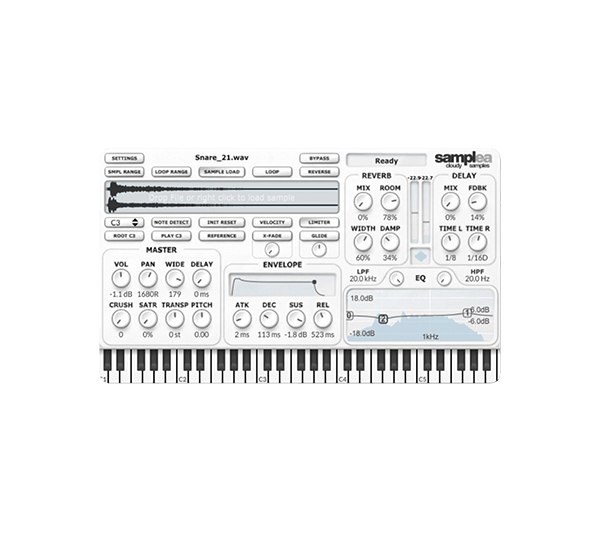
“Samplea,” a sampler plugin developed by Cloudy Samples, is available as a free download for a limited time.
In this article, we cover the giveaway details and an overview of what Samplea can do, so read on if you are looking for a lightweight sampler to add to your setup.
What Is Cloudy Samples “Samplea”?
Samplea is a minimal, CPU-friendly sampler plugin designed around speed, accuracy, and a clean, uncluttered interface. It focuses on the essentials you actually need when working with samples: a Note Detect function that automatically identifies the pitch of a loaded sample, an X-Fade control that removes click noise to create seamless loops, and Glide for adding expression to leads and 808s. It also includes built-in EQ, saturation, and spatial effects, so you can finish your sound design inside this single plugin without reaching for anything else.
Key Features
- Note Detect: instantly analyzes a loaded sample and maps it to the correct pitch with a single click
- Dedicated Sample Range and Loop Range editors for precise control over the playback region
- X-Fade knob that accurately removes click noise, letting you build seamless infinite loops in an instant
- Glide (portamento): smooth, adjustable pitch transitions that add expression to leads and 808s
- Highly readable ADSR envelope for shaping transients and tails down to the millisecond
- Built-in parametric EQ with LPF/HPF
- Built-in saturation
- Spatial effects including a reverb with adjustable width and a tempo-syncable delay
- Reference Tone Engine: tune samples by ear against the built-in reference sine wave
How to Download and Install Samplea
You can download and install Samplea by following the steps below.
- Create an Audio Plugin Deals account and log in
- Add Samplea to your cart and check out for $0
- Check the license key included in the confirmation email you receive
- Launch Pulse Downloader, enter the license key, and install the product
After installing through Pulse Downloader, you need to move the plugin files to the correct folders manually.
Windows
- VST folder: C:\Program Files\VSTPlugins
- VST3 folder: C:\Program Files\Common Files\VST3
macOS
- VST folder: Macintosh HD/Library/Audio/Plug-ins/VST/
- VST3 folder: Macintosh HD/Library/Audio/Plug-ins/VST3/
- AU folder: Macintosh HD/Library/Audio/Plug-ins/Components/
This is a limited-time offer running until around September 3, 2026.
Conclusion
That covers the free giveaway of Cloudy Samples “Samplea.” With Note Detect, flexible loop editing, and a full set of built-in effects, it is a compact but capable sampler that is well worth grabbing while it is free. Be sure to claim your copy before the offer ends.