

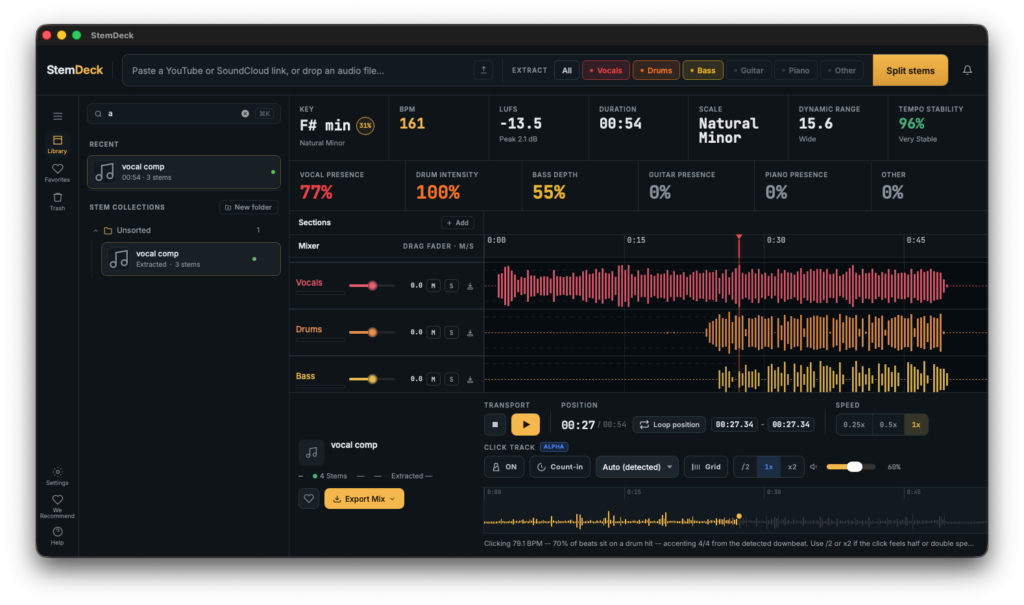
Stem separation software “StemDeck”, developed by Thales Claro, is currently available as a free download!
In this article, we cover the giveaway details and give you an overview of what StemDeck can do.
What Is Thales Claro “StemDeck”?
StemDeck is a free, open-source, locally-run stem separation tool for Windows, macOS, and Linux. It requires no account registration, has no limits on the number of tracks you can process, involves no uploading, and needs no subscription — everything is processed entirely in your local environment. Note that the software is currently in alpha.
Main Features
- Uses the open-source Demucs htdemucs_6s model to separate audio into up to 6 stems: vocals, drums, bass, guitar, piano, and other
- Automatically selects the best available Torch device (CUDA on NVIDIA systems, MPS on Apple Silicon, falling back to CPU on unsupported environments)
- Loads local files in common formats such as MP3, WAV, FLAC, OGG/Opus, MP4, and M4A. Also supports pasting YouTube URLs for content you have the rights to process
- Once separation is complete, a browser-based multitrack mixer launches, letting you mute/solo stems, adjust their balance, monitor a single stem, zoom into waveforms, loop sections, and export individual stems or custom mixes
- When only some of the stems are selected, StemDeck can generate an “Original” lane containing the remaining audio, which is handy for A/B checking and practice
- Built-in track analysis: BPM detection, key/scale estimation with a confidence value, integrated LUFS, and sample peak information
- Supports MP4 export, allowing you to mux your current mix with the original video when working with MP4 uploads or YouTube sources
- Can be exposed on your local network via the settings — processing runs on your own PC while you control the library and mixer from other devices on the same network
- Windows builds are available as CPU-only and NVIDIA CUDA versions; macOS builds come separately for Apple Silicon and Intel; Linux builds are also provided
- Free and open source. No account, no uploads, no subscription required
How to Download and Install StemDeck
Go to the GitHub releases page and download the single build that matches your system. File names follow the pattern “StemDeck-{OS}-{CPU}[.NVIDIA].{extension}”, so pick the right one for your setup from the list below.
Which File to Download
- Mac (Apple Silicon, M1–M4 etc.): StemDeck-macOS-arm64.dmg
- Mac (Intel): StemDeck-macOS-x64.dmg
- Windows (no dedicated GPU, or AMD/Intel GPU): StemDeck-Windows-x64.zip
- Windows (NVIDIA GeForce/RTX): StemDeck-Windows-x64.NVIDIA.zip
- Linux: StemDeck-Linux-x64.tar.gz (use StemDeck-Linux-x64.NVIDIA.tar.gz on machines with an NVIDIA GPU)
Builds with “.NVIDIA” in the name use CUDA to speed up the separation process. They provide no benefit on systems without an NVIDIA GPU, so choose the standard build in that case.
Note for Mac Users
The app is not code-signed at this time, so if you simply drag StemDeck into your Applications folder and launch it, macOS will tell you the application “is damaged”. Open Terminal and run the command below to remove the Gatekeeper quarantine attribute before launching the app.
xattr -dr com.apple.quarantine /Applications/StemDeck.appStemDeck by Thales Claro – Free Local Stem Separation with Up to 6 Stems
That wraps up the free giveaway info for StemDeck. If you want a powerful stem splitter that runs entirely on your own machine with no account or subscription, grab it from GitHub below.