

discoDSP’s singing synthesizer “Roboto” is currently available for free, but the giveaway is ending soon!
In this article, we introduce the download details and an overview of Roboto.
1. What Is discoDSP “Roboto”?
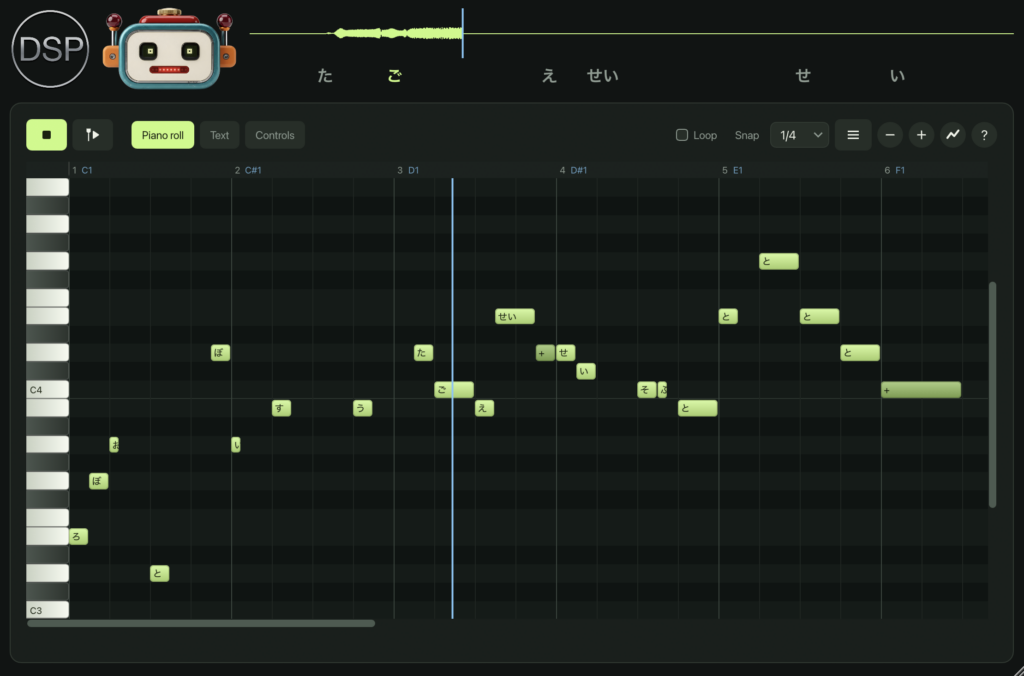
Roboto is a sample-free singing voice synthesizer that sings simply by entering a lyric (word) for each note in the piano roll. The voice is synthesized from a glottal pulse source, five formant resonators, and noise shaped for consonants. It works both as a plugin and as a standalone application.
Key Features
- Piano-roll song editor where a word is assigned to each note (a “+” note sings the next syllable of the previous word)
- Text tab that holds the whole song as text (word:note:beats)
- Automation curves for volume, pitch bend, vibrato amount, breath, formant shift, and chorus
- Supports 8 languages: English, German, French, Spanish, Japanese, Russian, Finnish, and Swedish (Japanese kanji reading is available only on macOS and iOS)
- 10 voice presets: Default, Robot, Soprano, Bass, Child, Whisper, Choir, Opera, Giant, and Alien
- Import support for MIDI, karaoke MIDI (.kar), UltraStar, LRC lyrics, SRT subtitles, and song text
- “Musicalize” button that automatically adds a pentatonic melody to lines of lyrics
- Transpose, host tempo sync, vibrato, jitter, breath, consonant level and length, formant shift and bandwidth, reverb, and double-tracking
- Animated robot face with LED eyes and a mouth that moves with the voice, plus waveform display and lyric highlighting
2. How to Download and Install Roboto
You can easily download the plugin files from the “DOWNLOAD” button on the official page. Move the downloaded plugin files to a folder your DAW can load.
Windows
- VST folder: C:\Program Files\VSTPlugins
- VST3 folder: C:\Program Files\Common Files\VST3
macOS
- VST folder: Macintosh HD/Library/Audio/Plug-ins/VST/
- VST3 folder: Macintosh HD/Library/Audio/Plug-ins/VST3/
- AU folder: Macintosh HD/Library/Audio/Plug-ins/Components/
That’s all for the free giveaway information on Roboto.