

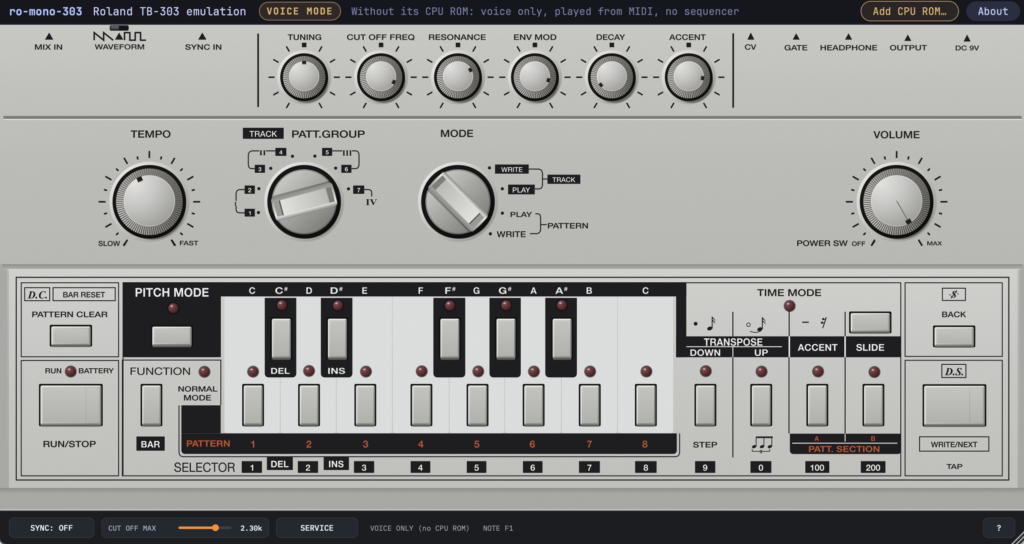
Lemus has released ro-mono-303, a free soft synth that emulates the Roland TB-303 Bass Line, and it is available as a free download now.
This article covers the download information and an overview of ro-mono-303.
What Is Lemus “ro-mono-303”?
ro-mono-303 is a synth that emulates the Roland TB-303 Bass Line, a monophonic bass synthesizer with a built-in step sequencer. It runs the original sequencer firmware on an emulated CPU, and the voice circuit is modeled component by component from the service notes. The source code is published on GitHub under the GNU AGPLv3. The current version, 0.1.3, is a beta release.
The TB-303 sequencer is a program stored in the ROM of the original hardware CPU, so no ROM image is included. Without a ROM, “Voice Mode” lets you play the TB-303 voice (the sound engine) from your DAW via MIDI. Sounds, MIDI notes and controllers, knobs, WAVEFORM, and automation work the same as with a ROM, but the built-in sequencer (patterns, tracks, tap input), the panel keys and LEDs, and TEMPO / MODE / TRACK do not function.
Key Features
- The voice circuit is modeled component by component from the service-note schematic and compared against an ngspice simulation of the same circuit
- Component values are calibrated within their tolerances to match 400 reference recordings of a real TB-303
- The sequencer runs the original program on an emulated CPU (IC8); no ROM image is bundled, so you need to supply your own
- Even without a ROM, “Voice Mode” lets you play the same voice from your DAW via MIDI (the built-in sequencer, panel keys, and TEMPO / MODE / TRACK do not work)
- Adding a ROM later switches to the full-featured TB-303 while keeping your knob settings and pattern memory
- CUT OFF MAX (1.2 to 3 kHz) and SERVICE trimmers cover the range of unit-to-unit variation
- SERVICE shows six trimmers plus a test-point scope, frequency counter, and meters
- The logo and model-number area on the panel is blank; you can add your own artwork via tb303.svg in the ROM folder
- Supported: macOS 11 or later Universal (AU / VST3 / Standalone), Windows 10 or later (VST3 / Standalone)
How to Download and Install ro-mono-303
Download and install it easily from the “DOWNLOAD FOR MACOS” or “DOWNLOAD FOR WINDOWS” button on the official product page. When you launch it for the first time without a ROM, a screen lets you choose how to continue. If you do not have a ROM, choose “Use voice mode” to start in Voice Mode and play it via MIDI.