

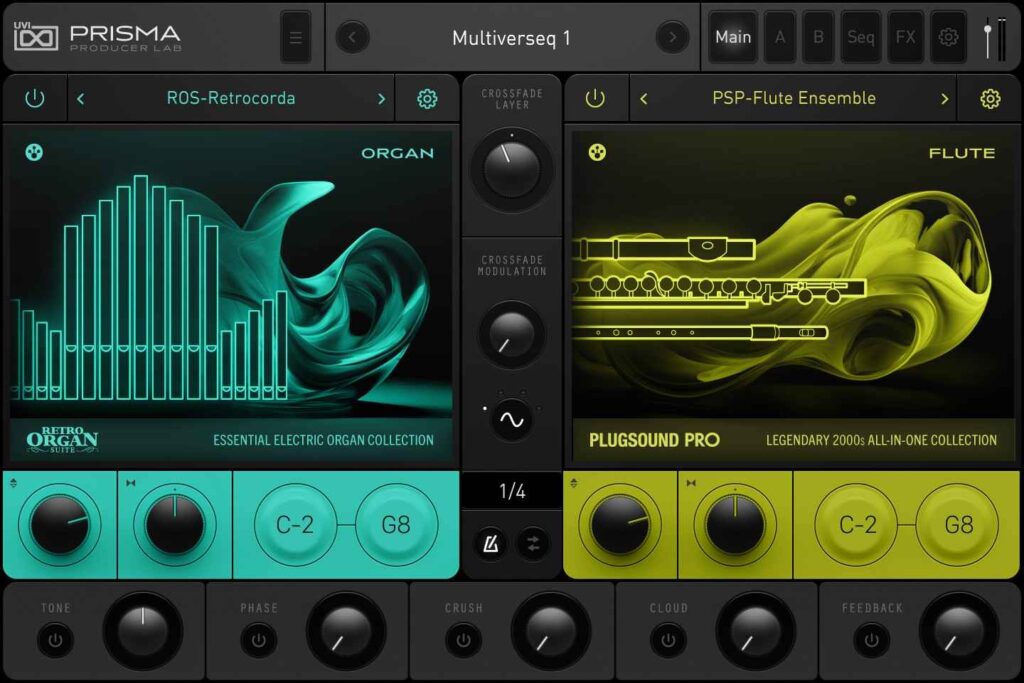
UVI’s multi-instrument plugin Prisma is being given away for free in a limited-quantity promotion. This article covers the giveaway details and an overview of the instrument.
What Is UVI Prisma?
Prisma is a dual-layer-engine multi-instrument that combines hand-picked content from more than 100 UVI products with over 1,000 dedicated presets. Its regular price is $149, and plugin store Loot Audio is giving away perpetual licenses for free as a partnership giveaway with UVI. The giveaway is first-come, first-served with a limited number of licenses, and it ends once the allocated licenses run out. As of October 8, 2026, the giveaway page showed “Allocation Depleted” (all licenses have been claimed), so the plugin could not be obtained at that time. However, the official page states “More may be on the way – please check back soon!”, so additional licenses may be released. No timing or quantity has been announced, so check the giveaway page regularly if you want it.
Key Features
- 1,151 presets, 539 layers and 25,676 samples
- Covers keyboards, drums, synths, orchestral, fretted instruments, world, sequences, FX and more
- 250 instruments in total selected from more than 100 UVI products, plus a modern dual-layer engine and built-in effects
- Size: 14.45 GB (FLAC lossless compression; 36.5 GB in WAV)
- Sample resolution: 44.1 kHz (recorded at 88.2 kHz)
- Runs on UVI Workstation 4.0.2 or later and Falcon 3.1.1 or later
- Formats: Audio Units, AAX, VST, VST3, Standalone
- Supported OS: macOS 10.14 Mojave to macOS 26 Tahoe, Windows 10 to 11 (64-bit)
- An iLok account is required (free, no dongle needed), and an internet connection is required for license activation
- Requirements: 15 GB of free disk space and 4 GB of RAM
How to Install and Activate Prisma
Log in with a verified Loot Audio account and claim the license (serial key) from the campaign page. Next, download and install UVI Portal, launch it, and log in with your UVI account (free to create). Click “Redeem Serial” at the bottom left, enter the serial key you received, then select the product in “My Library” and click “Install” to install and activate it. A free iLok account is required for activation.
Video demo audio samples: Splice Sounds.