

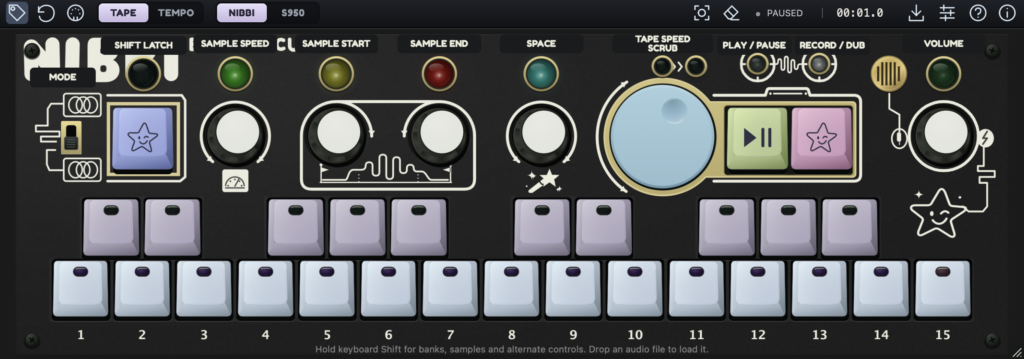
Temecula DSP’s sampler instrument Nibbi is available for free! This article covers the download information and an overview of Nibbi. Check it out.
1. What Is Temecula DSP “Nibbi”?
Nibbi is a sampler instrument that lets you play sampled sounds from a keyboard, layer them with a tape-style looper, and chop recordings into rhythm patterns. It is a modified version of the firmware from the open-source hardware sampler “CHOMPI” (released by CHOMPI Club and Chase Bliss), reworked by Temecula DSP to run as a desktop plugin, a standalone app, and in the browser.
Key Features
- Two playback engines: the original “NIBBI” engine and “S950”, which has the texture of a 12-bit sampler (internal sample rate of 7.5 to 48 kHz, with a dedicated filter)
- Two workspaces: “TAPE” for overdubbing with the tape looper, and “TEMPO” for working with slices and patterns
- MELO: spreads a single sample across a two-octave keyboard with pitch
- HITKIT: assigns separate one-shots to the keys, suited to drums and sound collages
- Adjustable sample start/end, speed, playback direction, attack, and release
- Effects: delay/reverb, saturation, tape wobble, and filter (can be placed before or after the looper)
- Tape wheel to change playback speed and direction (slowing it down also lowers the pitch)
- Resampling to bring the output back in as a new playable sound
- Supports loading audio files and recording input; playable via MIDI, PC keyboard, or on-screen keyboard
- MIDI Learn to assign knobs and buttons, with controller mappings that can be saved
- Saves sample edits, loaded/recorded audio, and tape loops in your DAW session
2. How to Download and Install Nibbi
Download it from the official page using “Download Mac” or “Download Windows”. A “Play in browser” option is also available so you can try it right in your web browser.
That wraps up the free giveaway of Nibbi. Be sure to check the official page for the latest availability.