

SolAudioLab is giving away Virtual Headphones, a headphone simulator plugin built for headphone monitoring, completely free of charge.
In this article we cover the giveaway details and an overview of what Virtual Headphones can do.
1. What Is SolAudioLab “Virtual Headphones”?
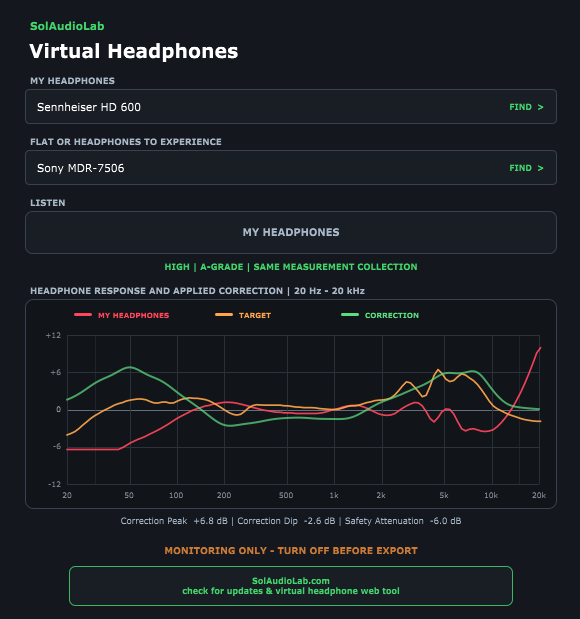
Virtual Headphones is a free monitoring plugin that lets you use the single pair of headphones you already own to compare the tonal balance of other headphones and consumer playback devices. You first select the headphones you are actually wearing, then choose a target: FLAT (flat correction), a different headphone model, or one of the supported consumer playback devices. A single LISTEN control switches between your current headphones and the selected target, so you can A/B compare without changing your listening position or breaking your workflow.
The on-screen response graph shows three curves at once: the characteristics of your current headphones, the characteristics of the selected target, and the correction curve that is actually being applied.
Note that the current release is Beta 0.5 and is designed strictly for headphone monitoring. It is recommended that you manually disable the plugin before your final export (bounce). The plugin does try to bypass processing during offline rendering, but the way each DAW reports its export state differs, so a manual bypass is the safe option.
Key Features
- Support for 330 models as MY HEADPHONES (the headphones you are wearing)
- 408 target models including headphones, in-ear monitors, earbuds and consumer playback devices
- FLAT correction for supported headphones
- One-control A/B comparison at a matched monitoring level
- Response graph showing your current headphones, the selected target and the correction being applied
- Shared safety attenuation that keeps headroom consistent when comparing
- Independent recently-used model history for source and target
- Recently selected models are saved locally
2. How to Download and Install Virtual Headphones
Virtual Headphones can be downloaded easily from the bottom of the official product page. Once downloaded, move the plugin file into a folder your DAW scans. A browser-based version of Virtual Headphones is also available on the official site, so you can try the functionality without installing the plugin at all.
Windows
- VST folder: C:\Program Files\VSTPlugins
- VST3 folder: C:\Program Files\Common Files\VST3
macOS
- VST folder: Macintosh HD/Library/Audio/Plug-ins/VST/
- VST3 folder: Macintosh HD/Library/Audio/Plug-ins/VST3/
- AU folder: Macintosh HD/Library/Audio/Plug-ins/Components/
Summary
That wraps up the free giveaway information for SolAudioLab “Virtual Headphones”, a headphone simulator that recreates the characteristics of 408 different models. If you mix on headphones and want a quick reality check against other headphones and consumer playback devices, it is well worth grabbing while it is free.