


Cableguys, the company behind the ShaperBox 3 arrangement multi-effect, is running a sale on its drum layering plugin Snapback. This article covers the latest Snapback deal, what the plugin does, and how to install and activate Cableguys products.
We will update this article whenever a new sale starts.
Snapback Latest Sale
Cableguys Black Friday Sale: runs until December 1-2, 2026
The following Cableguys products are currently on sale. Check the current price on Plugin Boutique.
- Snapback: Drum layering plugin that adds transient and pre-transient (snapback) layers
- Cableguys Bundle: Effects bundle including Snapback, HalfTime, Curve 2, FilterShaper XL and more
- VolumeShaper 7: Multiband ducking tool that controls the volume of 3 bands with drawable LFOs
- FilterShaper XL: Dual filter with multi-stage drive and flexible modulation
- ShaperBox 3 Bundle: Multiband effect that controls volume, pitch, pan and 11 effect types with drawable LFOs
- ShaperBox 3 Bundle Upgrade: Upgrade for owners of TimeShaper 3 / VolumeShaper 7
- MidiShaper: MIDI modulator with 4 drawable LFOs and 4 AHDSR envelopes for MIDI CC-compatible gear
Audio Plugin Deals, Plugin Boutique and ADSR Sounds often include free bonus plugins for buyers. Check each store page for the current bonus offer.
What Is Cableguys Snapback?
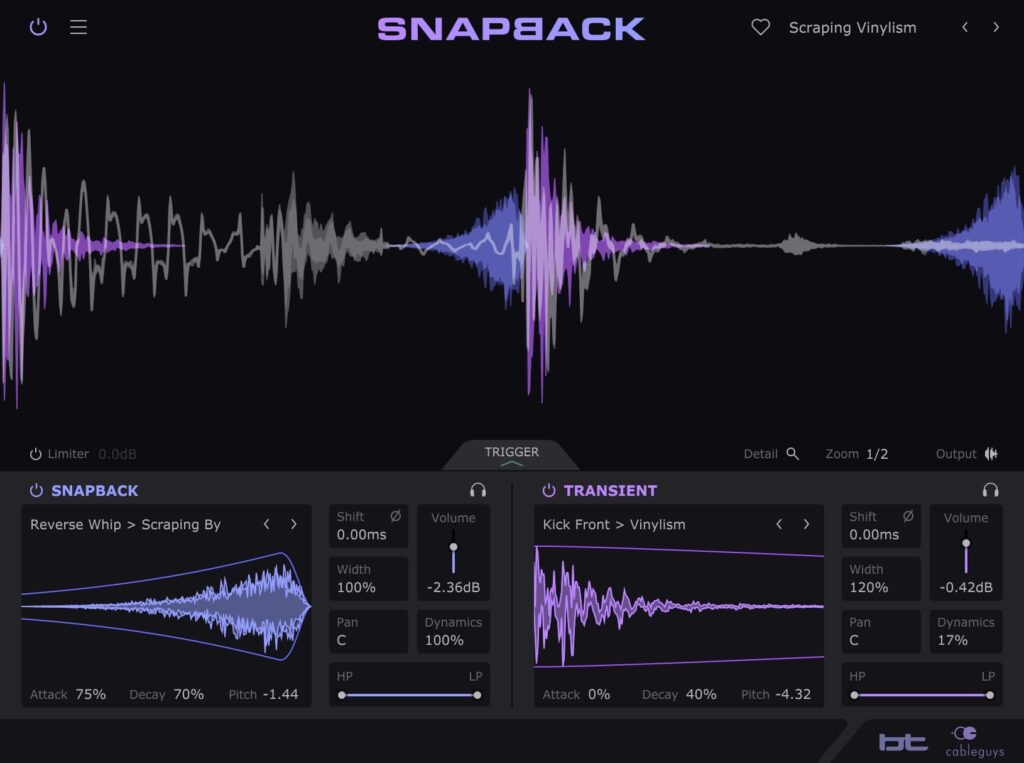
Snapback is a drum layering effect developed by Cableguys together with electronic music pioneer BT. Insert it on a drum track and it detects each hit and layers new samples with precise timing, adding punch and character that EQ, compression and distortion cannot achieve.
Snapback’s Two Layers
Transient Layer
A layer placed on the attack of the drum hit. For example, you can add a click to a dull kick to bring out the punch.
Snapback Layer
A special sample placed before the transient of the hit. It turns a secret technique used by professional producers into an easy-to-use plugin for the first time.
Both layers are adjusted with the same controls, so you can stack drums quickly.
The Pro Drum Technique: Snapback
Layering a snapback sample just before the hit gives the groove momentum and brings digital drum hits to life.
- Create a clap shifted ahead of the beat with one click
- Add a unique texture to kicks and snares
- Create movement between beats and avoid flat, over-quantized grooves
Add Drum Layers with One Click
There is no need to line up samples across multiple tracks. Snapback adds a layer with a single click.
- Kick: Layer a click over a dull kick to add instant punch
- Snare: Layer a stereo sizzle over a thin snare
- Clap: Add a natural tail to a flat clap
- Weak hits: Add thickness with analog-flavored samples, vinyl air and Foley FX
200+ Mix-Ready Layers
Snapback includes more than 200 Transient and Snapback layers made by BT, Goldbaby, Virtual Riot and Cyclick. Rather than finished drum hits, they are the individual parts actually used when building top-class drum sounds.
Main Features
- Sample import: Drag and drop your own samples onto the Transient or Snapback layer and save them to the library with the Save button. The Reverse button flips playback direction, so you can turn a percussion hit into an original snapback or create reversed vocal material.
- Sound shaping: Adjust filters, envelopes, pitch and layer alignment with simple controls. You can also lock a layer so it stays in phase with the original drum.
- Triggering: Choose from three audio trigger algorithms (Drums, General and Complex), with support for external sidechain. Threshold, Input Filter and Detail narrow down which hits are detected, and a trigger input monitor helps with setup. MIDI triggering is also supported for full rhythmic control.
- Waveform display and Detail View: A high-precision waveform view shows how layers overlap, and Output mode lets you check the combined waveform. Detail View zooms into the waveform to align transients.
- Presets: Professionally made presets cover the main use cases. Your own presets can sync to the cloud and can be loaded and saved in FXP format.
Adjustable Parameters
| Parameter | Description |
|---|---|
| Shift | Shift the layer by +/-4 ms to align phase |
| Polarity | Invert the phase of the sample |
| Volume | Boost up to +6 dB |
| Width | From fully mono to 200% wide stereo |
| Pan | Match the sample position to the input sound |
| Dynamics | 100% follows input volume, 0% gives a fixed volume |
| HP / LP | Cut lows and highs to blend into the mix |
| Attack / Decay | Adjust the sample’s onset and fade-out |
| Pitch | Transpose up or down by up to one octave |
| Limiter | Transient-aware limiter that fixes the level |
| Bypass / Solo | Click-free master bypass, plus bypass and solo for the Transient and Snapback layers separately |
Other Specs
- Resizable interface from 75% to 200% (Retina support)
- High-contrast display mode
- Help function that explains each control when you hover over it
Works Beyond Kick, Snare and Clap
- Percussion: Adds cut-through, sparkle and body
- Hi-hats: Makes them sharper and more present
- Recorded live drums: Makes hits more consistent and pushes them forward
- Instruments and bass: Adds new character and presence
How to Install and Activate
Cableguys products can be installed and activated in 3 steps.
- Enter your email address and serial number at https://www.cableguys.com/register.html
- Log in on the Cableguys website and download the product and license file
- Launch the plugin and select the license file
That is the latest Snapback sale. Check back for updates, and see Plugin Boutique for the full Cableguys lineup.