

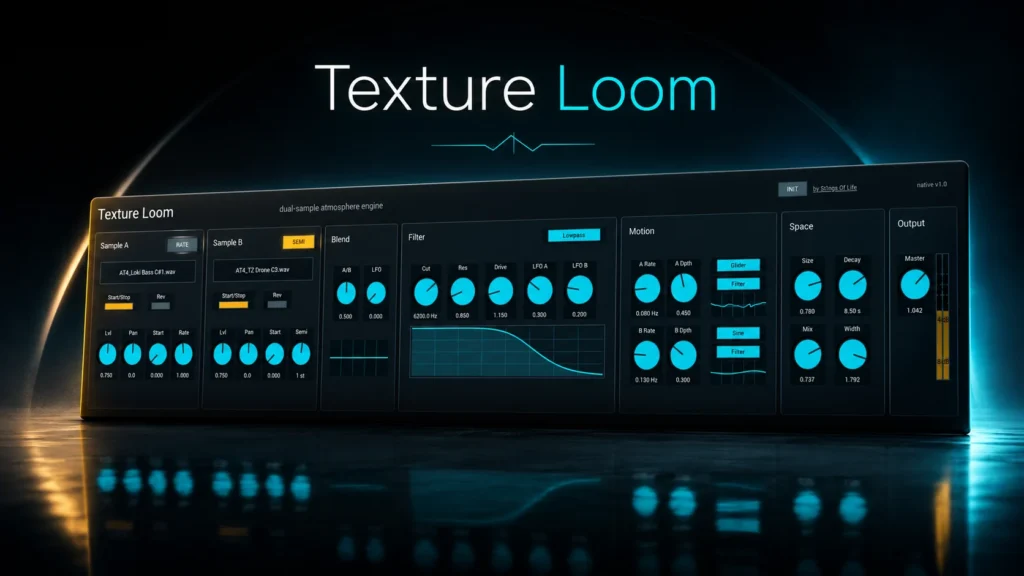
Texture Loom, an ambient sound design plugin developed by S1gns Of L1fe, is now available for free!
In this article, we cover the distribution details and an overview of Texture Loom, so be sure to use it as a reference.
1. What Is S1gns Of L1fe “Texture Loom”?
Texture Loom is a dual-sample atmosphere engine that blends two sample slots to build evolving pads, drones, cinematic beds, and ambient textures from your own samples and recordings. Originally developed as a Max for Live device, this release also includes a native plugin version so you can use the same workflow outside of Ableton.
Main Features
- Two sample slots, Sample A / Sample B, each with control over start/stop, reverse, start position, level, pan, and rate
- Rate/Semi modes let you handle playback speed continuously or move pitch in semitone steps
- An A/B Blend control crossfades between the two samples, with a dedicated Blend LFO adding slow crossfade motion
- A multimode filter offering lowpass / highpass / bandpass / notch / peak / allpass (cutoff, resonance, drive, and LFO modulation depth)
- Two Motion LFOs with sine / triangle / ramp up / ramp down / random / drift / glider waveforms; modulation destinations include Blend, Filter, Space, Sample A Start, and Sample B Speed
- A Space (reverb) section with Size, Decay, Mix, and Width, using a Clouds reverb based on Valdemar Erlingsson’s Cloudseed reverb
2. How to Install and Download Texture Loom
On the official Gumroad page, you can check out and download with just your email address by entering $0. The release includes a Max for Live device for Ableton Live 12 / Max 9, an AU/VST3 instrument for macOS, and a VST3 instrument for Windows.
That wraps up the free distribution info for Texture Loom.