

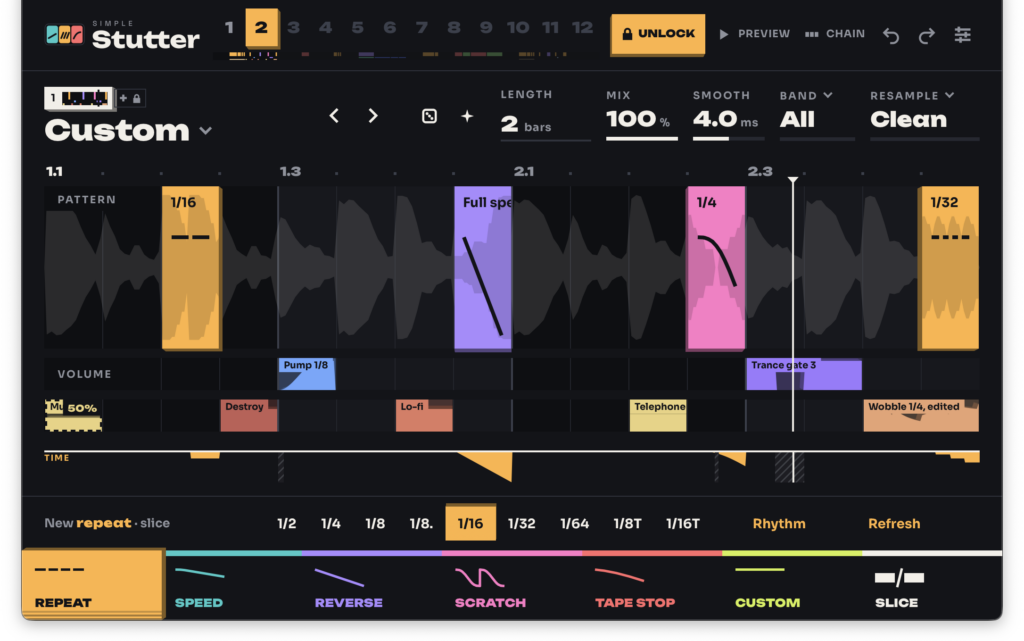


simpleSoundbank is giving away three plugins for free, including simpleStutter, a 16-step grid-based arrangement effect, and simpleTapeStop, a tape stop effect!
In this article, we introduce the simpleSoundbank freebies and give an overview of each plugin.
1. simpleSoundbank Free Plugins
Below is an overview of each plugin simpleSoundbank is offering for free.
simpleStutter
simpleStutter is a time effect that lets you draw blocks on a 16-step grid to apply beat repeat, half-time, reverse, scratch, tape stop, trance gate and more, all synced to your DAW tempo. Even the free version gives you access to every block, volume shape and filter, with no time limit.
- REPEAT: rolls/stutters from 1/2 to 1/64 (dotted and triplet supported)
- SPEED: speed changes from 0.05x to 3x (tape-style mode where pitch follows speed, or a mode that preserves pitch)
- REVERSE, SCRATCH, TAPE STOP (Tape / Turntable / Brake), SPIN UP, and CUSTOM (hand-draw your own speed, stop and rewind curves)
- VOLUME lane for gating, fades and pumping, with a filter lane below it
- Switch pattern slots via MIDI notes (C to B), or automate the Pattern parameter
- Where the pattern is empty, the input passes through bit-for-bit (32 samples of latency reported to the DAW)
- Free version: slots 1 and 2 plus 54 factory patterns
- The paid unlock adds 12 slots, 192 patterns, up to 4 layers, and saving of patterns and blocks
simpleTapeStop
simpleTapeStop is a tape stop effect that slows your track down to a halt like a tape machine being powered off, then spins it back up in time with the tempo. You can trigger it by clicking the Stop button, via MIDI notes, or with automation, and turning on Reverse lets you spin the tape backwards.
- Set stop and spin-up times independently, up to 8 seconds each
- Adjust the curve from a gentle drift to a hard brake
- With Sync on, set times in note values from 1/32 to 4 bars
- The tape stops (or reverses) while a MIDI note is held
- Reverse plays back roughly the last 10 seconds backwards
- During normal playback the input passes through bit-for-bit (8 samples of latency reported to the DAW)
simpleSF2
simpleSF2 is a free SoundFont player plugin that loads and plays SF2 and SFZ files directly in your DAW. Pick a preset, shape the sound with filters and visual envelopes, and save it as your own sound.
- Loads SoundFont 2 (SF2) and SFZ files directly, no conversion needed
- Browse banks and presets, search by name, and mark favorites
- Performance controls for volume, polyphony, transpose, pitch bend, glissando and glide
- Four filter types: low-pass, high-pass, band-pass and notch
- Independent ADSR envelopes for volume and filter
- Save your own presets to the library with “Save As”, and settings are stored with your project
- Free version: one library per instance
- The paid unlock (£9.99) adds multiple libraries, 16-channel multitimbral playback, and reverb/chorus
2. How to Download and Install the simpleSoundbank Free Plugins
For each plugin, download the free installer for macOS (.pkg), Windows (.exe) or Linux (.deb) from the official page and run it. No account or license key is required, and there is no time limit. After installation, rescan plugins in your DAW and it will be recognized.
- [Free] simpleSoundbank “simpleStutter” – a multi-function arrangement effect you draw on a 16-step grid
- [Free] simpleSoundbank “simpleTapeStop” – a tape stop effect that stops and spins back up in time with the tempo
- [Free] simpleSoundbank “simpleSF2” – a SoundFont player supporting SF2 and SFZ
That wraps up the simpleSoundbank free plugin giveaway.