


tinyant’s chorus & shimmer reverb plugin purpl is now available as a free download!
In this article, we cover the download details and an overview of purpl.
1. What Is tinyant “purpl”?
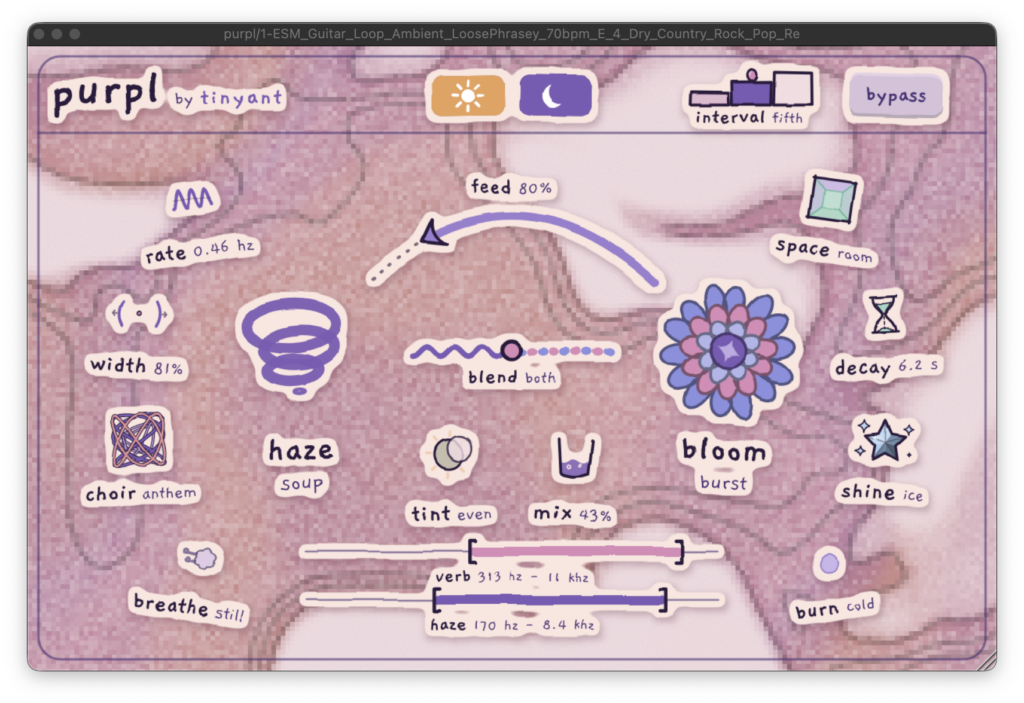
purpl is a chorus & shimmer reverb plugin that feeds up to 5 chorus voices into a reverb whose shimmer kicks in only when you hold notes. The shimmer can go up, down, or both ways; you can stack and harmonize it with choir, or add distortion to the wet signal only with burn. The dry signal always stays clean.
Key Features
- day / dusk / night: Switch the shimmer direction (up, both, down) along with the brightness and length of the tail
- rate / width / haze: Chorus modulation speed, stereo width, and amount
- blend: Balance between chorus and reverb
- choir: Stacks the input and adds harmonies
- tint: Adjusts the tone from warm to cold
- breathe: Ducks the reverb while you play
- haze range / verb range: Choose the frequency range the chorus / reverb is applied to
- interval: Shimmer pitch interval (+5, +7, +12)
- space / feed / decay: Room size, feedback from the reverb into the chorus, and reverb decay length
- bloom / shine: How much the sound swells when notes are held, and the sparkle of the tail
- burn: Distorts the wet signal
- mix: Dry / wet
- Supported formats: macOS (AU, VST3, CLAP), Windows (VST3, CLAP), Linux (VST3, CLAP)
2. How to Download and Install purpl
On the official page, click “download purpl” and choose your system (mac / windows / linux). A screen asking you to choose a support amount will appear, but you can download it for free by selecting “no thanks, just download”.
Note that macOS may block the Mac version from launching. Follow the instructions on the download page to grant permission, and you’ll be able to use it.
Windows (plugin install locations)
- VST folder: C:\Program Files\VSTPlugins
- VST3 folder: C:\Program Files\Common Files\VST3
macOS (plugin install locations)
- VST folder: Macintosh HD/Library/Audio/Plug-ins/VST/
- VST3 folder: Macintosh HD/Library/Audio/Plug-ins/VST3/
- AU folder: Macintosh HD/Library/Audio/Plug-ins/Components/
Summary
That wraps up our coverage of the free purpl giveaway. With three modes to switch the shimmer direction and tail character, plus choir, burn and breathe controls, it’s a great free addition to any ambient or lush production toolkit — grab it while you can!