


RiverFlux Audio is giving away its EQ plugin “Spatial EQ” completely free!
In this article, we cover the Spatial EQ giveaway details and an overview of the plugin.
1. What Is RiverFlux Audio Spatial EQ?
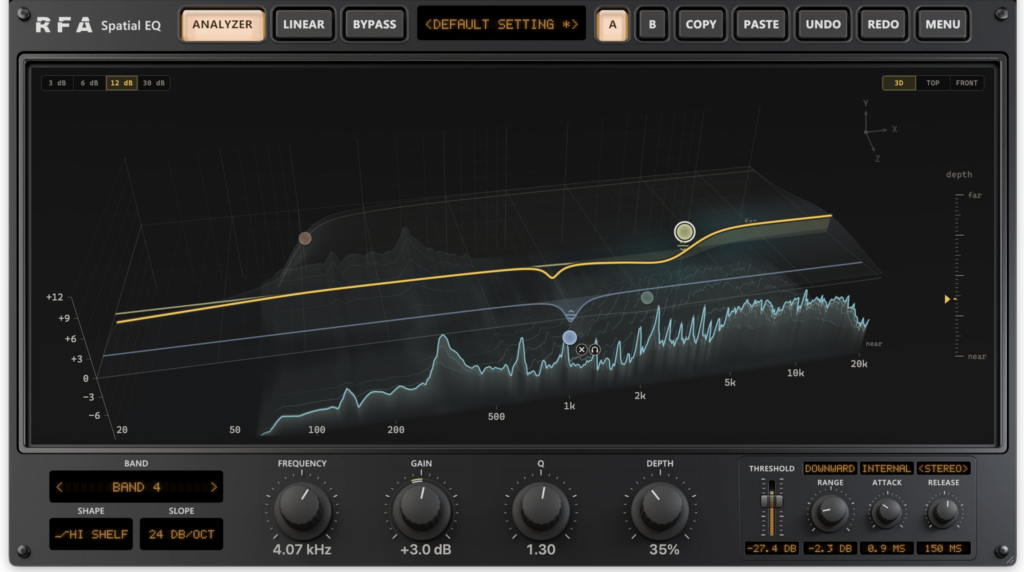
Spatial EQ is an EQ plugin that adds a fourth parameter, “Depth,” to the usual frequency, gain and Q controls of each band. When you boost a band and raise its Depth, that frequency range spreads out behind and to the sides, with short early reflections added behind it. This lets you place the airiness of a vocal behind its body, or push a whole pad wider and further away while keeping its low mids up front.
Bands can be moved directly inside the 3D display, or edited on a flat plane using the Front and Top views. Set Depth to 0 and it works as a clean, conventional EQ. There is no license key, no trial period and no paid version: it is completely free.
Key Features
- 8 bands, each with its own Depth setting. Boosting spreads that frequency range into space, while cutting moves it out of the center to the sides, letting you clean up widened muddiness without thinning out the center
- 7 filter shapes: bell, low shelf, high shelf, low cut, high cut, notch and band pass (cuts from 6 to 96 dB/oct, gain of ±30 dB)
- Per-band selection of Stereo, L, R, Mid or Side
- Dynamics processing on every band (downward/upward, threshold, range, attack, release, external sidechain support)
- 3D spectrum that visualizes the spread of the sound (mono content is shown at the front, side content at the back)
- Selectable zero-latency and linear-phase modes
- Add bands by dragging the curve, solo a band with the headphone icon, create bands directly from spectrum peaks, and enter values in Hz, note names, ratios or percentages
- 100 presets in 10 groups, with the ability to share your own presets as files
- A/B comparison, undo/redo, and copy & paste between two instances of Spatial EQ
- Includes an 11-page user manual explaining every control
- Supported formats: Windows 10 or later (64-bit): VST3 / macOS 12 or later: VST3, AU (Apple Silicon & Intel) / Linux: VST3
Samples used in the video | Splice Sounds
- at2_80_drum_loop_reminder_kick
- RKU_FL2_80_percussion_loop_magnetic
- BOS_DUS_80_Synth_Pad_Loop_Sailing_Dry_C
2. How to Download and Install Spatial EQ
Go to the Gumroad download page, enter “0” in the price field (or any amount you would like to pay to support the developer), and complete the checkout to download and install it easily.
That wraps up the Spatial EQ free giveaway. Grab this unique 3D EQ while it is available!