
OTODESK’s creative filter plugin “Quad Morph Filter” is available for free!
In this article, we introduce the distribution details and an overview of Quad Morph Filter. We hope you find it useful.
1. What Is OTODESK “Quad Morph Filter”?
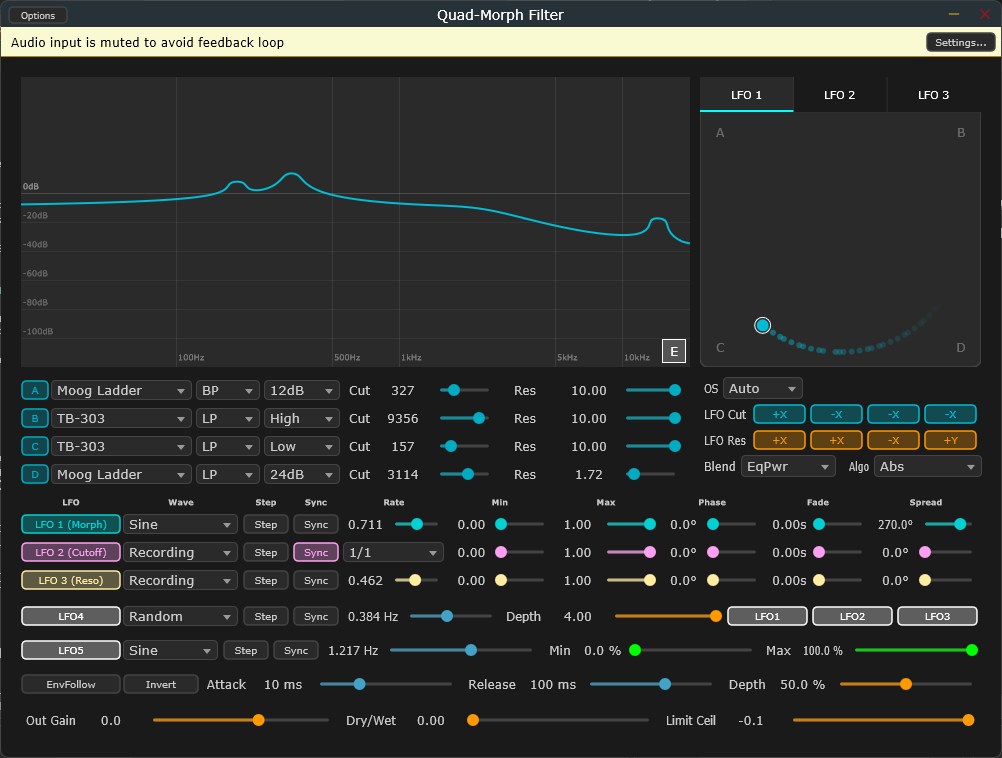
Quad Morph Filter is a high-performance, open-source VST3 filter plugin that lets you morph between 28 filter algorithms in real time using an XY pad. You can blend up to four filters simultaneously with equal-power blending, control them with 19 LFO waveforms, or record your own XY patterns—ideal for sound design, electronic music production, and experimental audio processing. From analog classics like the Moog Ladder and TB-303 to advanced digital algorithms such as Z-Plane morphing and the Bode frequency shifter, it features research-based DSP implementations.
Key Features
- Includes 28 meticulously modeled filter models (across 6 filter architecture categories)
- Analog classic emulations such as Moog Ladder, TB-303 Diode, Prophet CEM3320, Oberheim SSM 2040, Roland Jupiter, SEM, MS-20 Screaming, and CS-80
- Experimental filters including Formant, Comb Filter, Wavefolder, FDN Reverb, Bode Frequency Shifter, Z-Plane 2D Morph, and Modal Resonator
- Morph up to four filters simultaneously on the XY pad with zero artifacts
- Four morph blend algorithms (Equal Power / Linear / Smoothstep / Radial)
- 19 LFO waveforms, with 5 independent LFO / modulation engines
- Recording mode that lets you hand-draw XY patterns on the morph pad with the mouse
- Oversampling (Off / Auto / 2× / 4×), envelope follower, limiter, and automatic gain compensation (AGC)
- Real-time frequency-response display via 1024-point FFT
2. How to Download and Install Quad Morph Filter
Download the latest QuadMorphFilter.vst3 from the GitHub Releases page, copy the .vst3 folder into your VST3 folder (C:\Program Files\Common Files\VST3\), and rescan plugins in your DAW. A standalone version (Quad-Morph Filter.exe) that launches directly without a DAW is also included. Note that this plugin is optimized for Windows 64-bit, AVX2-compatible CPUs and does not support macOS (verified on Ableton Live 11 / 12; other DAWs untested). Also, depending on your settings, it may output high volume levels, so start at a low monitoring level and keep an eye on the output meter.
Windows
- VST folder: C:\Program Files\VSTPlugins
- VST3 folder: C:\Program Files\Common Files\VST3