

dBdone’s Feuer, a creative effect plugin for drums and percussion, is currently available as a free download!
In this article, we’ll go over what Feuer is, what it can do, and how to grab your free copy.
1. What Is dBdone “Feuer”?
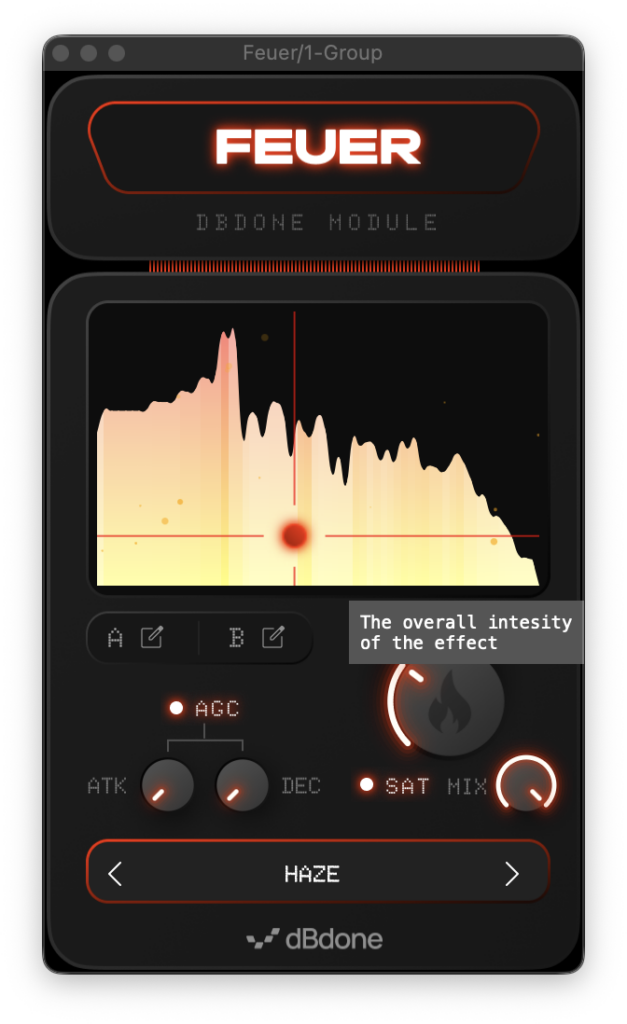
Feuer is a creative processing plugin for drums and percussion that splits the incoming drum signal into frequency bands, detects the attack and decay of each band, and sustains the decay — letting you push a sound all the way until it no longer resembles the original. The sustained energy comes back as body, reverb-like tails, distortion, and frequency content that was buried in the original loop. Depending on your settings, it can produce sounds reminiscent of a sub synth, a glitchy bitcrusher, or a granular effect.
Key Features
- Splits the drum signal into frequency bands and processes each band by detecting its attack and decay
- Drawable spectrum (two panels, A/B) that lets you freely draw which bands should ring out and which should stay tight
- XY pad for morphing between spectrum A and spectrum B
- Automatic gain compensation (AGC) for comparing the processed and dry signals at matched levels
- Built-in saturation
- 20 factory presets and unlimited user preset saving
Samples Used in the Video | Splice Sounds
- TSP_IHD_174_drum_break_rusty_amen
- 91V_LDA_174_synth_arp_sequence_driftwood_Bm
- 91V_LDA_174_bass_synth_save_you_fifths_Bm
2. How to Download & Install Feuer
Head over to the dBdone website and enter your email address to register (the registration process opens in a new tab). Keep the original download page tab open — once you complete the registration and return to that tab, the email entry field will have turned into a download link, and you can download Feuer from there.
Summary
That wraps up the free giveaway info for dBdone Feuer. If you make beats or work with drum loops, this is a fun and inspiring freebie to add to your toolbox — grab it while it’s available.