
Studio Kozak’s vintage chorus plugin FALA is currently available for free!
In this article, we introduce the details and overview of FALA.
1. What is Studio Kozak “FALA”?
In the demo, the electric piano is on the left and the bass is on the right.
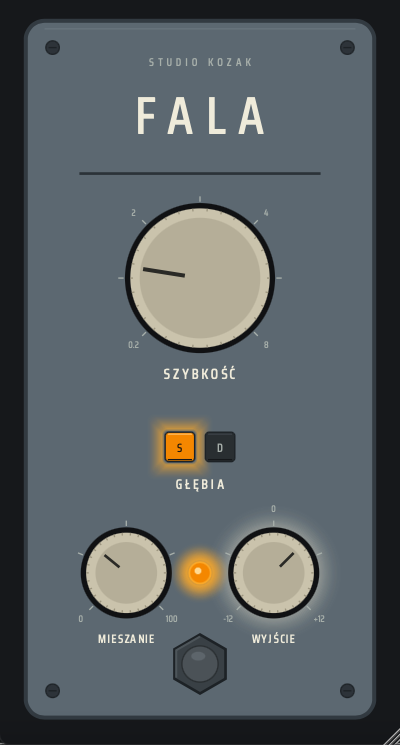
FALA is a vintage chorus plugin modeled on a BBD-style analog chorus, characterized by organic movement created through clock drift, wow & flutter, and saturation. “Fala” means “wave” in Polish, and rather than chasing perfect precision, it aims to recreate the instability and character unique to old analog modulation circuitry. It gives a wide range of sources—clean guitar, synth pads, electric piano, vocals and more—a “living” motion instead of a programmed uniformity.
Main Features
- BBD-style vintage chorus character
- Two modulation modes: Deep / Shallow
- Analog-style saturation
- Recreation of clock drift and modulation instability
- Wow & flutter behavior
- Dynamic noise floor modeling
- Compander-derived dynamics
- Low-end preservation
- Stereo modulation engine
- 4x oversampling processing
- Simple controls: SZYBKOŚĆ (Rate), GŁĘBIA (Depth), MIESZANIE (Mix), WYJŚCIE (Output), ZASILANIE (Power)
2. How to Install / Download FALA
Download the Windows or macOS version from the official GitHub releases page. Extract the ZIP file, then move “FALA.vst3” (Windows) or “FALA.vst3” / “FALA.component” (macOS) to the folders below. On macOS, you may need to manually allow the plugin due to security settings.
Windows
- VST folder: C:\Program Files\VSTPlugins
- VST3 folder: C:\Program Files\Common Files\VST3
macOS
- VST folder: Macintosh HD/Library/Audio/Plug-ins/VST/
- VST3 folder: Macintosh HD/Library/Audio/Plug-ins/VST3/
- AU folder: Macintosh HD/Library/Audio/Plug-ins/Components/