
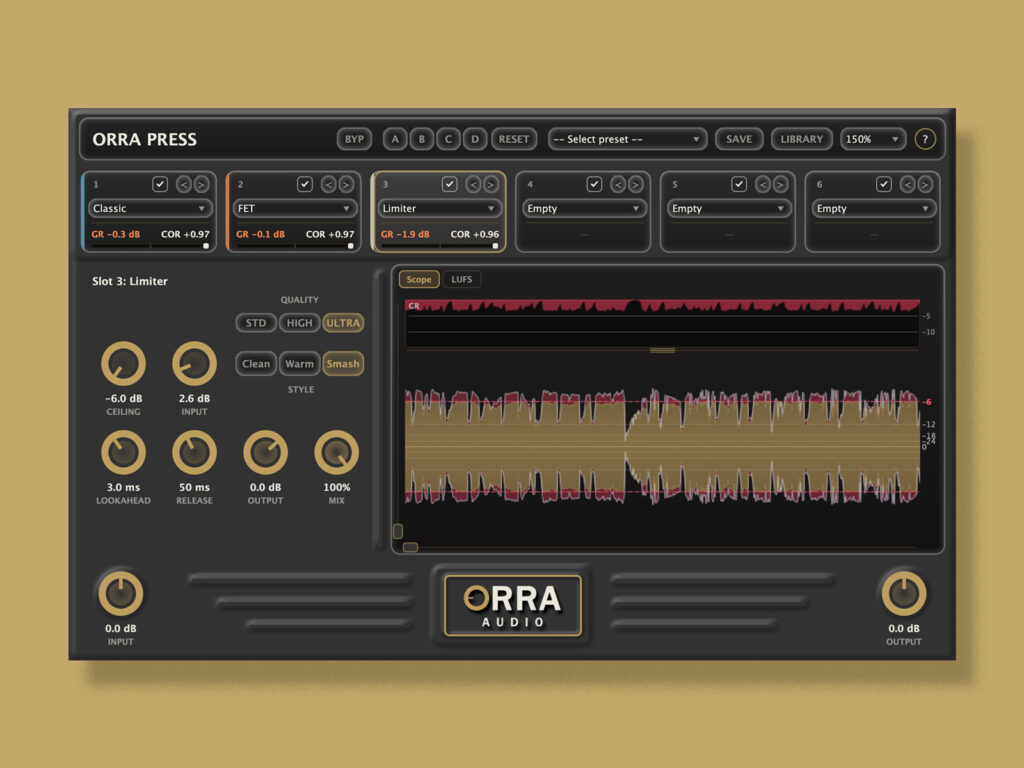
Orra Audio has released Orra Press, a new-generation multi-module serial compressor that integrates six dynamics engines into a single plugin, and it is currently on sale!
In this article, we cover the latest sale information for Orra Press along with an overview of the product.
1. Orra Press Latest Sale Information
Orra Press is currently running the following sale.
Orra Press Coupon Sale: Until June 25, 2026
- Orra Audio “Orra Press” — a next-generation multi-mode compressor with six freely arrangeable engines [Coupon code: DTMERPRESS] $39 (until 6/25) — Buy at Orra Audio (Official)
The companion plugin Orra Link (for sending sidechain signals) is also bundled with the main plugin.
2. What is Orra Audio “Orra Press”?
Orra Press is a completely new concept in multi-module serial compressors, letting you freely place six different dynamics engines across six reorderable slots.
Traditional compressors are built around “one engine, one workflow.” You open one compressor to shape tone, another for control, and yet another plugin for limiting — bouncing between multiple plugin windows until you lose track of which knob you moved and why. That is daily life for a mixing engineer.
Orra Press rethinks this from the ground up, adopting a design where six distinct dynamics engines — VCA, Optical, FET, Multiband, Spectral, and Limiter — can be stacked in series within a single window. Slot order can be rearranged instantly with arrow buttons, and you can even load the same engine into multiple slots (for example, three shallow Classic stages at 2 dB of gain reduction each). With one plugin, you can build a chain tailored to the track.
Orra Press Core Concepts — 7 Points
| 6 Engines | Classic VCA / Optical / FET / Multiband / Spectral / Limiter |
| 6 Reorderable Slots | Load any engine, change order with arrow buttons |
| Independent Sidechain | A different source can be set per slot |
| Orra Link Bundled | Turn any track in your DAW into a sidechain with 36 channels |
| A / B / C / D Snapshots | Instantly compare four complete plugin states |
| 16 Factory Presets | Covering vocals, drums, bass, master, and parallel |
| Per-Slot Oversampling | Off / 2x / 4x / 8x (Limiter: 4x / 8x / 16x) |
Six Dynamics Engines
Each slot can freely use any of the six engines, and duplicate loading is fine. Switching engines on a slot does not lose your dialed-in settings, so you can audition freely.
SLOT 1 — Classic (VCA-STYLE / ZERO LATENCY)
A workhorse VCA compressor. A feedforward VCA with stereo-linked peak detection, a soft-knee static curve, and standard attack/release. Predictable and transparent — a dependable second stage in your bus, vocal, or chain.
USE IT FOR:
- Drum bus glue
- Vocal smoothing
- Second stage in a chain
SLOT 2 — Optical (OPTO-STYLE / PROGRAM-DEPENDENT)
An opto emulation that prioritizes feel over precision. Features a dual-stage release (fast on isolated peaks, slow on sustained activity) and a soft initial ratio that increases the harder you push. Switchable between Compress and Limit modes.
USE IT FOR:
- Vocal leveling
- Bass guitar
- Two-bus glue in Limit mode
SLOT 3 — FET (AGGRESSIVE GRAB / ALL MODE)
A fast-attack FET style with input-driven engagement. The harder you push the INPUT knob, the harder it drives, with a tanh saturation stage that scales with gain reduction. In ALL mode (all buttons pushed in) it recreates British-mode chaos with ratios over 20:1.
USE IT FOR:
- Parallel drum room
- Vocal peak control
- Snare top transient grab
SLOT 4 — Multiband (4-BAND LINEAR-PHASE FIR)
A 4-band compressor using a linear-phase FIR crossover network. All bands share the same group delay, so there is no inter-band bleed, and the crossover handles can be dragged freely. Each band’s threshold line is displayed visually on the spectrum.
USE IT FOR:
- De-essing
- Mastering glue on a full mix
- Kick / bass separation
SLOT 5 — Spectral (FFT-DOMAIN / PER-BIN)
A frequency-domain compressor operating on roughly 1000 independent FFT bins. The Resonance control targets only narrow-band ringing peaks while passing broadband content through untouched. The Focus handle lets you limit the frequency range being compressed.
USE IT FOR:
- Snare ring suppression
- Vocal de-harshing
- Dynamic killing of room modes
SLOT 6 — Limiter (MASTERING-GRADE / TRUE-PEAK / LUFS)
A mastering-grade brickwall limiter. Equipped with a soft-clip pre-stage, lookahead, parallel fast/slow release, ISP (inter-sample peak) prediction, and ITU-R BS.1770-compliant true-peak detection. Switchable between three styles (Clean / Warm / Smash) and three quality tiers (4x / 8x / 16x).
USE IT FOR:
- Final brickwall in mastering
- Loudness boost on stems
- Transparent peak control
A 3-Step Workflow: Load -> Reorder -> Compare
| 01 Load | From each of the six slot dropdowns, choose Empty / Classic / Optical / FET / Multiband / Spectral / Limiter. Switching engines on a slot does not overwrite settings — change Classic to FET and back, and the dials remain. |
| 02 Reorder | Use the < > buttons on each slot card to instantly move it forward or backward in the chain. Parameters travel with the slot, so settings are never lost. Building a layout with fast, aggressive engines first and a Limiter to finish is intuitive. |
| 03 Compare | The A / B / C / D snapshots in the header record every slot’s engine, parameters, chain order, and SC routing in full. Switch instantly for A/B comparison; they are saved with the project and presets. |
Sidechain System: Orra Link Bundled
One of Orra Press’s biggest features is that each slot has a fully independent sidechain source. Directly above each slot’s knob area is a SIDECHAIN source dropdown, where you can select sources from three categories. Using the bundled companion plugin Orra Link, you can completely bypass host routing and use any track in the session as a sidechain source.
Three Sidechain Modes Per Slot
| Off | Default. Normal compression keyed by its own input. |
| External | The host’s dedicated stereo Sidechain bus. The source you route into the plugin’s SC input in the DAW drives detection (e.g., kick -> bass ducking). |
| Link 1-36 | The 36-channel sidechain supplied by Orra Link. Insert Link on any track, select a channel, and reference it from any Press card. |
All five compression engines (Classic / Optical / FET / Multiband / Spectral) support sidechaining. The Limiter slot does not use a sidechain by design, so its SIDECHAIN dropdown is hidden entirely.
Operating Orra Link
Orra Link is a small sender-only plugin that feeds the audio of the track it is inserted on into a numbered channel. The larger the SC, the more pronounced the effect. In the Spectral view, the per-bin GR display is replaced by an FFT display of the sidechain, so you can see at a glance which frequency components of the sidechain are reducing the main signal. The Multiband spectrum colors each band by its current per-band SC drive amount.
Multiband and Spectral Also Support Sidechain
Multiband splits the sidechain with its own FIR crossover bank, and each band’s detector is keyed by the corresponding SC band. Spectral runs a parallel FFT on the sidechain, allowing the main signal to be reduced in the frequency space where the sidechain has energy.
Notes on Use
Orra Link introduces one audio block of latency between the sender and receiver. Because the DAW cannot recognize this cross-track dependency, block order is undefined, and in the worst case audio from one block earlier may be used (a trade-off common to cross-track sidechain plugins).
Some DAWs run AU plugins inside a sandbox, which can block Orra Link’s shared-memory connection. In that case the status shows “Bus unavailable,” but Link passes audio through transparently, so nothing breaks. If it does not work, fall back to the host’s External SC bus.
Other Features
| Mix Knob for Parallel Compression | Every engine has a Mix knob. Set it to 30-50% with aggressive settings and parallel compression is completed within a single instance — the “New York” drum technique without an AUX bus. |
| 16 Factory Presets | Covering vocals (Tight FET / Smooth Opto / FET + Opto / Spectral Polish), drums (Gentle Glue / Parallel Crush / Punchy FET on kick), bass (Classic Control / Multiband Tight), master (Transparent Glue / Opto + Classic / Final Limiter Light), and Spectral applications (De-Resonate / Broadband Tame). |
| Per-Slot Oversampling | Off / 2x / 4x / 8x can be specified per slot for the detector and gain stage. The Limiter exposes three tiers — Standard (4x) / High (8x) / Ultra (16x) — for tight, ISP-aware true-peak control. |
| Tracking-Friendly | Classic / Optical / FET operate at zero latency when oversampling is Off, so inserting them while recording does not shift timing. Multiband / Spectral / Limiter do introduce latency, but it is automatically corrected by the host’s PDC (Plugin Delay Compensation). |
That wraps up the sale information for Orra Press.