

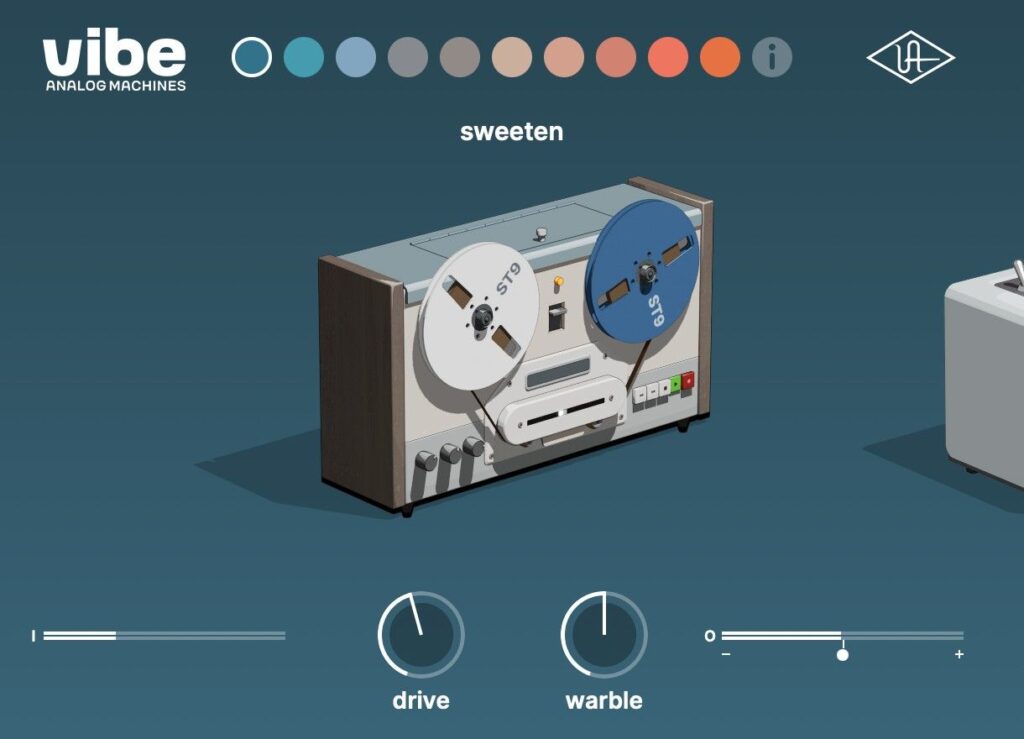


Universal Audio’s Vibe Analog Machines, a plugin packing 10 analog tone machines into one interface, is currently on sale!
In this article, we cover the latest Vibe Analog Machines deal along with an overview of the plugin.
This article will be updated whenever the sale changes.
1. Vibe Analog Machines Latest Deal
Vibe Analog Machines is currently on sale as follows.
When does the sale end? The end date of each sale is shown in parentheses. Please note that sales may be extended or end at slightly different times depending on the time zone. Some products have no stated sale period.
12 Days of UAD 2026 Sale: Until November 30, 2026
- (11/30) Universal Audio Vibe Analog Machines – a tone machine packed with 10 flavors of analog magic. Check the current sale price on Plugin Boutique.
UAD plugins traditionally require a UAD DSP accelerator or a Universal Audio audio interface with built-in DSP, but native plugins can be used without any hardware. Some native plugins ship with both “UAD Native” and “Apollo Realtime / UAD-2” versions, while others are Native-only.
Vibe Analog Machines is a Native-only product.
- UAD Native: runs without any UA hardware.
- It does not run on Apollo or other Universal Audio DSP hardware.
2. What Is Universal Audio Vibe Analog Machines?
Vibe Analog Machines is a saturation and tape effect plugin that combines 10 analog tone machines designed by Universal Audio into a single plugin. With just a few controls, you can quickly add the colorful saturation and tape sounds heard in hip-hop, lo-fi, electronic, rock, experimental music and more.
Vibe Analog Machines Highlights
- Includes 10 machines (6 of which are tape machines)
- Simple controls: just Drive, Tone/Warble and Output level
- Works on everything from drums, guitars, vocals and synths to the full mix
- Covers everything from sticky, warm tape to hi-fi tube saturation and extreme distortion
- Native plugin that runs without UA hardware
What Kind of Sounds Can You Create?
This plugin is designed to add retro analog character to modern mixes, turning in-the-box productions into more expressive, lively-sounding tracks.
Examples of analog color you can get
- Quirky sounds like a tape machine found at a thrift store
- The effect of playing through the small speaker of a vintage guitar amp
- The sheen of a high-end tube channel strip found in a large studio
For example, you can add gritty tape texture to kicks, snares and synths, and tube warmth to vocals, guitars, bass or the full mix.
The 10 Included Machines
The 10 machines are split into 6 tape machines adjusted with Warble (tape wobble) and 4 machines adjusted with Tone.
6 Tape Machines (Drive + Warble)
| Machine | Sound Character | Best Used For |
|---|---|---|
| Sweeten | The sheen and warmth of a studio open-reel tape machine that can be gently overdriven | Adding studio-quality tape sound to vocals, instruments or the full mix |
| Warm | An older, thicker tape machine than Sweeten, adding deeper warmth and wobble | Getting a tape sound with movement |
| Thicken | A gritty lo-fi texture like a recording from half a century ago | Adding atmosphere and depth to a track |
| Vintagize | A lo-fi, characterful sound like a tape machine found in a junk shop | Making modern recordings sound like they are from another era |
| Overdrive | A tape tone similar to Thicken and Vintagize, but growling even harder | Adding fuzzy tape tone to synths, guitars, drums and more |
| Fire | A scorching analog sound from a studio tape machine pushed to extreme distortion | Adding texture to vocals and instruments |
4 Machines Adjusted with Tone (Drive + Tone)
| Machine | Sound Character | Best Used For |
|---|---|---|
| Edge | Crunchy saturation like cranking the gain on an analog console | Bringing dull recordings to life |
| Glow | Warmth from rich harmonics, like running through a high-end tube preamp or channel strip | Warming up overly bright or thin tracks |
| Distort | A tube sound pushed to the limit, like a hard-driven analog preamp | Making tracks bold and aggressive |
| Sputter | Extreme distortion beyond the limit, as if on the verge of breaking | Pushing tracks past their limits |
How to Use It and Controls
Select a machine at the top of the interface and adjust it with the controls at the bottom. Turning on the Info button displays a description of the currently selected machine.
| Control | Function |
|---|---|
| Drive | Adjusts the amount of overdrive and distortion, with gain compensation |
| Tone | Adjusts the EQ (tone color). Used with Edge, Glow, Distort and Sputter |
| Warble | Adjusts the amount of tape-style wobble (modulation). Used with the 6 tape machines |
| Output Level | Adjusts the plugin output level within a range of ±12 dB |
Settings are remembered per machine
Drive, Tone and Warble settings are stored for each machine, so you can switch machines and come back to compare them with your previous settings intact. Only the output level is shared across all machines rather than stored per machine.
Note on automation
Drive, Tone and Warble behave very differently depending on the machine. Switching machines after automating these parameters may lead to unexpected results.
Differences from Vibe Analog Machines Essentials
There is also Vibe Analog Machines Essentials, a version with a reduced set of machines and controls.
| Item | Vibe Analog Machines | Vibe Analog Machines Essentials |
|---|---|---|
| Number of machines | 10 | 4 |
| Tape machines | 6 (Sweeten, Warm, Thicken, Vintagize, Overdrive, Fire) | 4 (Sweeten, Warm, Thicken, Vintagize) |
| 4 machines adjusted with Tone | Yes (Edge, Glow, Distort, Sputter) | No |
| Drive | Yes | Yes |
| Tone/Warble | Yes | No |
| Output level | Yes | No |
3. How to Install and Activate
Installing and activating Universal Audio products takes just 4 steps.
- Create a Universal Audio account and log in
- Go to the redeem page on the Universal Audio website and enter your email address and serial number
- Follow the instructions to download and install UA Connect
- Launch UA Connect and select ACTIVATE LICENSE → DOWNLOAD for the product
4. More UAD Plugin Deals
Looking for other Universal Audio plugins? Browse the full UAD plugin lineup and the latest UAD deals on Plugin Boutique.