

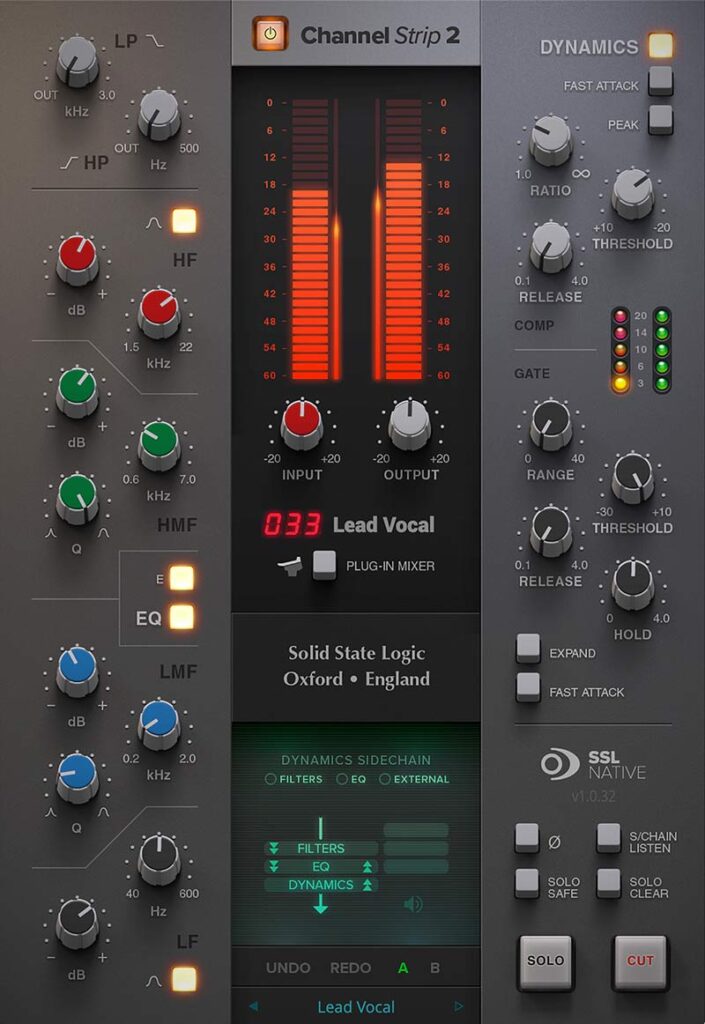


A sale is now on for “Native Channel Strip 2,” the channel strip plugin modeled on SSL (Solid State Logic)’s legendary consoles!
In this article, we cover the latest Native Channel Strip 2 deals along with an overview of the plugin.
This article will be updated whenever the sale changes.
1. Latest Native Channel Strip 2 Deals
Native Channel Strip 2 is currently on sale as follows.
Bus Compressor 2 & Channel Strip 2 Black Friday Sale: Until November 30, 2026
- (11/30) Solid State Logic “SSL Native Bus Compressor 2” – SSL G-Series bus compressor with Dry/Wet mix and sidechain HPF
- (11/30) Solid State Logic “SSL Native Channel Strip 2” – SSL 9000K channel strip with E/G-switchable 4-band EQ and independent compressor/gate
- (11/30) SSL “Native Essentials Bundle” – Bundle of SSL’s legendary bus compressor and channel strip
Check current price on Plugin Boutique.
With a deep discount, this is a highly recommended deal worth grabbing.
Solid State Logic product list
2. What Is SSL “Native Channel Strip 2”?
Native Channel Strip 2 is a channel strip based on the processing blocks of SSL’s analog consoles, offering the full set of SSL channel strip functions.
Its tone, features and workflow are inspired by channel strips such as the SSL 9000K, and the EQ digitally models the curves of the XL 9000K EQ circuit. It also features SSL’s proprietary EQ “anti-cramping” technology and an external sidechain input, letting you smooth, control and add presence to any source.
Native Channel Strip 2 Layout
- Input section (input trim, phase invert)
- Filters (high-pass / low-pass)
- 4-band EQ (E-Series / G-Series switchable)
- Dynamics (compressor, gate/expander)
- Output section (fader, pan, width, solo, cut)
- Routing menu that sets processing order and sidechain
Input Section and Meters
The input section provides ±20dB input trim and a phase invert button. Large signal meters are provided for input and output, displayed alongside a summed RMS meter.
Filters
- High-pass filter: 18dB/oct
- Low-pass filter: 12dB/oct
- Can be placed before or after the EQ
- Can also be moved from the input signal path to the sidechain path
EQ Section
The EQ uses SSL’s classic 4-band layout. The LMF and HMF mid bands are parametric, while LF and HF are shelving, and LF and HF can be switched to bell curves.
| Band | Frequency | Gain | Curve |
|---|---|---|---|
| HF | 1.5kHz–22kHz | ±20dB | Shelving (switchable to bell) |
| HMF | 600Hz–7kHz | ±20dB | Parametric (Q 2.5–0.5) |
| LMF | 200Hz–2kHz | ±20dB | Parametric (Q 2.5–0.5) |
| LF | 40Hz–600Hz | ±20dB | Shelving (switchable to bell) |
The entire EQ can be switched on/off with the EQ button, and it can also be moved into the dynamics sidechain.
Differences Between E-Series and G-Series
The EQ curve is switched with the “E” button. The default is G-Series; pressing the button selects E-Series.
G-Series (default)
- Shelving curves have overshoot/undershoot below the selected HF frequency or above the selected LF frequency
- HMF and LMF bandwidth changes with gain at any Q setting, so the EQ’s range narrows the more you boost or cut
- Effective at modest settings. The gentle Q curves suit EQ on mixed sources and subtle correction of instruments and vocals
E-Series
- Shelving overshoot/undershoot is removed and the slopes become slightly gentler
- HMF and LMF bandwidth stays almost constant at any gain. At low gain, the curve is relatively narrower at the same Q setting
- Higher Q can be used even at low gain, which is especially handy on drums
- Because Q must be adjusted to keep the same effect when changing gain, it is less suited to overall EQ or subtle correction
Anti-Cramping
EQ cramping is a phenomenon where the amplitude and phase response curves become asymmetrical when bell curves are used in the 15kHz–20kHz range. Channel Strip 2 features SSL’s proprietary “anti-cramping” algorithm, which prevents the unpleasant artifacts this causes.
Many plugins tackle this with oversampling, but because Channel Strip 2 builds anti-cramping into its processing, there is no latency compensation burden from oversampling.
Dynamics Section
The dynamics consist of a compressor/limiter and an expander/gate. Each operates independently and they can be used at the same time. The whole section is switched on/off with the DYNAMICS button.
Compressor
| Parameter | Description |
|---|---|
| RATIO | How strongly the signal is reduced once it exceeds the threshold |
| THRESHOLD | The point where gain reduction starts. Automatic make-up gain is applied at the same time |
| RELEASE | How quickly (in seconds) the level returns after the input falls below the threshold |
| FAST ATTACK | Attack time is automatically adjusted to the material. When on, a fast attack is always used |
| PEAK | Switches detection from RMS to peak |
| Mix | Balance of compressed (wet) and uncompressed (dry) signal, for parallel compression |
RMS vs. Peak
- RMS mode (default): Responds to the average signal level with a soft-knee characteristic
- Peak mode: Responds to peak signal levels with a hard-knee characteristic for more pronounced compression
Reading the Mix control: 100% means the signal passes entirely through the compressor, 0% is fully dry, and 50% is an equal blend of wet and dry.
It features a smoothly transitioning “Over-Easy” soft-ratio compression characteristic. The amount of compression is shown by five LEDs (yellow and red) on the left.
Gate/Expander
| Parameter | Description |
|---|---|
| RANGE | How strongly the signal is reduced when it falls below the threshold |
| THRESHOLD | The level at which the gate opens |
| HOLD | Wait time before the output level starts to drop |
| RELEASE | How quickly the level falls. Works together with RANGE, which sets the depth of gain reduction |
| FAST ATTACK | Attack time is normally 1.5ms per 40dB. When on, it becomes a fast 100μs per 40dB |
| EXPAND | Switches the gate to downward expansion mode |
Separate opening and closing levels (hysteresis)
The gate’s opening level is set higher than its closing level. Once open, the gate stays open until the signal falls below the lower “close” level, allowing instruments to decay naturally.
Gate vs. Expander
- Gate (normal): 40:1 ratio
- EXPAND on: a gentler 2:1 ratio
- FAST ATTACK is useful when gating signals with sharp transients, such as drums
Gate/expander activity is shown by five green LEDs on the right.
Output Section
The output section brings together a fader for adjusting output and controls for setting the stereo position.
| Control | Description |
|---|---|
| Fader | Output fader using the SSL fader scale. Range is -∞ to +12dB. Can be operated from the SSL 360° Plug-in Mixer |
| Output Trim | Clean digital gain after the fader. Range is ±20dB. Lets you correct levels without changing the fader position |
| WIDTH | Stereo width adjustment using mid/side processing. Fully left (0) is complete mono; turning right raises the side level to widen the stereo image (max 2). The default of 1 is normal stereo |
| PAN | Sets the signal’s position via left/right balance. Default is center |
| SOLO / CUT | Channel solo and cut (mute) |
| SOLO SAFE | Prevents this channel from being muted when other channels are soloed. Useful on AUX and bus channels |
| SOLO CLEAR | Clears solo on all channels |
| S/C Listen | Solos the sidechain signal |
WIDTH and PAN are available only with stereo output. When inserted on a mono channel, they are grayed out.
Processing Order and Sidechain
In the routing menu, the order of the filters, EQ and dynamics can be rearranged with the up/down arrows. However, the order “EQ → Dynamics → Filters” is not available.
Sidechain settings
- FILTERS: Moves the filters from the input signal path to the sidechain path
- EQ: Moves the EQ into the dynamics sidechain
- EXT: Sends an external source routed from your DAW to the sidechain
- When S/C Listen is on, the indicator lights up
External sidechain example
Send the kick signal to the sidechain input of a Channel Strip 2 inserted on the bass track, then turn on EXT. The kick signal drives the bass compressor, “ducking” the bass whenever the kick hits.
Solo and Cut Linking
When using the VST3 version in Ableton Live, Studio One or REAPER, SOLO and CUT automatically link with the DAW’s solo/cut, and the plugin automatically follows the track selected in the DAW.
In other DAWs, mixer-wide solo is available by running SSL 360°. Solo works by cutting the output of other 360-compatible channel strips in the session, so the following usage is recommended.
Tips for using solo
- Insert a 360-compatible channel strip on every track in your DAW
- Turn on SOLO SAFE for channel strips inserted on AUX, bus and subgroup channels
HQ Mode
Pressing the HQ button delivers higher sound quality through oversampling and other processing, at the cost of higher CPU load.
Oversampling reduces aliasing generated where the signal is distorted (the dynamics section) and further reduces the effects of cramping.
Control from SSL 360° and Hardware
Channel Strip 2 integrates with the SSL 360° Plug-in Mixer and can be controlled directly from the UC1, UF8 and UF1 hardware controllers.
- Fader level, pan and width can be controlled from the Plug-in Mixer and hardware
- The on-screen “360°” button opens the Plug-in Mixer instantly
- Displays the name of the track it is inserted on and its position number in the Plug-in Mixer
Presets, A/B Comparison, UNDO/REDO and Help
- Presets: Factory presets included. Switch with the left/right arrows; click the preset name to open the management screen. Current settings can be saved as user presets
- Revert Changes: Discards changes made to the current preset
- A/B: Quickly switch between two settings to compare them. “COPY X TO Y” copies between A and B
- UNDO/REDO: Undo or redo parameter changes
- Built-in help: Click the “?” at the bottom right and hover over any part of the interface to see an explanation of its function
Features
- The functionality, workflow and sound of an SSL console channel strip
- 4-band EQ (2 shelving bands, 2 parametric bands)
- EQ characteristics switchable between E-Series and G-Series
- EQ with SSL’s proprietary “anti-cramping” technology
- Variable high-pass/low-pass filters
- Smoothly transitioning “Over-Easy” soft-ratio compression
- Compressor Mix control for parallel compression
- Routing with reorderable processing
- External sidechain input
- Independent sidechain processing for the compressor and expander/gate
- Fader level, pan and width controls
- Track selection following and solo/cut linking in Ableton Live, Studio One and REAPER (VST3)
- Integration with Pro Tools EQ and dynamics displays
- HQ mode that raises sound quality at the cost of CPU load
- Built-in help that displays context-sensitive explanations
- Preset management and UNDO/REDO
- Integrated with SSL 360° and controllable from UC1, UF8 and UF1 hardware
Solid State Logic product list
Summary
We have covered the latest Native Channel Strip 2 deals. With its authentic SSL 9000K-style EQ, flexible dynamics and deep SSL 360° integration, it is well worth picking up while it is on sale.
Solid State Logic product list