

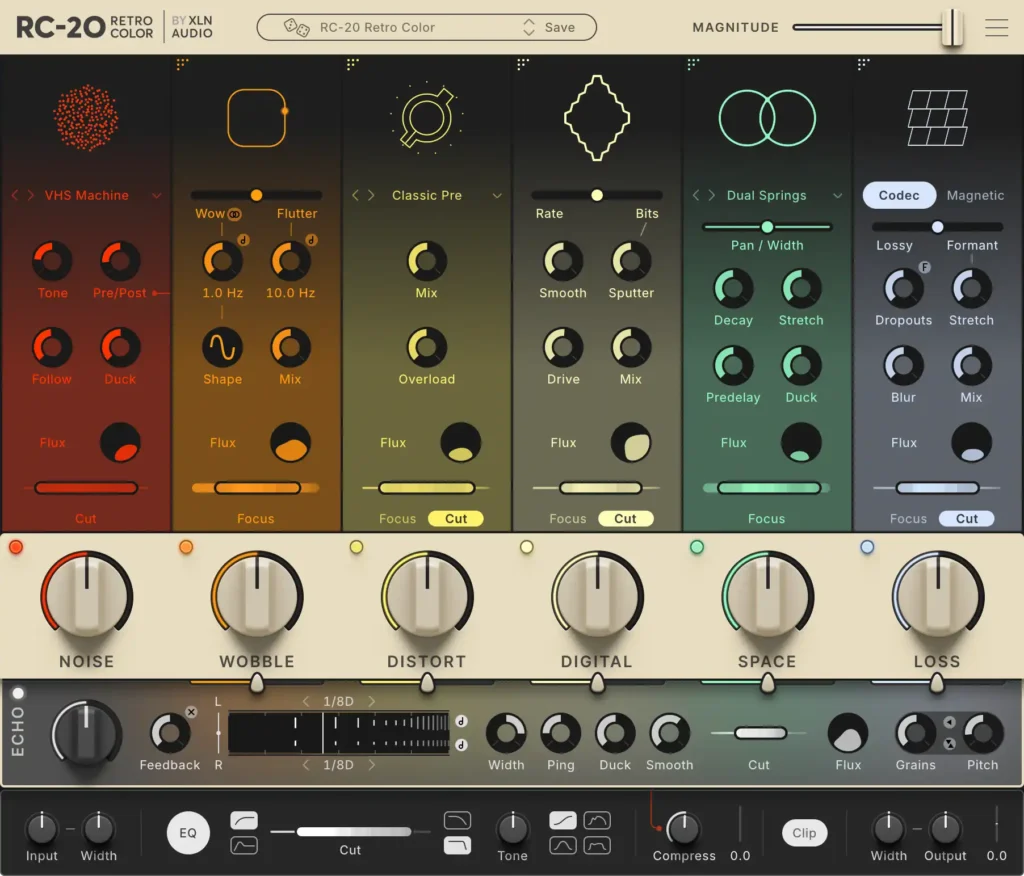
This article covers the latest sale on XLN Audio RC-20 Retro Color v2, the lo-fi multi-effect plugin for building vintage, textured sounds. It also gives a quick overview of the plugin and how to activate it after purchase.
This page will be updated whenever a new sale starts.
RC-20 Retro Color v2 Latest Sale Info
RC-20 Retro Color v2 is currently on the following sale.
RC-20 Retro Color v2 Intro Sale: Until January 12, 2027
- (1/12) XLN Audio RC-20 Retro Color v2: the further evolved, go-to lo-fi effect that simulates vinyl, VHS, tape and more. Check current price on Plugin Boutique.
- (1/12) XLN Audio RC-20 Retro Color v2 Upgrade: upgrade version for v1 owners. Check current price on Plugin Boutique.
Audio Plugin Deals, Plugin Boutique and ADSR Sounds may also include free bonus gifts for buyers.
What Is XLN Audio RC-20 Retro Color v2?
RC-20 Retro Color is a creative effect plugin from XLN Audio that recreates the warmth of vintage recording gear. Using six effect modules, you can add vinyl crackle, tape wobble, VHS-style instability and the grit of early samplers. Version 2, released on November 3, 2026, keeps every feature of the original and adds Echo, a feedback delay that places RC-20’s own effects inside the loop. All six modules also gain new features and deeper control.
Key Points of RC-20 Retro Color v2
- Six effect modules that work together or on their own
- The new Echo feedback delay adds wobble, distortion and degradation to every repeat
- A single Magnitude slider controls the overall intensity of the whole plugin
- Each module has a FLUX engine that adds irregular, analog-style fluctuation
- Includes presets for drums, keys, guitar, bass, full mixes and post-production
- Installs alongside v1, so existing projects open as before, and all v1 presets are included
New Features in v2
- Echo: a feedback delay with RC-20 inside the loop. Wobble, distortion and degradation build up with each repeat so the sound keeps changing
- Grains: turns delay tails into wide, shimmering ambient soundscapes and granular textures
- Codec: adds digital grit, from lossy network compression and packet dropouts to formant shifting and smeared artifacts
- Expanded sound palette: new tape, classic preamp, 4-track cassette distortion, 32 new reverb types, warp modulation, Sputter and Drive for Digital, ducking for Space, and pre/post blend for Noise
- Module reordering: drag Wobble, Distort, Digital, Space and Loss into any order
- Focus/Cut filters: dedicated filters on the Noise, Wobble, Distort and Loss modules let you target the frequency range of each effect
- Tempo sync: lock modulation, Magnetic tape flutter and Echo delay time to the project tempo
- Loudness Match: automatically matches the processed output to the dry level so you can compare without volume bias
- Better preset browsing: tags, custom collections, search filters and preset sharing
- Workflow upgrades: full undo history, module locking, modifier keys for multi-parameter edits, snapshot comparison, oversampling and master compression
- v1 compatibility: installs alongside the original, existing projects open as usual, all v1 factory and artist presets are included, and your own v1 presets can be imported in a few clicks
The Six Effect Modules
Audio generally flows through the modules from left to right. Use the large Big Knob on each module to set the amount of that effect.
1. NOISE (Noise Generator)
Adds many noise types, including record crackle, tape hiss, cassette and VHS noise, studio ambience, electrical hum and stompbox static.
- Tone: balances the high and low ends of the noise
- Follow: makes the noise level follow the input level (effective on drums)
- Duck: ducks the noise on input peaks
- Routing Post: places the noise at the end of the effect chain, after the master EQ
2. WOBBLE (Wobble & Flutter)
Adds the pitch (and speed) fluctuation caused by unstable record players and tape machines.
- Wow / Flutter: slow (Wow) and fast (Flutter) fluctuation, each with its own Rate
- Wow/Flutter Balance: sets the ratio between the two
- Stereo: makes Wow stereo for a chorus-like effect
- Mix: balances against the original sound
3. DISTORT (Saturation & Distortion)
Distorts the sound with several distortion types, from light saturation to heavy fuzz.
- Type: selects the distortion type
- Focus Filter: chooses the band to distort (for example, keep the lows clean and distort only the mids and highs)
- Mix: balances the distorted and original sound
4. DIGITAL (Degrader & Bitcrusher)
Lowers the sample rate and bit depth to recreate vintage digital gear such as old samplers.
- Rate/Bits Balance: sets the ratio between sample rate and bit depth reduction
- Focus Filter: selects the band to affect (for example, roughen only the highs of a kick and keep the lows)
- Cut: cuts the frequencies outside the selected band
- Smooth: softens the harshness of the digital sound
- Mix: balances the processed and original sound
5. SPACE (Reverb)
A reverb/resonator module that adds depth and width to a track.
- Decay: sets the reverb tail length
- Focus Filter: adjusts the resonance and damping of the reverb itself
- PreDelay: delays the reverb slightly from the dry sound to reduce muddiness
- Stereo: turns mono sources into stereo or widens the space
6. MAGNETIC (Volume Drops)
Recreates the degradation and volume drops of magnetic tape recording and playback.
- Wear: volume fluctuation like tape worn down by repeated playback
- Flutter: faster volume fluctuation (speed set with Rate)
- Dropouts: random sudden volume drops
- Wear/Flutter Balance: sets the ratio between Wear and Flutter
- Stereo: switches whether the degradation and dropouts move identically on left and right
Global Controls
Magnitude Slider
A single slider that adjusts the intensity of the entire plugin. It controls the six Big Knobs and the master section (In, Out, EQ) together. It supports automation and changes continuously from an unprocessed to a heavily processed sound, so it is also useful for intros, outros, drops and transitions.
FLUX Engine
Simulates organic, non-linear fluctuation, tuned individually for each module. A little adds life and texture to a track, while a lot creates intense, unpredictable changes.
Master Section
- Input Gain: adjusts the input level (raise it to drive DISTORT and DIGITAL harder)
- Cut Filter: cuts unwanted low and high frequencies (Soft or Hard curve)
- Tone: shapes the final tone (Tilt mode for high/low balance, Mid mode for the midrange)
- Output Gain: adjusts the output level
- Width: sets stereo width from 0% (mono) through 100% (original stereo) to 200% (enhanced stereo)
Installation and Activation
Authorization and activation take four steps.
Note: when creating your account, check I HAVE A PRODUCT KEY TO REGISTER (OPTIONAL) to register with your serial number at the same time.
- Register an account with XLN Audio
- Download the XLN Online Installer
- Launch the XLN Online Installer and enter your serial number under Register Product
- Install the product from the XLN Online Installer
Where to Buy RC-20 Retro Color v2
XLN Audio RC-20 Retro Color v2 is available from the following stores.