

iZotope has launched an intro sale on Photon, a drop-in stem separation and noise removal tool that processes audio automatically on your local GPU.
This article covers the latest Photon sale details, an overview of the product, and a breakdown of the 12 models built into it. This article will be updated as new sales start.
Photon Sale Information
Photon: Sale Ends November 18, 2026
The intro sale on Photon runs until November 18, 2026 (Plugin Boutique pricing is listed through December 7). Check current price on Plugin Boutique.
Buy Photon
Crossgrade to Photon
- Photon Crossgrade from any paid iZotope product
- Photon Crossgrade from RX Elements
- Photon Crossgrade from RX Standard
- Photon Crossgrade from RX Advanced
Photon Crossgrade from any paid iZotope product
Photon Crossgrade from RX Elements
Photon Crossgrade from RX Standard
Photon Crossgrade from RX Advanced
What Is iZotope Photon?
Just drop it in and it unravels: an audio processing tool that starts stem separation and noise removal automatically as soon as you drop in a file
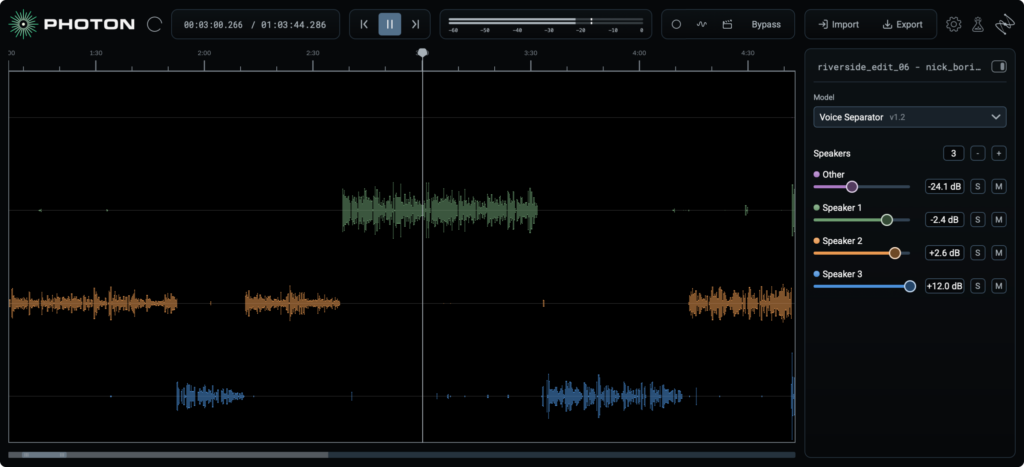
iZotope Photon is a standalone app and ARA plugin that automatically handles stem separation and noise removal / voice correction on your PC’s GPU. It includes 12 uniquely trained machine learning models for two purposes: “DeMix”, which separates a mix, and “DeNoise”, which cleans up recordings. Processing starts the moment you drop in a file, and after analysis you can audition the result while changing the processing strength in real time.
While RX is a repair tool for fine-tuning problems in detail, Photon is a tool for finishing quickly by simply dropping files in; the relationship is likened to “a paintbrush and a paint roller”. It is the result of the first joint research between iZotope and Boris FX, and is an evolution of SoundApp / CrumplePop.
Key Features
- 12 models across DeMix and DeNoise: DeMix separates music, video, speech, and drums, while DeNoise handles noise removal and voice correction. Just pick the model for your purpose and process.
- Drop-in automatic processing: Processing starts the moment you drop in a file. There is no need to hunt for problem spots, play them back, or choose which tool to use.
- Instant preview from any position: Just move to the position you want to check and processing starts immediately, letting you audition results in a few seconds.
- Real-time adjustment after processing: After analysis, you can audition on the spot while changing the processing strength.
- Everything runs on your local GPU: No upload waiting times, no limits, and no interruptions to your work. It is also safe for confidential material or audio that cannot be sent externally.
- Video file support: You can load and export video files as they are, and play the video simultaneously in a pop-up window while the audio plays.
- Photon ARA plugin: In ARA2-compatible DAWs, you can use all of Photon’s features directly on the timeline. It processes with the context of the whole clip in mind, and running or comparing multiple models at once is smooth. From drag and drop and dial adjustments to final delivery, everything can be done inside the DAW.
- Model Manager: Download new or updated models directly from Model Manager, with no need to reinstall.
- Japanese UI available: Change the language setting from the gear icon at the top right to display the interface in Japanese.
Photon includes 12 models in total: 6 for DeMix (separation) and 6 for DeNoise (noise removal / correction).
DeMix: Separate Any Mix
Separate the audio of video productions (music, sound effects, dialogue, and so on), split songs into 4 stems including vocals, isolate up to 6 speakers, or break a drum kit into 5 parts. Just choose the model for your goal and it separates automatically.
| Model | Description |
|---|---|
| Music 4 Stems | Separates a finished song into 4 tracks: vocals, drums, bass, and other. Get ready for remixing or balance adjustments even without the original session files. |
| Music 4 Stems Ultra | A high-accuracy model for when each stem needs to stand on its own quality. Suited to bringing out just the vocals or bass line. |
| Voice Separator | Separates up to 6 voices in a single recording into individual stems. Room tone and background sound can also be extracted separately. |
| Cinema 4 Stems | Separates video and audio files into dialogue, music, sound effects, and other. Useful when you want just the dialogue without background music, or when replacing background music whose license has expired. |
| Drums 5 Stems | Separates a drum kit into 5 parts: kick, snare, hi-hat, toms, and cymbals. Work with just the part you need from a drum bus or a full song. |
| Voice 2 Stems | Separates a track into 2 parts: voice and music. A simple separation model for making instrumentals, acapellas, and karaoke tracks, or adjusting background music in videos. |
DeNoise: Noise Removal and Voice Correction by Choosing Your Recording Environment
Just choose the model that matches the environment you recorded in and processing starts. It automatically finds problems and tidies up noise, levels, mic tone, and echo to make voices easier to understand.
| Model | Description |
|---|---|
| Voice Restore | A model that cleans up noise, levels, mic tone, and echo to make the voice crisp. It handles podcast guests far from the mic, muffled live-stream audio, and interviews with traffic noise. |
| Indoor (Fast) | Removes noise and room reverb picked up when filming at home or interviewing in rooms without acoustic treatment. |
| Indoor Noisy (Fast) | A model for noisy indoor spaces, such as loud factory floors and highly reverberant event venues. |
| Outdoor (Fast) | Removes general background noise picked up when shooting outdoors, making speech clearer. |
| Outdoor Traffic (Fast) | A model trained specifically on traffic noise, for shooting in places with car sounds and street noise. |
| Outdoor Wind (Fast) | Strongly reduces wind noise in environments where strong wind hits the mic, such as rooftops and beaches. |
That covers the latest Photon sale. Check the Plugin Boutique links above for current pricing.