

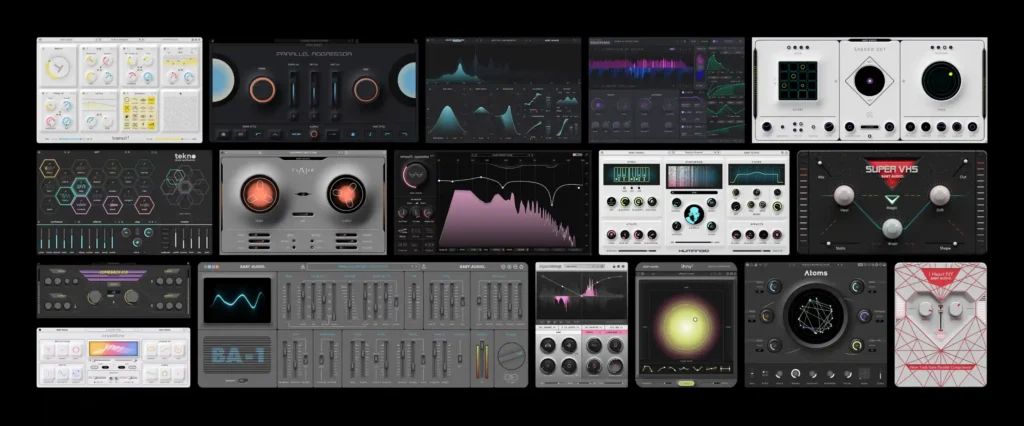
Baby Audio, the developer of distinctive effects and synths, is running a big sale right now!
This article covers the latest Baby Audio deals along with an overview of each product.
We will keep this article updated as new sales are announced.
Latest Baby Audio Sale Roundup
Baby Audio is currently running the following sales. Check current prices on Plugin Boutique.
Black Friday Sale: Until December 9, 2026
- Baby Audio Crystalline – algorithmic reverb with BPM-synced decay and Shimmer/Freeze (until 12/9)
- Baby Audio Atoms – physical modeling synth that bows a linked network of masses and springs; expansion packs also on sale (until 12/9)
- Baby Audio BA-1 – synth recreating the compact 1982 Yamaha CS-01 analog synth; expansion packs also on sale (until 12/9)
- Baby Audio Comeback Kid – analog-style delay with tape saturation (until 12/9)
- Baby Audio Complete Bundle – complete bundle with all Baby Audio effects and synths (until 12/9)
- Baby Audio Grainferno – granular synth that breaks samples into tiny grains and rebuilds them into new sounds (until 12/9)
- Baby Audio Humanoid – hard-tune pitch corrector that turns vocals into robotic voices (until 12/9)
- Baby Audio I Heart NY – compressor that delivers New York-style parallel compression with a single SPANK knob (until 12/9)
- Baby Audio IHNY-2 – parallel compressor with an XY pad to adjust dry balance and compression amount at once (until 12/9)
- Baby Audio Parallel Aggressor – parallel compressor that blends dry, compressed and saturated signals (until 12/9)
- Baby Audio Smooth Operator Pro – suppressor that tames muddiness, harsh resonances and masking to match a target curve (until 12/9)
- Baby Audio Spaced Out – spatial effect with a 16-step sequencer and four reverb programs (until 12/9)
- Baby Audio SubCulture – bass enhancer that follows pitch to generate sub-harmonics (until 12/9)
- Baby Audio Super VHS – lo-fi effect adding 80s-90s textures with six modules (until 12/9)
- Baby Audio TAIP – tape saturator trained with AI on real tape machines (until 12/9)
- Baby Audio Tekno – sample-free drum synth with 18 analog circuit-modeled engines; expansion pack also on sale (until 12/9)
- Baby Audio Transit 2 – transition multi-effect with 28 effects driven by 6 motion modes (until 12/9)
- Baby Audio All Presets Bundle – preset bundle collecting all expansion packs for BA-1, Atoms, Tekno and Grainferno (until 12/9)
HyperWarp Release Sale: Until November 30, 2026
- Baby Audio HyperWarp – arrangement effect that warps audio along the time axis using 7 effect profiles (until 11/30)
IHNY-2 Free Bonus: Until November 30, 2026
- Free bonus with ADSR Sounds purchases (until 11/30): Baby Audio IHNY-2 – parallel compressor with an XY pad to adjust dry balance and compression amount at once
Audio Plugin Deals, Plugin Boutique and ADSR Sounds also offer free bonus plugins exclusively for buyers.
Black Friday Exclusive Sale: Until January 3, 2027
- Plugin Boutique $29 Black Friday Bundle – 10-product bundle of instruments, effects and samples including BassRift, Quadrant 2 and Skyridge (until 1/3)
- Plugin Boutique $49 Black Friday Bundle – 24-product bundle of instruments, effects and samples including Tape Wobble, Galactic Reverb and Lounge Lizard Session (until 1/3)
- Plugin Boutique $69 Black Friday Bundle – 39-product bundle of instruments, effects and samples including SLAP, I Heart NY and Loopmix (until 1/3)
Baby Audio Product Links
Baby Audio Product Overview
Baby Audio mainly develops the products below. Product names in the table below match the sections that follow.
| Product | Category | In a nutshell |
|---|---|---|
| HyperWarp | Granular multi-effect | Draw time-axis curves on a graph to warp sound |
| SubCulture | Bass enhancer | Pitch-following, perfectly tuned sub-harmonics |
| Grainferno | Granular synth | Turn your own samples into a playable synth |
| Tekno | Drum synthesizer | Synthesize drums from scratch without samples |
| Smooth Operator Pro | Spectral balancer | Automatically tame muddy or harsh resonances |
| Transit 2 | Motion multi-effect | Create transitions and movement with a single knob |
| Crystalline | Algorithmic reverb | Clean modern reverb with tempo sync |
| Humanoid | Vocal transformer | Turn vocals into robot voices or synths |
| Comeback Kid | Delay | Delay with analog-style coloration |
| TAIP | Tape saturator | Machine-learning recreation of a 1970s tape machine |
| Super VHS | Lo-fi multi-effect | 80s VHS-style texture with six knobs |
| Spaced Out | Delay / reverb | 16-step delay and reverb in one |
| Parallel Aggressor | Parallel compressor and saturator | Parallel compression and parallel distortion in one unit |
| IHNY-2 | Parallel compressor | Quick New York-style parallel compression with an XY pad |
| Atoms | Physical modeling synth | Sound produced by a mass-and-spring simulation |
| BA-1 | Analog modeling synth | 80s-style synth that even recreates dead-battery noise |
HyperWarp
HyperWarp is a multi-effect powered by Baby Audio’s granular engine that freely warps the time axis of your audio according to motion drawn on a graph. From classic edits such as stutter, half-time, record scratch and tape stop to the fluctuations and textures unique to granular processing, you can do it all in a single plugin.
HyperWarp Basics
| Item | Details |
|---|---|
| Category | Granular multi-effect |
| Effect profiles | 7 (each with 4 dedicated macros) |
| Presets | 190 (global presets plus graph presets) |
| Best for | Rebuilding loops and stems, glitch/stutter, granular sound design |
Control Time with the Graph
Place breakpoints on the graph at the top of the screen and connect them with lines to draw changes in playback speed and direction. Hold Shift while dragging to quickly draw staircase-like steps, so rhythmic stutters including reverse playback that would take hours by hand can be created instantly. The graph length can be set to match your material, and grid quantize snaps breakpoints at even intervals. Amount/Skew can also scale and shift the whole graph to create variations.
Shape Sound Grain by Grain
The input is broken down into extremely small fragments (grains) by the granular engine and rebuilt following the graph sequence. In the Warp panel you can adjust pitch independently, add randomness and feedback, and set grain size from tiny samples to audible slices.
7 Effect Profiles
- Clean Warp: clear time manipulation with independent pitch and time
- Flange Warp: tight effect from fine grains, with full control over time and pitch
- Degrade Warp: lo-fi time disturbance with granular processing
- Filter Spam: a filter that moves per grain, with plenty of random behavior
- Harmo-Nicer: pitch-shifted grains that build harmonic thickness
- Fauxcoder: generates resonant overtones reminiscent of a classic vocoder
- Lo-Fizzly: granular digital downsampling
Main Features
- Dedicated graph randomizers: “Steppy” for glitchy results and “Curvy” for speed changes such as swing and scratch
- Lock and Randomize: randomize everything except parameters locked with the key icon to instantly generate usable settings
- Graph presets: many patterns and rhythmic effects included, usable without placing any breakpoints
- Mix: blend wet and dry signals with the original
- Band Split: apply low-pass/high-pass to the processed sound to limit its range and replace the rest with the original
Tip: Load loops or stems and turn them into glitchy rhythmic chops or granular sound material. If your loop-based productions tend to sound like everyone else’s, it is a tool to add your own character.
SubCulture
SubCulture is a new type of bass effect that uses advanced pitch-tracking technology to generate perfectly tuned sub-harmonics for monophonic signals.
Unlike conventional bass enhancers that stop at fixed-frequency boosts or simple pitch shifting, SubCulture uses a fully adaptive architecture. The entire processing chain changes according to the pitch of the input, so you can build a clean, deep low end while avoiding low-frequency clashes. The generated sub-harmonics are also created from the input sound itself, resulting in bass that translates well on any speaker system.
SubCulture Basics
| Item | Details |
|---|---|
| Category | Pitch-tracking bass enhancer |
| Engines | Sub Layer / Root Boost / Resonance |
| Presets | 177 (bass, kick, drums, synth, vocals and more) |
| Supported input | Monophonic signals such as bass, vocals and drum hits (for polyphonic material, specify pitch via MIDI or fixed notes) |
3 Pitch-Following Engines
- Sub Layer: blends a pitch-matched sub-harmonic layer within two octaves above and below the input. Level and width are set on an X/Y grid
- Root Boost: a pitch-tracking EQ that follows the fundamental of the bass and emphasizes the key band of each note
- Resonance: a tuned parallel filter modeled on classic analog design that adds warmth and harmonics while highlighting the detected pitch
Each engine syncs to the detected pitch and can be offset by up to two octaves up or down, or set in custom semitone steps. SubCulture is designed so that it is “the only plugin you need on a bass”. After adjusting the three engines, you can add harmonics, punch and cohesion with saturation and compression, and finish the low-end balance in the mix section.
Main Features
- Saturation: 5 clipping types – Tube / Tape / Diode / Vintage / Crystal
- Compression: 3 modes, including a classic mix-glue bus compressor
- Output 3-band EQ: quickly adjust the Sub / Low / High balance
- HPF and Mono: master high-pass and mono-ization below a set frequency
- Auto pitch setup: calibrate pitch detection to your material from the tuning fork icon
- Auto Gain, compensated wet/dry, and near-unlimited undo/redo
- Pitch specification via MIDI input (for polyphonic material such as master tracks)
Tip: It is not just for bass. Add sub-octaves or fifths to vocals for thickness and harmony, layer the three engines at different octaves on synth or guitar leads, or add fifths and sevenths higher up for experimental effects on drums and synths.
Grainferno
Grainferno is a granular synthesizer that breaks existing audio material into tiny grains and rebuilds it to create entirely new sounds. From transparent tonal sounds to experimental digital noise, it turns your own sample library into a playable source of inspiration.
Grainferno Basics
| Item | Details |
|---|---|
| Category | Granular synthesizer |
| Included content | 1.5GB (325 presets, 378 sample files, 6 templates) |
| Modulation | 3 envelopes, 3 LFOs, 3 random generators, envelope follower |
| Supported samples | WAV / AIFF / FLAC / MP3 / Ogg Vorbis |
Build a Synth from Any Sound
Grainferno can generate grains fast enough to reach audio rate. At that speed, grains behave like oscillators rather than textures, and any audio file becomes a playable synth voice. The texture of the original sound remains even at audio rate, so you can play unique synth sounds with the spectral character of your source in the key of your song.
Morph Between Two Samples
Grains can be generated from two independent samples and morphed in real time using 7 morph modes. In addition, “per-grain effects” applied at the moment grains are generated let you create textures that are not possible with conventional synthesis, such as hybrid sound sources and wavering drones.
Per-Grain Processing Modules
- G-Filter: a multimode filter applied to each individual grain
- G-Comp: controls dynamics for each generated grain, with multiple detection modes
- G-Blur: feedback that flows the sound of the previous grain into the next. Violent mode creates undulating pitch effects
Main Features
- Drag and drop modulation assignment to almost every parameter, with cross-modulation between modulators
- Drawable LFOs (grain sync, modulo shaper, ENV mode, grid quantize)
- Fine control of grain generation with Rate / Size / Scan / Scatter / Position
- 3 screens: Play View (4 macros) / Design View / FX View
- Built-in effects including delay, reverb, analog-style modulation and multimode saturation, with reorderable order and modulation support
- Mono / Poly / Legato voice modes with glide, and modulation via MIDI (notes, velocity, mod wheel, pitch wheel)
- Sample normalization, automatic pitch matching to the nearest C, and manual tuning
Tip: The included factory samples are royalty-free and can be used in your own music. The 6 templates in the bottom panel let you quickly try typical granular synthesis techniques with the samples you load.
Tekno
Tekno is a hard-hitting, modern drum synthesizer that synthesizes drum sounds from scratch without samples. Co-developed with Jatin Chowdhury, a leading figure in analog circuit modeling, it carries on the spirit of legendary 80s and 90s drum machines while aiming for sounds that are more finely adjustable and more powerful than a simple emulation.
Tekno Basics
| Item | Details |
|---|---|
| Category | Drum synthesizer |
| Drum engines | 18 (a combination of analog circuit modeling, FM and digital synthesis) |
| Presets | 72 global presets + 1,296 voice-level presets |
| Sequencer | Built-in 16-step sequencer (v1.1) |
18 Drum Engines
| Type | Engines |
|---|---|
| Kick | Kick A / Kick B |
| Snare / Clap | Snare A / Snare B / Clap / Rimshot |
| Hi-hat / Cymbal | Hat A / Hat B / Hat OP / Ride / Crash |
| Toms / Congas | Tom L / Tom H / Conga L / Conga H |
| Other | Tonal / Cowbell / Block |
Tekno generates each drum hit through complex nonlinear virtual analog circuits, so the same sound never plays twice – a trait it shares with classic analog drum machines. The Humanize parameter lets you emphasize variation in tone, velocity and timing even further.
Main Features
- Built-in sequencer: smart randomize, auto-fill, per-step velocity, Chance (trigger probability), per-lane length for polyrhythms, 32nd-note steps, playback speed (1x / 2x / 0.5x)
- Drag and drop sequences into your DAW as MIDI files. Sounds themselves can also be exported by dragging and dropping into your DAW or a folder
- Detailed per-voice synthesis settings and circuit bending from the gear icon
- Randomization of everything, per voice or per effect using the dice icon, plus voice locking
- Circuit-modeled effects such as tape saturation, exciter and compression, plus a punchy limiter/clipper
- Sidechain between voices, choke groups, MIDI mapping, and a dedicated reverb bus for multi-out
Tip: Presets were created by sound designers such as Mr. Bill, Virtual Riot and Yoad Nevo. It works for a wide range of genres that use electronic elements, from dance, hip-hop and pop to underground techno.
Smooth Operator Pro
Smooth Operator Pro is a spectral signal balancer that automatically removes harshness, muddiness and masking to clear up your mix. You can pinpoint small problems, or process the entire band for a quick fix that feels like lifting a blanket off the speakers.
Smooth Operator Pro Basics
| Item | Details |
|---|---|
| Category | Spectral signal balancer (resonance suppressor) |
| Processing | Spectral processing (linear phase) |
| Presets | 184 (created by engineers such as Craig Bauer, Max Jaeger and Preston Reid) |
| Sidechain | Supported |
Using it is simple: set the target curve with the EQ nodes, then raise the large Threshold knob until processing starts to engage. Because it removes excess frequency content only in the affected band and only when it occurs, tracks end up lighter and clearer. Spectral processing, which splits the signal into fine components and treats them individually, balances harmonics more effectively than conventional mixing tools.
“Override Global” for Per-Node Settings
While typical spectral balancers process with one global setting, Smooth Operator Pro allows individual settings per frequency. Turn on a node’s “Override Global” to change the Focus / Comp / Imaging settings for that node only. For example, within a single instance you can simultaneously process only the left side of 7500Hz to tame harsh cymbals, clean up the side content around 150Hz to tighten the bass, and gently control vocals around 2.5kHz with a soft compression setting.
Main Features
- Global Threshold: adjust the overall processing intensity with one knob
- High/low shelf nodes and peak nodes added by double-clicking, with node solo listening
- Focus / Comp / Imaging (L/R and M/S) menus
- Sidechain: process according to the frequency distribution of another track (such as reducing guitar to fit vocals, or bass to fit kick)
- Reduction meter, A/B comparison, Auto-Gain, Lo/Hi Preserve filters
Tip: An upgrade to Smooth Operator Pro is available for owners of the older Smooth Operator (v1). The v1 license remains valid after upgrading, and Pro runs with a separate license key.
Transit 2
Transit 2 is a multi-effect for creating transitions and movement in your mix, born from a collaboration between Baby Audio and popular producer Andrew Huang. Build any effect chain you like and then set it in motion to create transitions that connect song sections, addictive rhythmic movement and complex sidechain effects.
Transit 2 Basics
| Item | Details |
|---|---|
| Category | Motion multi-effect / transition designer |
| Motion modes | 6 |
| Effect modules | 28 (up to 7 used in series at once) |
| Presets | 968 (created by Andrew Huang and sound designers) |
Making a transition normally takes multiple tracks, plugins and a lot of automation. Transit packs this into one plugin and one knob, so automating that knob alone creates deep effect sweeps. Each linked parameter can have its own movement, allowing more expression than a simple macro knob.
6 Motion Modes
- Macro: move multiple parameters with one knob to create big sweeps
- LFO: rhythmic movement with sine, triangle, saw and square LFOs, synced from 1/64 notes to 8 bars
- Follower: effects move in response to changes in the track’s volume
- Sidechain: control effect movement with the input of another track
- Gate: triggers the transition only while you hold the click. Great for live use
- Sequencer: triggers the transition from the beginning of the next bar after you click, aligned to the DAW grid
28 Effect Modules
- New in v2: Loop, Reverser, Warp, Retroverb, Mod Filter, Compressor, Pitch+, Speaker, Analog chorus, EQ
- Existing: Auto pan, Bitcrusher, Digital Chorus, Delay, Distortion, Filter 12, Filter 24, Flanger, Noise, Osc, OTT, Phaser, Pitch Shift, Pump, Reverb, Spread, Tremolo, Utility
- Each parameter can be left fixed or linked to motion
Main Features
- Smart randomize with range and lock options
- Mix Range: wet/dry and global output can also be linked to motion
- Reorder modules by dragging, plus per-module randomization and presets
- Settings such as Smoothing and FX on at 0% to smooth transitions
Tip: An upgrade to Transit 2 is available for owners of the older Transit (v1). The v1 license remains valid, and Transit 2 runs with a separate license key.
Crystalline
Crystalline is a cutting-edge algorithmic reverb with a rich, clear sound. Its 15 parameters let you freely shape the character of the reverb, and a major feature is that pre-delay and decay time can be synced to your DAW’s tempo.
Crystalline Basics
| Item | Details |
|---|---|
| Category | Algorithmic reverb |
| Algorithm | All-pass loop |
| Parameters | 15 |
| Presets | 300+ (with contributions from Damian Taylor, Michele Canova, Eric J Dubowsky, Matt Sim, M-Phazes and others) |
Unlike natural rooms and halls, Crystalline is not bound by the laws of physics, so settings such as “a huge space with very short reverb” or “a small space with very long reverb” are possible. In addition to tempo-synced pre-delay/decay, ducker, filters, low-end clean-up, smoothing of harsh bands and stereo image adjustment for clean reverb, it also offers creative features such as freeze, modulation, shimmer and reverse.
Features by Section
- Reflections: Size (room size), Sparkle (high-frequency emphasis within the algorithm), Width (mono to extra wide)
- Start / End: sync the reverb attack and decay to tempo note values. Can also be set in ms
- Depth: Resolution (fineness of the algorithm), Modulation, Shimmer (keeps highs 2x / 4x / 6x longer)
- Clean-Up: Damping (remove highs and lows), Sides (remove stereo content in the low end), Gate (80s-style gated reverb)
- Shape: Tone (tilt EQ), Smoothing (EQ curve to suppress harsh bands), Warp (adjust the dynamics of the reverb)
- Output: Ducker (with Gentle mode), Reverse, Freeze, Dry/Wet, Wet Lock
Tip: Turning on Eco Mode sets Resolution to minimum and disables shimmer to reduce CPU load. It has won Plugin Boutique’s “Reverb Plugin Of The Year” award.
Humanoid
Humanoid is a vocal transformer and hard-tuner that turns any vocal into a robotic, ultra-synthetic performance. Using Baby Audio’s proprietary resynthesis and phase vocoding technology, it can transform a voice regardless of the singer’s style or skill.
Humanoid Basics
| Item | Details |
|---|---|
| Category | Vocal transformer / hard-tuner |
| Pitch specification | Scale (auto-correct to key) / Note (manual or automation) / MIDI |
| Wavetables | 64 factory tables (custom tables can also be loaded) |
| Presets | 281 |
Create New Melodies and Harmonies from Any Vocal
In addition to automatic tuning, pitch can be specified via MIDI or automation, so you can create new melodies, harmonies and chords from a single vocal take. You can also thicken a lead vocal by layering it with pitch-shifted copies of itself, or use it as a futuristic vocoder.
Turn Your Voice into a Synth
A built-in wavetable synth follows the input pitch and resynthesizes the voice. The Transform dial seamlessly morphs between robotic hard-tuning and a fully synthesized voice, and it can also be used to add just a touch of electronic texture.
Main Features
- Smooth FFT-based retune engine and high-quality formant shifting
- Filter: works on the spectrum at the analysis stage, allowing steep cuts impossible with regular filters
- Utility: range limiting, de-esser, gate, smoothing
- Effects: Widen (spread), Warble (spectral vibrato), Freeze (BPM-syncable stutter)
- Sharpen: make vocals clearer so they cut through the mix
- Buffer size (Low / Medium / High) switching. Low for low-latency operation
Tip: No AI is used; it runs on DSP only. It is not meant to make vocals sound natural, but to make voices unnatural and robotic. If you only want a little effect, you can adjust it with dry/wet.
Comeback Kid
Comeback Kid is a delay that makes warm, analog-style delays and echoes easy, ideal for everyday use. The basic functions are gathered on a simple screen with no submenus, and with effects that color the wet sound and a built-in ducker, you can create a variety of delay colors such as tape-delay style, modern slapback and gritty lo-fi echo.
Comeback Kid Basics
| Item | Details |
|---|---|
| Category | Analog-style delay |
| Delay time | Tempo sync (straight / dotted / triplet), 0.01-2500ms in free mode |
| Effects | 14 that color the wet sound |
| Presets | 61 (created by Mick Schultz, Anthony Saffery and others) |
Sound Shaping Features
- Lo-Cut / Hi-Cut: analog-modeled filters
- Attack / Sustain: transient designer to shape the envelope of the delay sound
- Cheap: an 11-bit signal path inspired by vintage digital delays
- Tape: analog-modeled saturation that goes from tape-delay style to distinct distortion
- Swirl: a warm, organic phaser
- Sauce: an algorithmic reverb that adds diffusion
- Wider / Richer: widen with timing differences between left and right / chorus effect from pitch differences between left and right
- Pan / Mono: delay panning and mono-ization
- Destiny: adds subtle timing fluctuation to repeats for a human texture
- Ducker: lowers the delay sound while the original sound is playing
Tip: Ping-pong delay is also supported. Double-click the numeric display to type in the delay time directly in 0.01ms steps.
TAIP
TAIP is a tape saturator that uses machine learning (AI) to faithfully recreate the sound and nonlinear behavior of classic 1970s tape machines. The captured characteristics are broken down into individual functions, so you can combine them to create your own preferred tape texture.
TAIP Basics
| Item | Details |
|---|---|
| Category | AI tape saturator |
| Modeled after | Classic 1970s tape machines |
| Presets | 135 (created by Mark Needham, Max Jaeger, Rob Kleiner and others) |
| AI training data | Only in-house material such as sine sweeps and white noise |
While conventional DSP emulations are built by guessing the influence of analog components, TAIP uses a neural network to learn the sound and behavior of tape machines, aiming for a recreation that does not rely on guesswork or approximation. It can go beyond tape: drive it hard for saturation and distortion, emphasize glue to use it as a virtual compressor, or add wow/flutter and noise for lo-fi.
Parameters
- Drive: the most important parameter, from a hint of warmth to extreme saturation
- Mix: blend with the original in parallel. Combined with Wear, it creates a tape flanging effect
- Model: Single (one machine) / Dual (two machines in series)
- Lo / Hi-Shape: vary the amount of low and high saturation relative to other bands, preserving low end and air
- Glue: emphasizes the compression that occurs naturally in tape recording
- Noise: add tape noise, or remove it completely
- Presence: restores the brightness lost on tape for a more modern sound
- Wear: slightly varies tape speed to recreate the instability of a worn tape machine
- Auto-Gain: keeps output level constant even as you raise drive
Super VHS
Super VHS is a channel strip with six one-knob effects, inspired by the lo-fi aesthetic of the 1980s. You can quickly add the sounds of the VHS era to clean tracks, such as slightly out-of-tune synths, warm tape saturation, gritty samples and rough reverb.
Super VHS Basics
| Item | Details |
|---|---|
| Category | 80s-style lo-fi multi-effect (channel strip) |
| Effects | 6 one-knob effects |
| Operation | Each knob controls multiple parameters internally at once |
6 One-Knob Effects
- Static: VHS noise generated by an internal synthesizer
- Heat: analog-emulated tape saturator inspired by consumer tape machines
- Shape: sample rate reducer inspired by 1980s 8-bit samplers
- Magic: a darker, deeper ensemble effect inspired by Juno chorus
- Drift: an LFO that creates unpredictable time and pitch wobble
- Wash: a “poorly made hall” reverb inspired by cheap 1980s rack gear
Tip: Each effect is controlled with a single knob, but internally it moves multiple parameters at once, giving you both fast workflow and unexpected results. The more effects you combine, the stronger the lo-fi texture becomes.
Spaced Out
Spaced Out combines delay, reverb and modulation in one plugin to add rich, modern spatial effects to vocals and instruments. It has more than 50 effect parameters inside, yet is operated from a simple screen with no submenus.
Spaced Out Basics
| Item | Details |
|---|---|
| Category | Delay / reverb / modulation multi-effect |
| Delay | 16-step delay sequencer synced to your DAW tempo |
| Reverb | 4 programs (Vacuum / Small Space / Medium Space / Outer Space) |
| Presets | 125 (created by Filip Nikolic, David Nakaji and others) |
This plugin was born from the idea of “what if a Space Echo-style effect were designed with today’s computer power, 50 years later?” You can build unpredictable delay patterns with the step sequencer and control a deeply modulated reverb space with a circular joystick. If you are not sure where to start, the dice icon in the center generates one musically tuned new effect setting after another.
3 Sections
- Echoes: 16-step delay, modes (Straight / 2x / Dotted / Triplet), Intensity, Dimension (Off / Ultra-Wide / Motion), Texture (Clean / Wonky Tape / Lofi / Hazy), Reverse, analog-modeled filters
- Space: X-Y joystick for reverb length and modulation, 4 programs, pre-delay 0-250ms, Stardust (shimmer), Mellow (damping), Clean-Up, Width
- Central Mixer: X-Y joystick for Wet/Dry of Echoes/Space, Generate (randomizer), Lift-Off (glues the wet sound with compression, M/S processing and EQ), Ducker (BPM-syncable)
Tip: It has won numerous awards, including Future Music “Plugin Of The Year” and Computer Music Magazine “Plugin Of The Year”, and is the plugin that made the Baby Audio name widely known.
Parallel Aggressor
Parallel Aggressor is a parallel processing plugin that handles parallel compression and parallel saturation in one plugin. It splits the sound into three signals, processes them, and mixes them together, adding power and presence to a track while keeping the dynamics of the original. Parallel processing is completed inside the plugin without routing to an external bus.
Parallel Aggressor Basics
| Item | Details |
|---|---|
| Category | Parallel compressor / parallel saturator |
| Signals | 3: Dry (original) / Spank (compressed) / Heat (saturated) |
| Presets | 25 (created by KurtCurt, Anthony Saffery and others) |
2 Parallel Engines
- Spank: powerful compression designed for parallel use. Style buttons: Extra Punch / Extra Smack / Sidechain Filter / Mono
- Heat: aggressive analog-modeled saturation. Style buttons: Extra Hot / Tone / HP Filter / LP Filter
Main Features
- Balance the three signals with the center fader
- Solo buttons to monitor each signal individually
- Auto Gain: roughly matches the total level of the three signals to the input level, keeping output constant
- Left and right meters to check the right amount (peaking just before the orange line is a good guide)
IHNY-2
IHNY-2 is a modern parallel compressor that delivers parallel compression with a faster workflow and a more powerful sound. It can add weight and punch to drums, vocals and even the master. It is the successor to Baby Audio’s first plugin, “I Heart NY”, and the name comes from “New York compression”, another name for parallel compression.
IHNY-2 Basics
| Item | Details |
|---|---|
| Category | Parallel compressor |
| Basic control | XY pad (horizontal axis: compression amount / vertical axis: dry/wet balance) |
| Oversampling | 1x / 2x / 4x |
| Presets | 156 (created by Delbert Bowers, Matt Sim, M-Phazes and others) |
The plugin handles two signals, dry and wet, internally, and moving the node on the XY pad adjusts compression strength and blend at once. The compression sound itself is optimized for parallel processing, with an aggressive response that can crush signals hard without losing clarity.
Tweak Panel (Detailed Settings)
- Attack / Release: how fast the compressor engages and recovers
- Ratio: compression strength from mild to aggressive
- Punch: emphasizes the attack that is often lost with heavy compression
- Harmonics: saturation linked to gain reduction. Heavily compressed parts distort more
- Shape: a “smile curve” EQ that lifts lows and highs
- Tilt: adjusts whether compression is applied more to the low or high side
- Lo / Hi Preserve: do not compress below/above a set frequency. Useful for keeping the kick on a drum bus
Tip: “AGR (Adjusted Gain Reduction)”, displayed when you move the XY pad, is a guide to compression strength that takes gain reduction and dry/wet balance into account. A good starting point is -10 to -20. An upgrade to IHNY-2 is also available for owners of I Heart NY (v1).
Atoms
Atoms is a synthesizer that uses state-of-the-art physical modeling technology to produce organic yet otherworldly sounds. Sound is produced by exciting a simulation of interconnected masses and springs with a virtual bow. It is a sound source like “a futuristic stringed instrument made in a science lab”.
Atoms Basics
| Item | Details |
|---|---|
| Category | Physical modeling synthesizer |
| Sound generation | Mass-and-spring network excited by a virtual bow |
| Profiles | 4 (with different mass and spring configurations) |
| Presets | 250 |
Like a real instrument, Atoms never plays the same sound twice. By automating its 6 main parameters, you can also create ever-changing soundscapes. Except for the reverb (Space), effects are built inside the physical model rather than as post effects, resulting in unique modulation that is integrated with the model.
Sound Shaping Parameters
- Chaos: increases the nonlinearity of masses and springs, creating wavering pitch glides and detune
- Force: bow pressure. Raising it adds noise and sharp harmonics
- Overtones: bow position. Moving it closer to the end gives brighter overtones
- Order: increases spring damping, acting like a low-pass filter
- Attack / Release: how the bow is applied (abrupt to gradual) and the length of decay (short to infinite sustain)
- Root / Profile: octave setting and switching between 4 network configurations
Main Features
- A musical randomizer that considers relationships between parameters, plus Recycle to create similar sounds, locking and range limiting
- 4 automation types (tempo-synced, per-voice trigger supported)
- Drive (harmonic clipping) and a low-pass filter with resonance
- Built-in reverb controlled with an X/Y pad
- Polyphonic aftertouch via MPE, mono/poly switching, ECO mode
- A visualizer that displays the movement of the physical model as it is
BA-1
BA-1 is an analog modeling synthesizer that starts from a unique 1982 analog synth and reimagines the 80s synth for the modern era. After thoroughly measuring and emulating the original hardware, it was expanded in features and tuned in sound character.
BA-1 Basics
| Item | Details |
|---|---|
| Category | Analog modeling synthesizer |
| Filter | Analog-modeled 24dB low-pass (self-oscillating) |
| Presets | 500+ (synthwave, modern pop, lo-fi hip-hop and more) |
| Included | The effects section of BA-1 is also included as a standalone effect plugin |
Even the Hardware’s Quirks Are Recreated
It recreates the quirks that real hardware users loved (and sometimes hated), such as draining the battery to add strange low-power noise, distorting with circuit bending, outputting through the built-in speaker, and creating unpredictable stepped glides with Gliss. You can create authentic lo-fi synth sounds even before adding effects.
Main Features
- Oscillators with grit and slight analog drift (triangle wave and PWM are especially distinctive)
- FM: set an FM oscillator one octave above or below oscillator 1
- Envelope attack can be synced to the DAW BPM
- LFO (tempo-synced / free) with a hidden LFO fade-in feature
- Tone (two shelving filters) and Drive (Circuit / OD modes)
- Delay + reverb + chorus modeled after cheap 1980s rack gear
- Sidechain (Internal to create automatic four-on-the-floor ducking / External for external input)
- Arpeggiator (3 modes, 1-3 octaves, tempo-syncable. Added in v1.5)
- Re-Gen: automatically generates musically usable patches with each click
- 5 color themes and window resizing
Summary
That covers the latest Baby Audio sale information. Be sure to check Plugin Boutique for current prices, as discounts can change during the sale period.