


DDMF Plugindoctor is on sale! In this article, we cover the latest Plugindoctor deal along with an overview of its features.
We hope you find it helpful.
1. Latest Plugindoctor Deal
Plugindoctor is currently available at the following sale price.
Plugindoctor Black Friday Sale: Until December 7, 2026
2. Plugindoctor Overview
Plugindoctor is a plugin analyzer that loads VST and AU effect plugins, measures what each plugin is doing to the sound, and displays the results as graphs.
It is designed both for developers who want to test the audio quality of their own plugins and for users who want to understand in detail how the plugins they own behave.
How to Use Plugindoctor
- Use it standalone: launch it as a standalone application, load the plugin you want to examine, and take measurements.
- Use it as a plugin in your DAW: plugin versions in VST/VST3/AU/AAX formats are also available, so you can analyze while listening to the audio inside your DAW.
- Plugins it can load: VST, VST3, and AU (AU on Mac only) effect plugins.
Six Analysis Modes
Analysis is performed in six modes, which you switch between using tabs on the screen.
| Mode | What It Shows |
|---|---|
| Linear Analysis | Frequency response and phase response. You can check things like EQ curves. |
| Harmonic Analysis | How harmonics are generated when a sine wave is fed in. THD/THD+N values are also displayed, and there are modes for intermodulation distortion (IMD) and for measuring with a frequency sweep. |
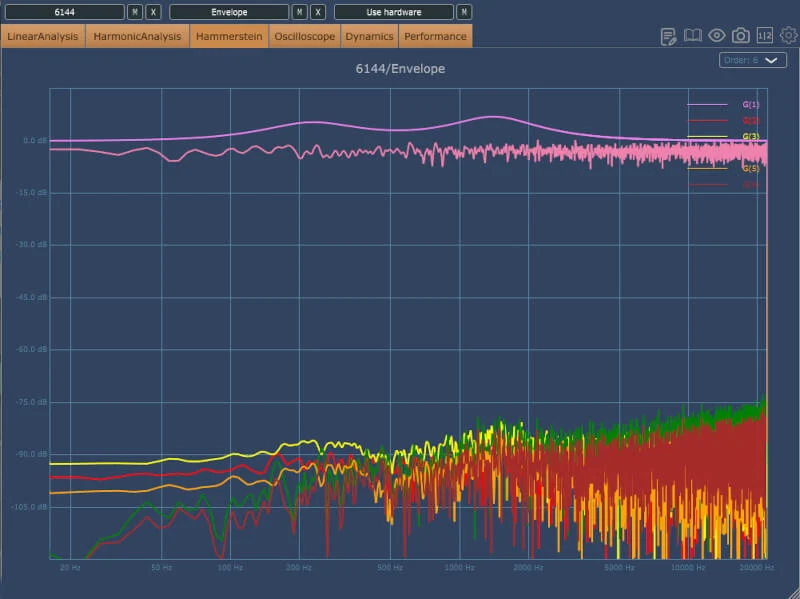
| Hammerstein | A mode for examining nonlinear behavior in greater detail. |
| Oscilloscope | Displays in real time how the waveform of the input sine wave changes. |
| Dynamics | How compression and expansion are applied, plus the attack/release curves of compressors. |
| Performance | How many milliseconds the plugin actually takes to process audio (for each buffer size). |
Comparing Two Plugins
The Plugindoctor interface has two columns (chains) for loading plugins, each with six slots.
Plugins placed in the same chain are connected in series, so you can measure not just a single plugin but a chain of up to six plugins. You can then compare it against a different plugin or combination set up in the other chain.
In Linear Analysis and Harmonic Analysis, you can save measured curves, making it easy to compare differences when you change settings or between different plugins.
Hardware Analysis
The standalone version can also analyze external hardware such as outboard EQs and compressors.
Once you connect the gear to the inputs and outputs of your audio interface and configure it, you can measure it in the same way as you would analyze a plugin.
- Cannot load AAX plugins: Plugindoctor itself is available in AAX format, but the plugins it can load for analysis are VST, VST3, and AU (Mac only).
- Interface: the window is freely resizable, and there is also a feature to save screenshots.
- Free demo available: in the demo version, processing is interrupted periodically, and only one plugin can be loaded per session. Hardware analysis is available only in the full version.