

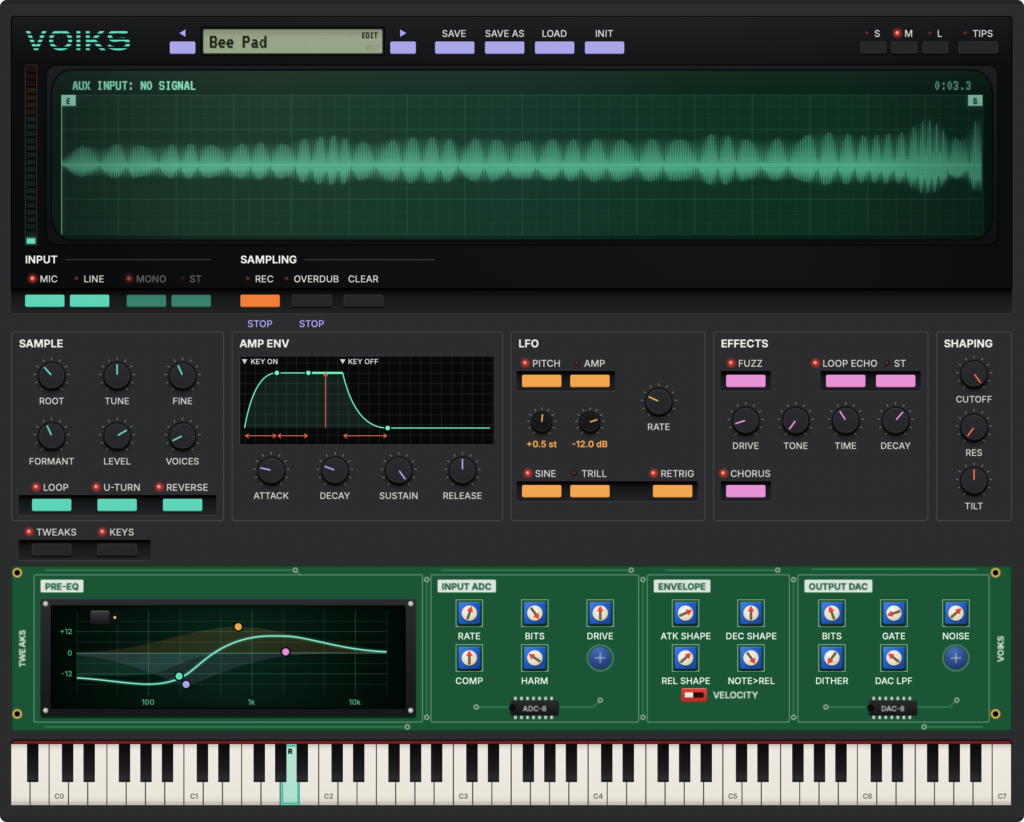
StageBox Software’s lo-fi sampler plugin “VOIKS” is currently available as a free download!
This article covers the download details and an overview of VOIKS.
What Is StageBox Software “VOIKS”?
VOIKS is a lo-fi 8-bit sampler that recreates the character and fun of small sampling keyboards from the 1980s. Record a single sound and it is mapped across the whole keyboard through an 8-bit signal path, ready to play. Besides recording from a microphone, you can also load audio files by dragging them into the editor.
Key Features
- Play one recorded sample across the entire keyboard (the root note is set automatically after recording)
- Record from a microphone, or load audio files by drag and drop
- Switch between LOOP, U-TURN (back-and-forth loop) and REVERSE with a single button
- OVERDUB to layer new sound on top of an existing sample
- MIC/LINE switch (MIC emulates the built-in microphone tone of a toy keyboard) and MONO/STEREO switch
- Five modules: SAMPLE, AMP ENV (ADSR), LFO, EFFECTS (fuzz, echo, chorus) and SHAPING
- TWEAKS drawer that gathers the lo-fi settings for the recording path and output stage
- Polyphony (VOICES) adjustable from 1 to 32
- TUNE (±24 semitones), FINE, and FORMANT to shift the tonal character without changing pitch
- Save and load patches, with factory patches included
- All features are usable, with no limit on the number of saves
- Supported formats: macOS (AU, VST3), Windows (VST3)
How to Download and Install VOIKS
Go to the official page and click “DOWNLOAD VOIKS” to reach the download page, enter your email address, and click “CONTINUE TO DOWNLOADS”. By downloading, you agree to occasionally receive emails about StageBox Software products.
That wraps up the free distribution info for VOIKS.