

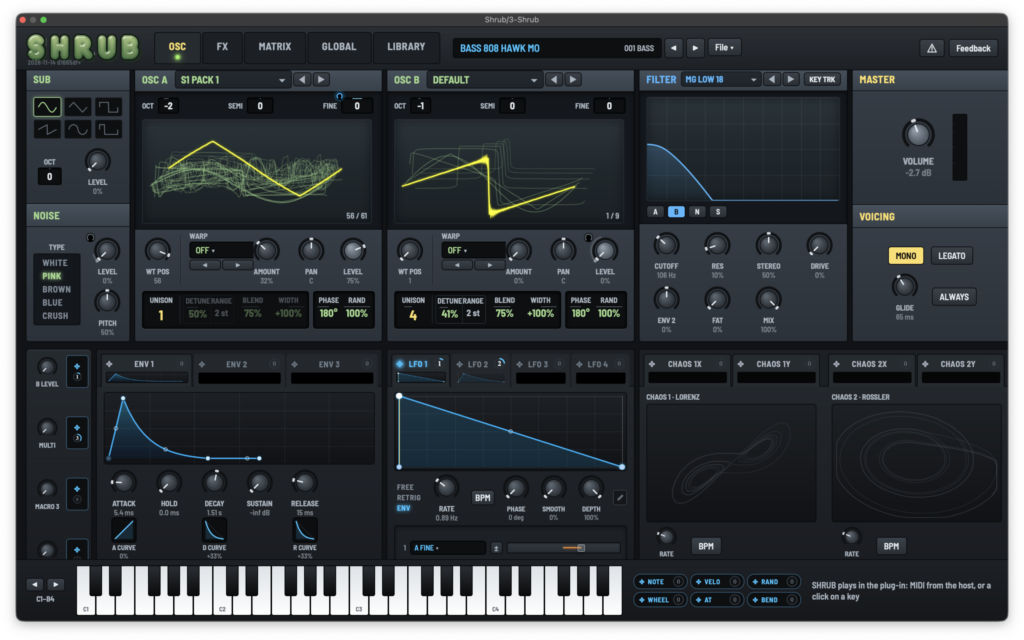


A VST3 version of SHRUB, a wavetable synth designed as a stripped-down version of Xfer Records’ Serum and built to run on M-VAVE’s pocket FM synthesizer “FM-1” (hardware), is now available for free!
In this article, we cover SHRUB’s download information and an overview of what it offers.
1. What Is Xfer Records SHRUB?
SHRUB is a wavetable synth created as a stripped-down version of Serum, designed to run on the hardware synthesizer M-VAVE FM-1. Once you install the SHRUB firmware on the FM-1, it turns the unit into a wavetable synth that incorporates many elements of Serum.
SHRUB consists of firmware that runs on the FM-1 itself, a browser-based editor, and a VST3 version for macOS, Windows and Linux. The VST3 version lets you use the same synth engine as the editor inside your DAW, so you can use it as a free VST3 instrument even if you don’t own an FM-1. According to the official guide, SHRUB was created by Steve Duda, and the official site currently labels it as “Beta.”
What Is the M-VAVE FM-1?
The FM-1 is a pocket-sized hardware FM synthesizer (officially called “A Pocket FM Synthesizer”) released by M-VAVE (CUVAVE), headquartered in Zhuhai, China. Out of the box it is a 6-operator, 32-algorithm FM synth, and SHRUB works by replacing the FM-1’s internals (its firmware). SHRUB is not manufactured, sold or supported by M-VAVE.
- Synthesis: FM synthesis (6 operators, 32 algorithms), 128 factory presets
- Up to 12 voices (POLY mode)
- 27 silicone keys (standard piano layout), 8 octaves via OCT-/OCT+
- 6 effects (Filter / Reverb / Delay / Distortion / Chorus / Phaser), 7-mode arpeggiator, 16-step sequencer
- Color TFT display
- USB MIDI (Type-C), Bluetooth BLE MIDI and 3.5mm MIDI IN can be used simultaneously
- 3.5mm stereo headphone output, built-in speaker (auto-muted when headphones are connected)
- 2000mAh battery for about 12 hours of use, USB Type-C charging
- Size: 161.5 × 96.5 × 28.6 mm, weight: approx. 251 g
Key Features
- Two wavetable oscillators (OSC A / OSC B), plus a sub oscillator and noise
- Serum wavetables and warp modes (sync, bend, PWM, FM, etc.), unison of up to 8 voices
- ADDITIVE tables where you set 24 harmonics by hand, and RULE tables that generate frames using cellular automata
- All Serum 1 filter types and many Serum 2 filter types (ladder, MG DIRTY, FRENCH LP, all-pass, comb, phaser, etc.)
- 3 envelopes, 4 LFOs, 2 chaos sources, a 16-slot modulation matrix and 4 macros
- Serum 1 effect modules (Hyper/Dimension, Distortion, Flanger, Phaser, Chorus, Delay, Compressor (OTT / single band), Reverb (Plate / Hall), EQ, Filter) in a 7-slot rack
- Serum 2 arpeggiator (19 patterns), 51 scales, voice controls and per-note randomization
- Includes 100 presets
- Loads Serum 1 presets (.fxp), exports to the Serum 2 preset format (.SerumPreset), and imports your own wavetables (WAV)
- Serum 1 factory presets can be loaded even if Serum 1 is not installed (fetched from shrub.audio on first use)
- All parameters can be automated from your DAW; patches, wavetables, libraries and MIDI maps are saved with the project
- Main differences from Serum: a single filter shared by all notes (paraphonic); ENV 2, ENV 3, LFOs and chaos are shared by all notes; 4-note polyphony (from a 16-voice pool); 7 effect slots
- The VST3 version does not include the SEQ tab (motion sequencer editing); connecting to the FM-1 and updating firmware are done in the browser
- Supported formats: VST3 (macOS Universal, Windows x64, Linux arm64 / amd64)
2. How to Download and Install SHRUB
From the “SHRUB AS A VST3” section of the official website, download the zip file for your OS (macOS Universal 8.0 MB / Windows x64 4.6 MB), unzip it, and place “Shrub.vst3” in your VST3 folder. Then rescan plugins in your DAW and load it as an instrument. The version at the time of writing is 1.01 (2026-11-14).
According to the official notes, while the VST3 version can be used as a free VST3 instrument, it was not originally designed as a VST3 instrument. Because it runs the hardware code as-is, CPU usage is high even if it looks lightweight in your DAW. It is primarily intended as a convenient way to use the editor/librarian, which sounds 1:1 identical to the firmware, inside your DAW.
If you own an M-VAVE FM-1, open the official installer page (shrub.audio/editor/install) in Chrome or Edge and install the firmware onto your USB-connected FM-1 (takes about 2 minutes). SHRUB is not manufactured, sold or supported by M-VAVE, and installation is at your own risk. The developer notes that you can revert to the M-VAVE firmware at any time.
Windows (plugins)
- VST folder: C:\Program Files\VSTPlugins
- VST3 folder: C:\Program Files\Common Files\VST3
macOS (plugins)
- VST folder: Macintosh HD/Library/Audio/Plug-ins/VST/
- VST3 folder: Macintosh HD/Library/Audio/Plug-ins/VST3/
- AU folder: Macintosh HD/Library/Audio/Plug-ins/Components/
[FREE] Xfer Records SHRUB – a mini Serum built for a compact hardware synth (VST3 available, beta)
Summary
That wraps up our look at the free SHRUB release from Xfer Records. If you’ve ever wanted a taste of Serum’s wavetable engine in a lightweight, hardware-born form, it’s well worth grabbing while it’s in beta.