

Autodafe’s drum machine instrument “Mega Drum Machines” has been updated to version 2 and is available for free!
This article covers the download details and an overview of Mega Drum Machines 2. Be sure to check it out.
1. What Is Autodafe “Mega Drum Machines 2”?
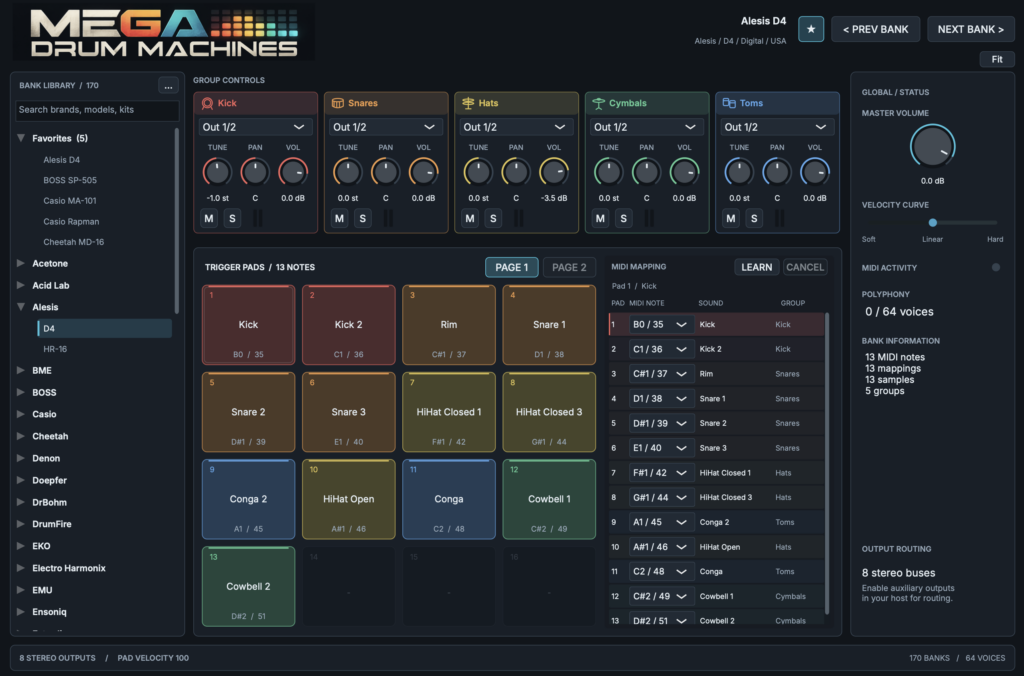
Mega Drum Machines 2 is a free drum machine plugin featuring samples of vintage, rare, obscure and classic drum machines. V2 is a ground-up rebuild of the original Mega Drum Machines released in 2017, now a native plugin with a new audio engine and a redesigned interface. It includes 170 drum machine kits, each organized into five groups: Kick, Snare, Hats, Cymbals and Toms.
Key Features
- 170 drum machine kits included
- Brand-new native audio engine
- Resizable new user interface
- 16 velocity-sensitive pads (with a second page of pads for larger kits)
- Tune, Pan and Volume for each sound
- MIDI note remapping and MIDI Learn
- Hi-hat choke groups
- 8 stereo multi-outs (16 outputs) with per-group output routing
- Group Mute/Solo and level meters
- Velocity curve adjustment and master volume
- Previous/Next buttons for quick kit switching
- New Expansion system supporting additional drum libraries
- Factory library built into the plugin (no external sample folder required)
- Supported: macOS 11 or later (Standalone, AU, VST3; Apple Silicon/Intel universal), Windows 64-bit (Standalone, VST3), Linux 64-bit (Standalone, VST3)
2. How to Download and Install Mega Drum Machines 2
Select “Download for free” on the official product page, add it to your cart and check out, then download it from the email you receive. Move the downloaded plugin files to a folder your DAW can load.
Windows
- VST folder: C:\Program Files\VSTPlugins
- VST3 folder: C:\Program Files\Common Files\VST3
macOS
- VST folder: Macintosh HD/Library/Audio/Plug-ins/VST/
- VST3 folder: Macintosh HD/Library/Audio/Plug-ins/VST3/
- AU folder: Macintosh HD/Library/Audio/Plug-ins/Components/
That’s the rundown on the free release of Mega Drum Machines 2.