
With a free Musio account, you can use Cinesamples sounds and the music-creation app “Musio Studio” completely free of charge!
In this article, we introduce the Musio free plan, what it includes, and how to get it.
1. What Is the Cinesamples “Musio” Free Plan?
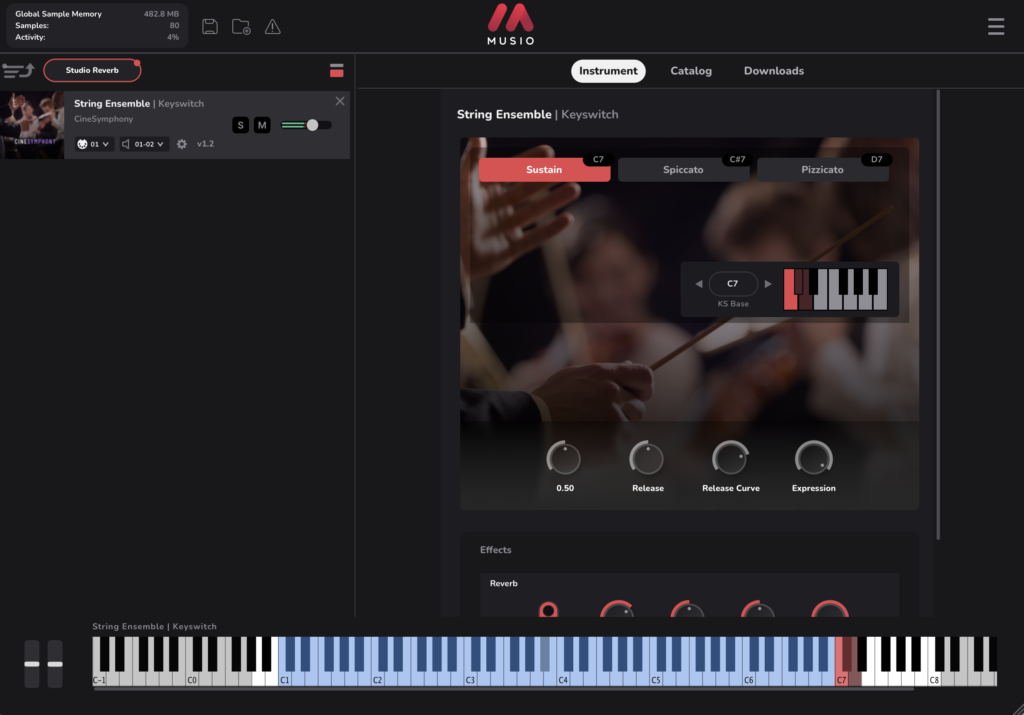
The Musio free plan lets you use the sounds in the free collections, the music-creation app “Musio Studio” (which lets you compose, record, mix, and export), and the Musio plugin for your DAW, simply by signing in with a free Musio account. A single installer includes both Musio Studio and the Musio plugin. To access every sound, you need the paid Musio Complete subscription ($15/month or $179/year).
Key Features
- Musio Studio (music-creation app), free sounds, and the Musio plugin are all available with a free Musio account
- Musio Studio and the Musio plugin share the same library (sounds downloaded once can be used in both)
- Musio plugin: Mac (AU / VST3 / AAX), Windows (VST3 / AAX), Linux (VST3), and standalone
- Musio Studio: 7 templates with instruments, tempo, and room already set up
- Musio Studio: EQ, Echo, Chorus, Drive, and Filter effects with 63 presets (tempo-synced)
- Musio Studio: import a MIDI file and Musio sounds are assigned to each part automatically
- Musio Studio: MIDI/audio recording with count-in and metronome
- Musio Studio: export songs as WAV, per-track stems, or MIDI
- Musio Studio: up to 512 tracks, with autosave and session recovery
- Sounds are downloaded in the background when you need them
- No other sample player such as Kontakt is required
Collections Available for Free
The collections marked “Free” in the official store are as follows:
- African Marimba
- Ancient Bones
- CineLegacy: Harp
- CineLegacy: Percussion
- CineSymphony
- Create Series: Accent Pianos
- Create Series: Kalimba
- Create Series: Tonal Tickies
- Create Series: Tongue Drum
- Create Series: Toy Xylo
- Create Series: Twisted Psaltry – Cinematic FX
- Handbells
- Mister Rogers’ Celeste
- Session Piano – Upright
- Village Drums
- Village Mallets
- Vintage Drum Machine: LinnDrum
- Vintage Synthesizer: Prophet 5
2. How to Install and Activate Musio
Download the installer for Mac / Windows / Linux from the download page on the official website (no account is required to download). After running the installer, launch Musio Studio or the Musio plugin in your DAW, sign in with a free Musio account, and download the free sounds.
System requirements: macOS 11 or later (Apple Silicon / Intel; the Musio plugin alone supports macOS 10.14 or later), Windows 10 or later (64-bit), or 64-bit Linux from 2020 or later (Intel / AMD). 8 GB or more of RAM is recommended. Required disk space depends on the sounds you install, ranging from under 1 GB up to about 30 GB for the largest collection.
Summary
That covers the Cinesamples Musio free plan. With CineSymphony, Session Piano, vintage drum machine and synth collections, and a full music-creation app included at no cost, it is well worth grabbing.