

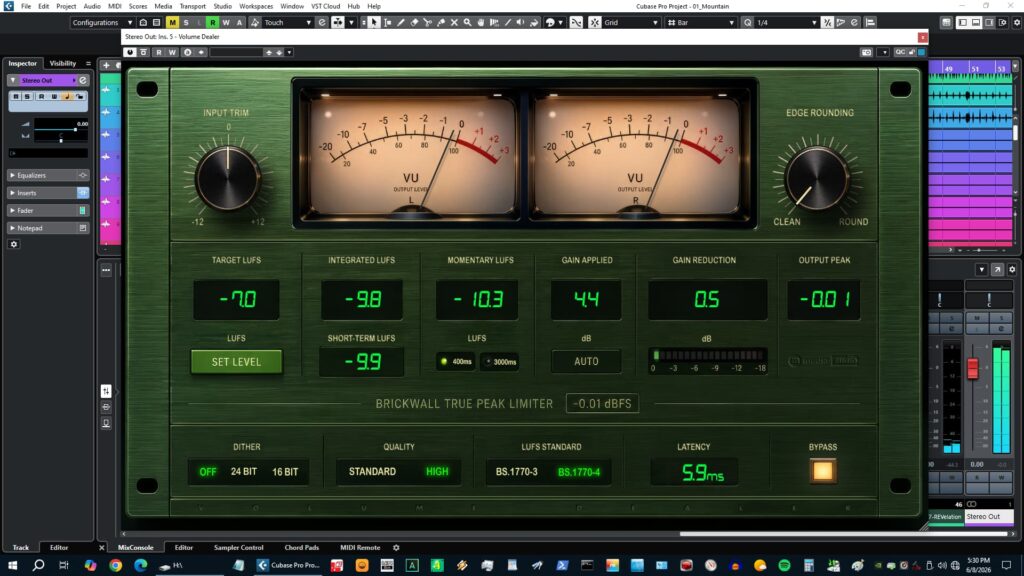
M Media Audio is giving away two free plugins: Volume Dealer, a true-peak limiter for mastering, and Violet Crown, a channel strip for the mix bus.
This article covers the release details and an overview of these two free M Media Audio plugins, “Volume Dealer” and “Violet Crown.”
1. What is M Media Audio “Volume Dealer”?
Volume Dealer is a true-peak mastering limiter with a full BS.1770-compliant LUFS meter. Simply insert it on your master bus, set a target LUFS, and click “Set Level” to apply the required correction gain. It displays Integrated, Momentary, and Short-Term LUFS in real time, letting you dial in your target in a single move.
Main features
- Target LUFS: enter a value by clicking the display, or adjust with the mouse wheel (-14 = streaming, -16 = podcast, -23 = EBU R128, etc.)
- Set Level: apply the correction gain offset with one click (no repeated manual trimming required)
- Gain Applied display: shows the applied offset in dB
- Reset measurement: clear the accumulated Integrated LUFS and re-measure
- High Quality mode: 2x oversampling on export (IIR half-band polyphase filter) to catch inter-sample peaks exceeding 0 dBFS. Standard mode runs at native rate for low latency
- Full BS.1770 LUFS metering: Integrated LUFS, Momentary LUFS (switchable 400 ms / 3000 ms), and Short-Term LUFS (3-second average)
- Switch between BS.1770-3 / BS.1770-4 standards without stopping measurement
- Analog-style dual VU meters (300 ms ballistics)
- Edge Rounding (soft knee, 0–100%; 0% gives a hard brickwall, higher values start gain reduction 6 dB below the ceiling)
- Input Trim (-12 to +12 dB)
- Dither (Off / 24-bit / 16-bit noise shaping)
- True-peak brickwall limiter (fixed ceiling, no dedicated adjustment knob)
- Reports 250 samples of latency (lookahead) to the host and begins gain reduction before peaks reach the ceiling
2. What is M Media Audio “Violet Crown”?
Violet Crown is a free stereo channel strip that combines a 6-filter EQ section with an RMS bus compressor. Each of the three EQ bands has independent boost and cut filters with their own frequency selectors, enabling asymmetric EQ curves and two control points within a single band. The compressor uses RMS detection with auto-release.
Main features
- Input Level: pre-EQ trim (-8 to +8 dB; applied before the compressor depending on the routing setting)
- 3-band EQ section with 6 filters total (each band has independent boost and cut filters plus its own frequency selector)
- Low band: high-shelf / low-shelf, 20–100 Hz
- Mid band: peak (bell), 200 Hz–5 kHz (Boost / Cut share the Q value)
- High band: high-shelf / low-shelf, 800 Hz–16 kHz
- EQ / Comp routing switch (EQ → Comp or Comp → EQ)
- Compressor: Threshold -60 to 0 dB (RMS detection), Harder / Softer ratio 1.5:1 to 8:1, Attack 1–200 ms
- Release: program-dependent auto-release or fixed 50–2000 ms, Makeup Gain -10 to +10 dB
- Dual VU meters with independent L/R display (300 ms ballistic RMS response)
- Hard bypass
3. How to download and install Volume Dealer / Violet Crown
For both products, visit the official page and enter the email address where you want the download link sent; the download link will then be delivered to you. Move the downloaded plugin files into a folder that your DAW can load.
Windows
- VST folder: C:\Program Files\VSTPlugins
- VST3 folder: C:\Program Files\Common Files\VST3
macOS
- VST folder: Macintosh HD/Library/Audio/Plug-ins/VST/
- VST3 folder: Macintosh HD/Library/Audio/Plug-ins/VST3/
- AU folder: Macintosh HD/Library/Audio/Plug-ins/Components/