

nClear has released two vocal-processing plugins, “Sibalance” and “VocRide,” and both are currently available for free!
In this article, we introduce the giveaway details and an overview of Sibalance and VocRide.
1. What are nClear “Sibalance” and “VocRide”?
Sibalance and VocRide are two vocal-processing-focused plugins released by nClear.
Sibalance (De-esser / Sibilance Shaper)
Sibalance is a de-esser / sibilance shaper that controls sharp high-frequency noise such as “s” and “sh” sounds without degrading the overall vocal take. It detects only the moments when sibilant energy appears and applies reduction, and with Delta monitoring you can actually listen to the component being removed.
- Detects high-frequency sibilance such as sharp “s”/“sh” sounds and breaths, applying reduction only when needed
- A main sibilance reduction control
- Delta monitoring to hear the removed component
- Sibilance Sensitivity control (added in v1.1.0)
- A smoothing slider that seamlessly switches between Tight, Normal, and Soft
- Click-free bypass and a rewritten oscilloscope display
VocRide (Pitch-Tracking Vocal Harmonic EQ)
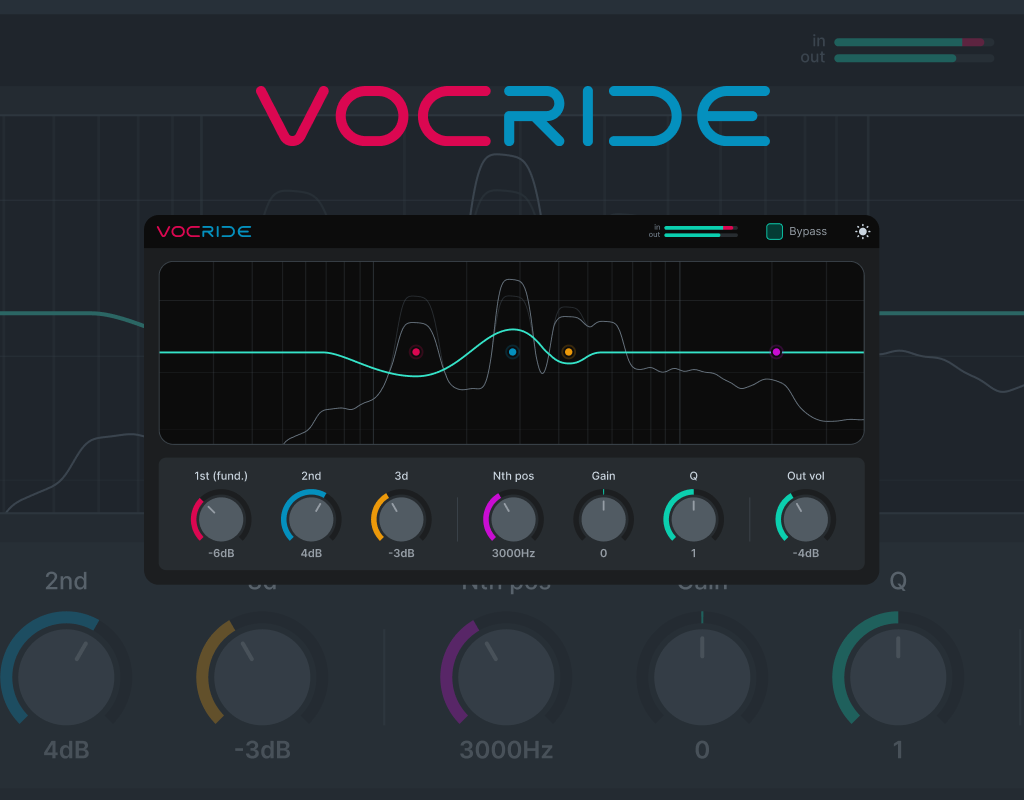
VocRide is a pitch-tracking harmonic EQ that shapes tone and texture by following the vocal fundamental rather than using fixed EQ bands. It tracks the pitch the singer is actually singing and lets you boost/reduce the fundamental and its harmonics at that position, so you can add weight and clarity without manually chasing individual notes.
- Pitch-tracking design that performs EQ processing by following the vocal fundamental rather than fixed EQ bands
- Two main controls to boost/reduce the fundamental and the 2nd harmonic
- A 3rd-harmonic control and a parametric Nth-harmonic band
- Input/output frequency analysis, level meters, and output volume
- Improved harmonic detection and frequency display
2. How to Install and Download Sibalance / VocRide
Access each product’s Ko-fi giveaway page and enter 0 in the “How much would you like to pay?” amount field to download it for free. Unzip the downloaded file and place it in the appropriate plugin folder below depending on your format.
Windows
- VST folder: C:\Program Files\VSTPlugins
- VST3 folder: C:\Program Files\Common Files\VST3
macOS
- VST folder: Macintosh HD/Library/Audio/Plug-ins/VST/
- VST3 folder: Macintosh HD/Library/Audio/Plug-ins/VST3/
- AU folder: Macintosh HD/Library/Audio/Plug-ins/Components/
nClear Sibalance
nClear VocRide
That’s the free giveaway information for Sibalance and VocRide.