

Rob Clouth has made Noise Canvas, his spectral sound design application, available as a free download.
In this article we cover what Noise Canvas is, its main features, and how to download and install it.
1. What Is Rob Clouth’s Noise Canvas?
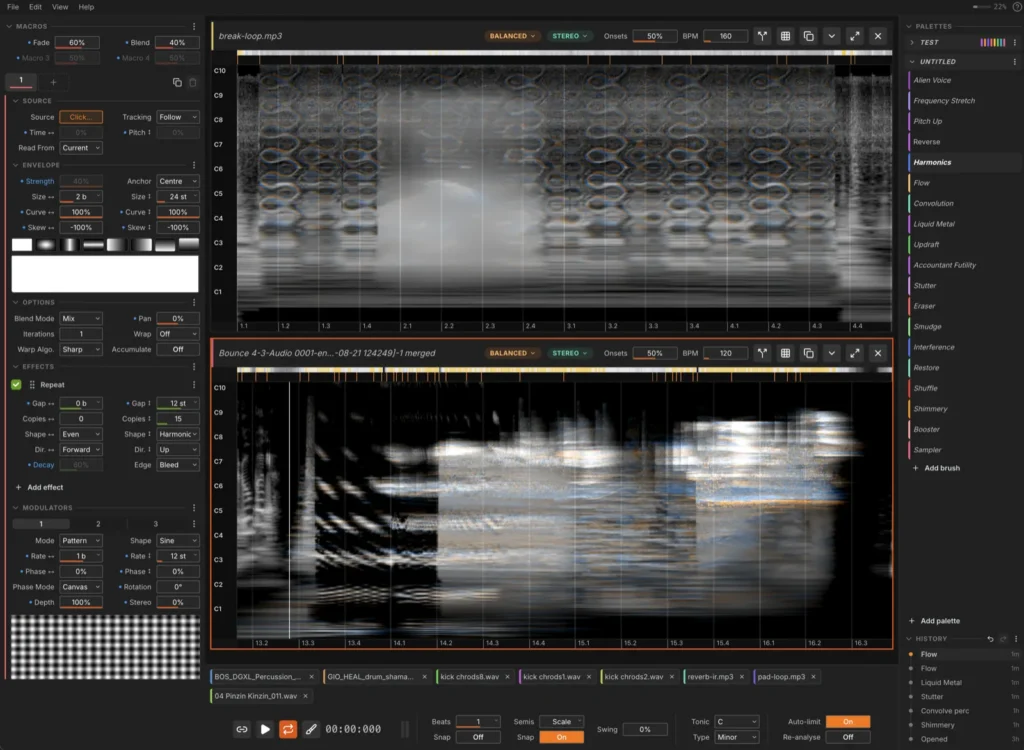
Noise Canvas is a spectral sound design tool that loads an audio file, displays it as a spectrogram, and lets you paint transformations and effects directly onto the sound with brushes. Developer Rob Clouth describes it as “something like Photoshop for sound”, building on the foundation of projects such as Metasynth while adding proper phase handling, a modern UI and better DAW integration. The entire tool is designed around a drawing metaphor of brushes, palettes and strokes, and it supports pen tablets so you can sketch with a stylus.
Key Features
- Loads and analyzes audio files, converting them into a spectrogram canvas
- Brush panel organized into categories such as Restoration, Space, Mixing and Mangle – add the brushes you want to your palette and use them from there
- Versatile brushes including Gain, Octave Up / Down, Smudge, Noise Gate and Reverse
- Uses the Constant Q Transform (CQT) instead of an FFT to generate a more musically accurate canvas
- The spectrogram’s horizontal axis is time in beats and the vertical axis is pitch in semitones; you can load any sample onto the same grid and paint accurate pitch shifts and time-based transformations
- Brightness represents amplitude and color represents the stereo image (orange = left, blue = right, gray = evenly centered)
- 2D modulation system that allows independent modulation per frequency
- Source separation that isolates elements inside a sample so you can process them individually and recombine them afterwards
- Effects such as Evolve that grow generic sounds organically
- Undo and branching system so you never lose the material you have already worked on, plus edit history export
- Tooltips on every parameter, a walkthrough on first launch, and a “?” function that lists every part of the window
- All effects are implemented as shaders, so processing runs on the GPU instead of the CPU
- Works as an external sample editor for your DAW (in Logic Pro, set it under Settings → Audio → File Editor)
- A Live 12 Extension (beta) is available that embeds the editor inside Ableton Live 12
2. How to Download and Install Noise Canvas
Noise Canvas is distributed on GitHub, where you can simply select your platform (Mac, Windows and others) and download and install it. Note that it is a standalone application rather than a VST/AU plugin.
The interface is laid out in three columns: the right sidebar holds the brush list, the left panel holds the settings for the currently selected brush, and the center is the canvas you paint on. The basic workflow is as follows.
- Load a sound with File → Open (Cmd/Ctrl+O) or by drag and drop, then set the BPM in the file header to match the tempo of your material
- Click “Add palette” at the bottom of the right sidebar to add a bundled palette, then click a brush inside it to select it (by default only an empty brush is loaded, and it has no effect on the sound as-is)
- Use Envelope in the left panel to set the brush size, which determines the area it affects
- Left-drag over the spectrogram to paint (a single click stamps one brush)
- Save from File in the top left
To change the playback start position or set a loop range, use the time legend (the strip of time markings) below the spectrogram. Clicking on the spectrogram itself will apply the brush, so be careful.
That covers the free release of Rob Clouth’s Noise Canvas. If drawing on a spectrogram sounds more inspiring than turning knobs, it is well worth grabbing while it is free.