

iZotope’s mastering plugin Ozone 12 Elements is being given away for free as a bonus for registering for a free online event hosted by Mastering.com.
This article covers how to get Ozone 12 Elements, along with an overview of the plugin.
What Is iZotope Ozone 12 Elements?
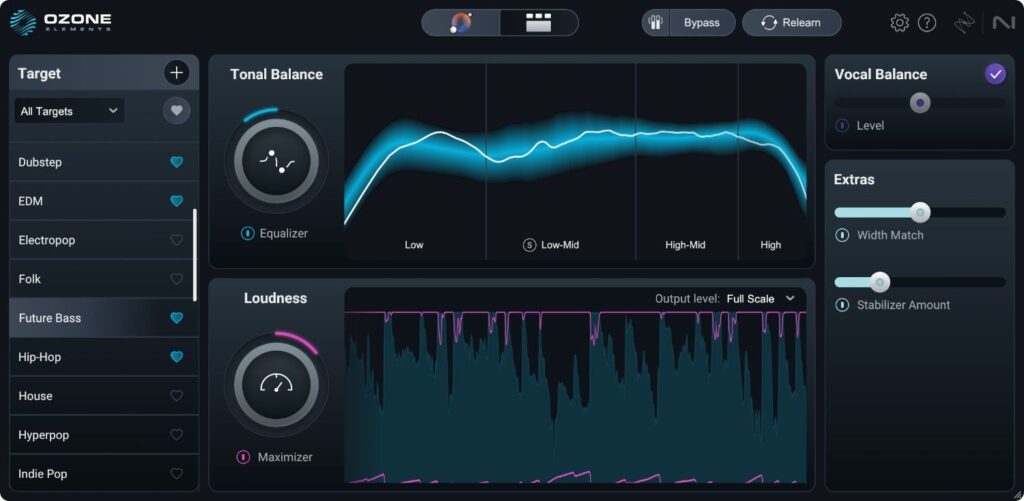
Ozone 12 Elements is an entry-level mastering plugin that uses an AI-powered Master Assistant to build a processing chain tailored to your track in seconds. Everyone who registers for the free three-day online event “Fix-The-Mix Challenge feat. iZotope”, hosted by Mastering.com in partnership with iZotope (held on Zoom, starting Nov 4 at 2:00 JST / Nov 3 at 17:00 UTC), receives Ozone 12 Elements for free. The countdown on the event page runs until the start time, so registering early is recommended.
Key Features
- AI-powered Master Assistant (Auto-Master / Custom flow)
- In the Custom flow, you can guide the Master Assistant by specifying the genre, loudness target and more
- Technology that matches tonal balance, stereo width and impact to hit songs or reference tracks
- Assistive Vocal Balance, which keeps the vocals in your mix sitting well
- Assistant View, which lets you adjust the suggested processing to your taste
- Metering with Tonal Balance curves
- Supported formats: AAX / AU / VST3 (64-bit only)
- Supported OS: macOS Sonoma (14.8) / Sequoia (15.8) / Tahoe (26.x) (Intel / Apple Silicon), Windows 10 (22H2) / Windows 11 (24H2)
How to Get Ozone 12 Elements for Free
Go to the Mastering.com event page, click “SAVE MY SPOT” and enter your email address to register for the free “Fix-The-Mix Challenge feat. iZotope”. Everyone who registers receives Ozone 12 Elements for free. The other sign-up prompts, such as adding the event to your calendar, are optional. Claim your copy from the email titled “Ozone 12 Elements Code”. Once you have the code, register and activate it with iZotope.