

• Skip to main content
  • Skip to primary sidebar
  • Skip to footer
  • HOME
  • Deals
    • DAW Deals
    • Plugin Deals
  • DAW
  • Plugins
    • Effects
      • Equalizer
      • Compressor
      • Mastering
      • Multi Effects
    • Instruments
      • Synthesizers
      • Bass
      • Drums
  • Samples
  • STORES
  • Distribution
daw-plugins-top-2023

DAWPLUGINS.net

Music Production Information Site

plugin-boutique free banar
You are here: Home / VST Plugins / Effect Plugins (VST Effects) / Free! Phantom Sounds “Intermod” — Self-Intermodulation Effect for Otherworldly Sound Design

Free! Phantom Sounds “Intermod” — Self-Intermodulation Effect for Otherworldly Sound Design

intermod
This post contains affiliate links. plugin-boutique free banar

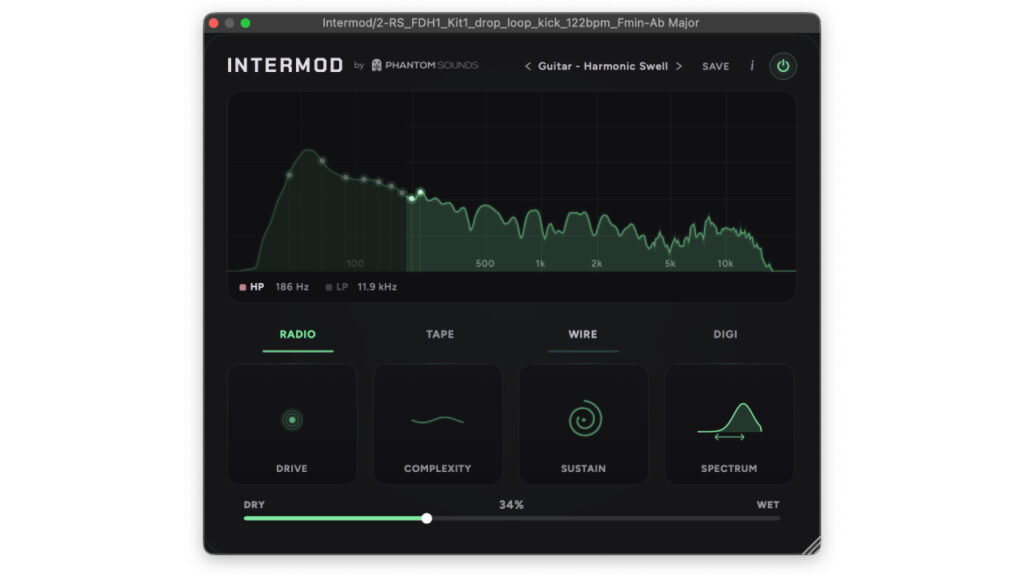
Phantom Sounds is giving away Intermod, a self-intermodulation effect plugin that generates “phantom frequencies” derived entirely from the input signal itself. Unlike ring modulators that rely on an external carrier, or distortion units that generate harmonics, Intermod multiplies the signal’s own components together to produce new frequencies — which means every input creates a uniquely characterful output profile.

Following up on Phantom Sounds’ previous freebies Orbit and 56K, Intermod is a sound-design-oriented tool that can conjure otherworldly tones and sustained, pulsing tails from drums, guitar, piano, synth, vocals, and more.

What is Phantom Sounds “Intermod”?

Key Features

  • Self-intermodulation engine that multiplies the strongest components of the signal against each other to generate phantom frequencies.
  • Four source modes — Radio, Tape, Wire, and Digital — covering everything from warm analog-style decay to harsh digital destruction.
  • Four main parameters: Drive, Complexity, Sustain, and Spectrum.
  • Built-in real-time spectrum visualizer.
  • HP and LP filters for additional tone shaping.
  • Dry / Wet slider for effect-amount control.
  • 33 factory presets organized by instrument category (Bass, Drums, Guitar, Piano, Synth, Vocals, SFX, Strings, etc.).
  • Formats: VST3 / AU / AAX.
  • OS support: Windows / macOS.

How to Download & Install Intermod

  1. Visit the Phantom Sounds free downloads page.
  2. Enter your email address on the page.
  3. Check your inbox for the download link email (covers Intermod and other free Phantom Sounds plugins).
  4. Download and install Intermod from the email link. If you have previously registered, an email has already been sent to you.

➡ Get Intermod (Official)

Primary Sidebar

More to See

[Free] DsgDnB “vitOTTx” Giveaway! An Adjustable 3-Band OTT Compressor Plugin Derived from Vital

June 14, 2026 By DAWPlugins.net

Aurora DSP “GRIM3” Free – Front-End Boost/Overdrive Plugin That Tightens Up Your Tone

June 14, 2026 By DAWPlugins.net

WA Production “Mutant Delay” Free for a Limited Time — A Ducking Delay That Stays Out of Your Dry Signal’s Way

June 14, 2026 By DAWPlugins.net

Softube Sale Roundup: Latest Deals and Product Guide

June 14, 2026 By DAWPlugins.net

Tags

iZotope

Footer

Text Widget

This is an example of a text widget which can be used to describe a particular service. You can also use other widgets in this location.

Examples of widgets that can be placed here in the footer are a calendar, latest tweets, recent comments, recent posts, search form, tag cloud or more.

Sample Link.

Recent

  • [Free] NEXTLIGHT “Next OXX” — An OTT-Style Multiband Compressor for the Modern Music Scene (Windows Only)
  • Aurora DSP “GRIM3” Free – Front-End Boost/Overdrive Plugin That Tightens Up Your Tone
  • WA Production “Mutant Delay” Free for a Limited Time — A Ducking Delay That Stays Out of Your Dry Signal’s Way
  • Piruz Labs “Thrilled Groove” Free Download! 80s Horror-Funk Software Synth
  • [Free] DsgDnB “vitOTTx” Giveaway! An Adjustable 3-Band OTT Compressor Plugin Derived from Vital

Search

Tags

iZotope

Copyright © 2026 · Magazine Pro on Genesis Framework · WordPress · Log in