

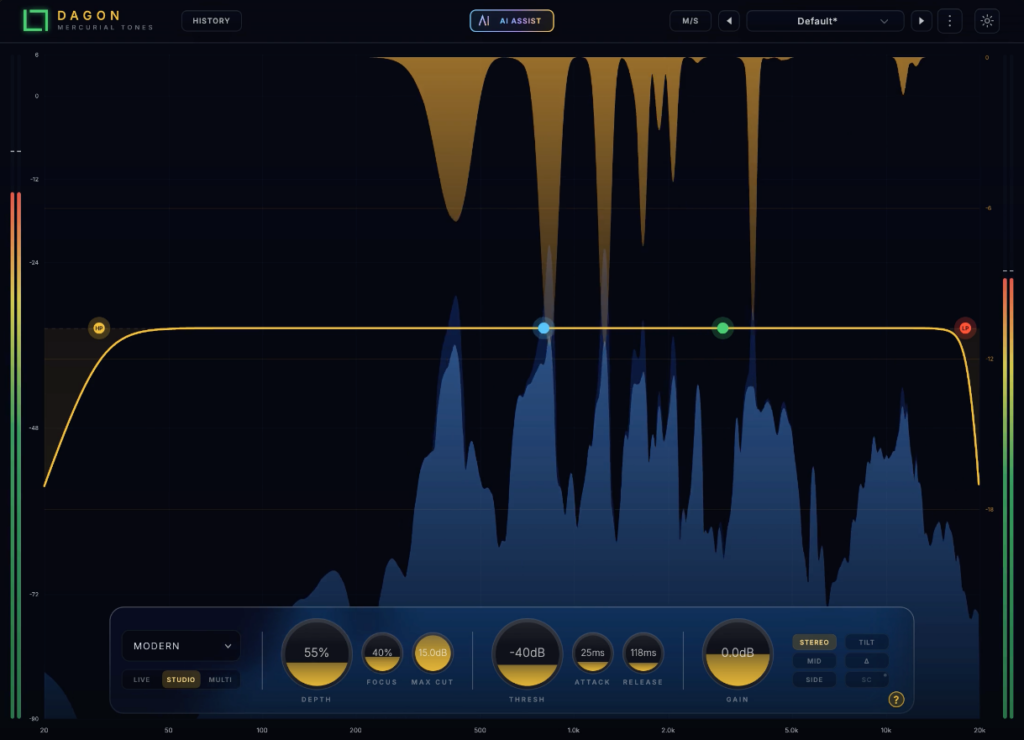
Mercurial Tones’ resonance control plugin Dagon has been updated to version 2, and it is available for free right now!
In this article, we cover the Dagon 2 giveaway details and an overview of the plugin.
What Is Mercurial Tones Dagon?
Note: the video above is for version 1.
Dagon is a resonance control plugin that detects resonances, harsh frequency bands and level spikes in context and suppresses them automatically, without squashing the whole signal. It offers five suppression modes.
Version 2 adds “AI Assist,” which automatically finds an optimal starting point for your settings, a “History” view that visualizes where Dagon is working, Mid/Side processing, output gain and faster timing. Existing projects and presets load with the same sound as before.
Key Features
- Detects and suppresses resonances, harsh bands and level spikes in context
- Five suppression modes (Resonance / Soft / Perceptual / Volume / Smart)
- Smart mode detects relative spectral prominence, and the main threshold works as an Amount control
- The Focus control adjusts processing selectivity (lower values target broader resonance bands, higher values target narrower ones)
- Attack and Release control response and recovery speed (v2 supports fast timing from a few milliseconds, with no added latency)
- [New in v2] AI Assist: listens to your track for a few seconds, identifies drums, bass, keys, synth, vocals or a full mix, and automatically sets nodes, Depth and Threshold (processing runs inside the plugin, and the result can be undone with a single undo)
- [New in v2] History view: shows the time-averaged amount of cut and a timeline of the last 10 seconds, and lists the 3 spots it processes most by frequency and note name (click to place a node)
- [New in v2] Mid/Side processing (Stereo / Mid / Side)
- [New in v2] Output gain (±12 dB) for level-matched A/B comparison
- Quality modes: Live (zero latency) / Studio (linear phase)
- VST3 / AU formats, supports macOS and Windows
How to Download and Install Dagon
Complete the free checkout on the official shop page, then download and install “Mercurial Tones Hub” from the email you receive. Launch it and log in with the email address you used at checkout to install and activate the product. The Hub automatically installs the plugin into the appropriate plugin folder.
If you already own Dagon, you can open Mercurial Tones Hub and update to version 2.0.
That wraps up the Dagon giveaway information.