

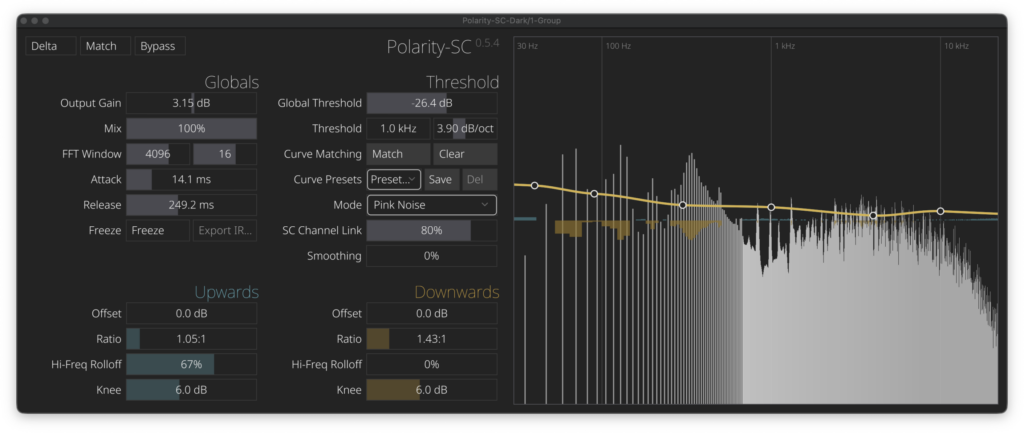
Polarity Music’s spectral compressor plugin “Polarity-SC-Dark” is now available as a free download! In this article, we share the distribution info and overview of Polarity-SC-Dark — hope you find it useful.
1. What is Polarity Music “Polarity-SC-Dark”?
Polarity-SC-Dark is an FFT spectral compressor plugin built by Polarity on top of Robbert van der Helm’s open-source Spectral Compressor, adding a dark-themed UI and a wide range of feature extensions. Its standout trait is the ability to apply upward and downward compression simultaneously across thousands of narrow bands in the frequency domain. It also offers pink-noise shaping for spectral contouring, sidechain-based spectral matching, Freeze to lock the curve, IR export, and more. It is distributed entirely free of charge for Windows, macOS, and Linux in VST3 and CLAP formats.
Key Features
- FFT spectral compression: serious spectral processing performed per bin across thousands of narrow bands
- Simultaneous upward + downward processing: independent control of offset, ratio, knee, and high-frequency roll-off
- Built-in threshold curve presets for mastering, drums, bass, pads, leads, equal-loudness balancing, and more
- User presets: save, reload, and delete your own threshold curves
- Curve matching: convert a measured spectrum into an editable threshold curve
- Custom threshold curves: fine-tune behavior per band with center, slope, and curve controls
- GR smoothing: softens abrupt per-bin gain reduction in the time domain for a more natural sound
- Pink noise mode: uses a spectral curve as an internal reference to push material toward a pink-noise slope
- Frequency guides: overlays frequency labels and guide lines on the analyzer
- Sidechain-based spectral matching, Freeze for curve locking, and IR export support
- Supported formats: VST3, CLAP
2. How to Download and Install Polarity-SC-Dark
Go to the official Polarity Productions site, hit the “Download” button to grab the ZIP for your OS, unzip it, and copy the .vst3 (etc.) into the plugin folder for your OS. As noted in the README, on macOS you’ll first need to bypass Gatekeeper at your own risk.
Windows
- VST folder: C:\Program Files\VSTPlugins
- VST3 folder: C:\Program Files\Common Files\VST3
macOS
- VST folder: Macintosh HD/Library/Audio/Plug-ins/VST/
- VST3 folder: Macintosh HD/Library/Audio/Plug-ins/VST3/
- AU folder: Macintosh HD/Library/Audio/Plug-ins/Components/
That’s the rundown on the free Polarity-SC-Dark release. Grab it while it’s still available!