

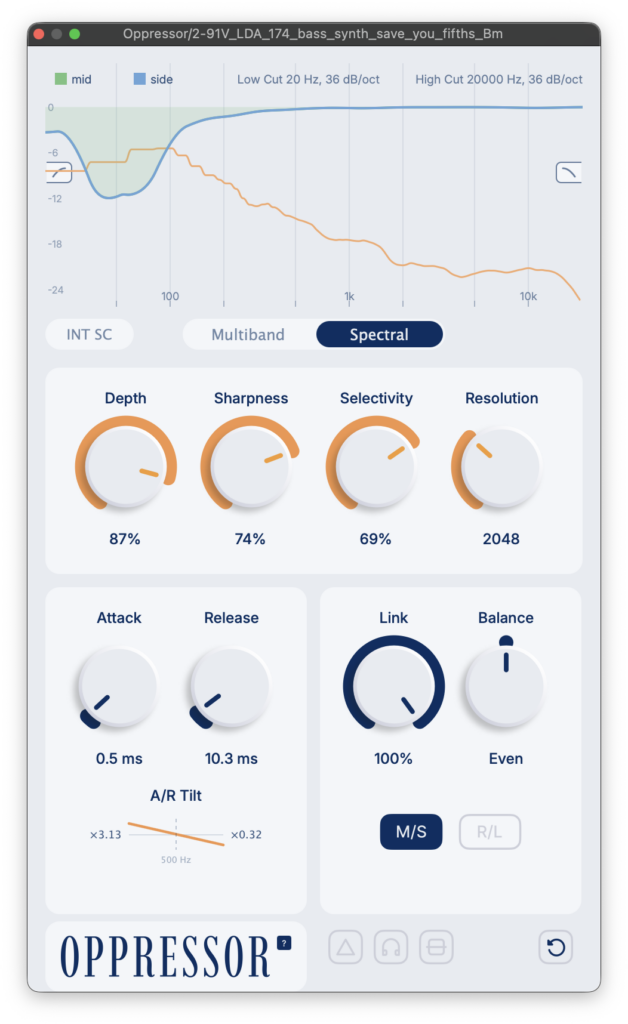
Rue Blose’s multiband and spectral dual-mode unmasking plugin “Oppressor” is now available as a free download! This article covers Oppressor’s download details and an overview of what it does.
1. What is Rue Blose’s Oppressor?
Oppressor is a sidechain compressor / spectral unmasker that ducks only the frequencies clashing between two tracks, carving out space for another track without pulling down the whole signal. It’s suited to tasks like making room for a kick inside an 808, pushing a guitar back behind a lead vocal, or taming bus resonances. With the internal sidechain enabled, it can also be used as a dynamic EQ, a de-esser, or a general harsh-frequency suppressor.
Key Features
- Multiband mode: 32 dynamic bell filters logarithmically spaced from 20Hz to 20kHz, arranged in a series cascade. When no compression is occurring, the signal passes through with zero-sample latency and bit-perfect quality.
- Smooth/Curve controls let you adjust the number of active bands (32-8) and their spacing (from even distribution to musically weighted).
- Spectral mode: uses a 256-point STFT for narrow-band, surgical cuts. Includes Depth, Sharpness, Selectivity, and Resolution controls, with Selectivity letting you target only the most prominent resonant peaks.
- FFT size can be selected from 1024 to 8192 samples, with latency reported to the DAW and compensated sample-accurately.
- A/R Tilt stretches or compresses attack/release times per band around a 500Hz pivot point (up to 4x slower in the low end, down to 0.25x in the high end).
- Supports independent L/R and M/S processing, with adjustable Link (0-100%) and Balance (-100% to +100%).
- An interactive sidechain EQ (6-72dB/oct) lets you drag low-cut and high-cut points directly on the spectrum display.
- Includes internal sidechain switching, Delta/Listen monitoring, and latency-compensated bypass.
2. How to Download and Install Oppressor
⚠ Before You Download
Oppressor is the first VST plugin developer Rue Blose has completed, so it may contain errors or bugs. Bug reports to the developer are welcomed. On macOS, the plugin may be blocked by Gatekeeper and fail to load in your DAW. The download includes an “Install Oppressor.command” file that removes the quarantine flag and installs the plugin — just double-click it, no need to type any commands manually.
Oppressor can be downloaded simply by entering $0 as the price and providing your email address. Once downloaded, move the plugin files into a folder your DAW can load plugins from.
Windows (Plugin)
- VST folder: C:\Program Files\VSTPlugins
- VST3 folder: C:\Program Files\Common Files\VST3
macOS (Plugin)
- VST folder: Macintosh HD/Library/Audio/Plug-ins/VST/
- VST3 folder: Macintosh HD/Library/Audio/Plug-ins/VST3/
- AU folder: Macintosh HD/Library/Audio/Plug-ins/Components/
Summary
That covers the free giveaway of Rue Blose’s Oppressor, a multiband and spectral dual-mode unmasking plugin.