

nClear Audio has released a free bus compressor plugin called Gluon.
In this article, we’ll introduce Gluon’s download info and an overview of what it can do.
1. What Is nClear Audio “Gluon”?
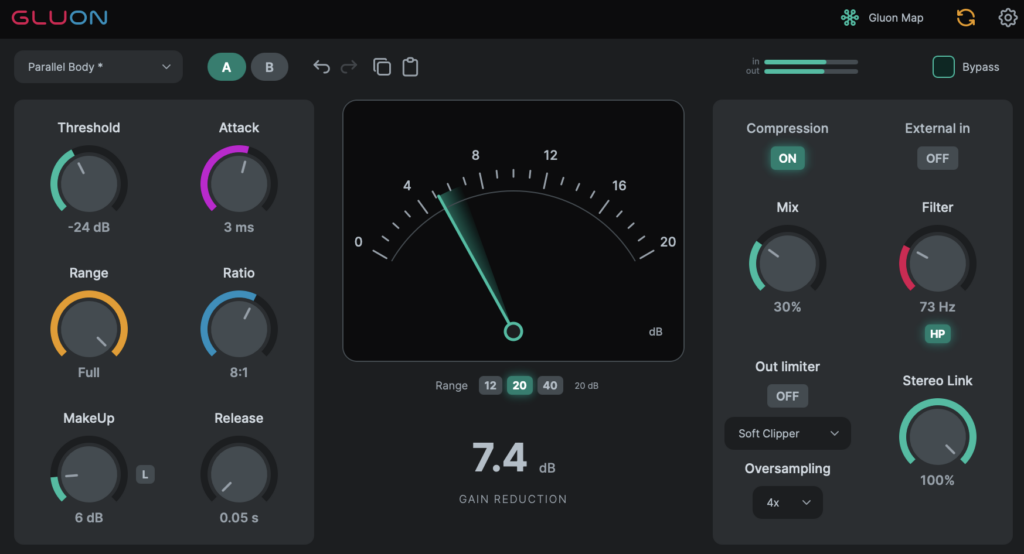
Gluon is a bus compressor that reinterprets the classic British console bus compressor, built around “Gluon Map,” a single screen that lets you view and control every Gluon instance in your session at once. It’s great for gluing a mix bus together, adding punch to a drum bus, or adding density with parallel compression — and it’s completely free to use, with no activation required and no feature limitations.
Key Features
- Threshold, Makeup, Attack, Ratio, and Release controls, plus a Range control that caps the maximum gain reduction and a Mix control for parallel compression
- Attack from 0.01 to 60 ms, Ratio from 1.5:1 to 20:1, and Release from 0.05 to 2 seconds (with an Auto mode), covering everything from subtle glue to heavy squashing
- Gluon Map: view every Gluon instance in the same DAW session at once — complete with track name, input/output meters, settings, and bypass state — and control them all without opening each plugin window
- Global Control: adjust settings across multiple instances relatively, all at once (e.g. lower every threshold by 1 dB)
- MakeUp Learn: measures the level difference from about 10 seconds of playback so you can do a level-matched comparison
- An output stage with Hard Clip, Soft Clip, and Limiter modes (2x/4x/8x oversampling)
- External sidechain input, HP/BP/LP detector filters, and stereo link
- Factory and user presets, A/B comparison, undo/redo, and copy & paste
- Dark/light themes and 0.75x–2x UI scaling
2. How to Download & Install Gluon
You can download and install Gluon by entering your email address under “Download Gluon” on the official product page.
That’s the free giveaway info for Gluon.