

FX-Mechanics’ spatial granular plugin Bloom is currently available as a free download!
In this article, we cover the giveaway details and give you an overview of what Bloom can do.
We hope you find it useful.
1. What Is FX-Mechanics “Bloom”?
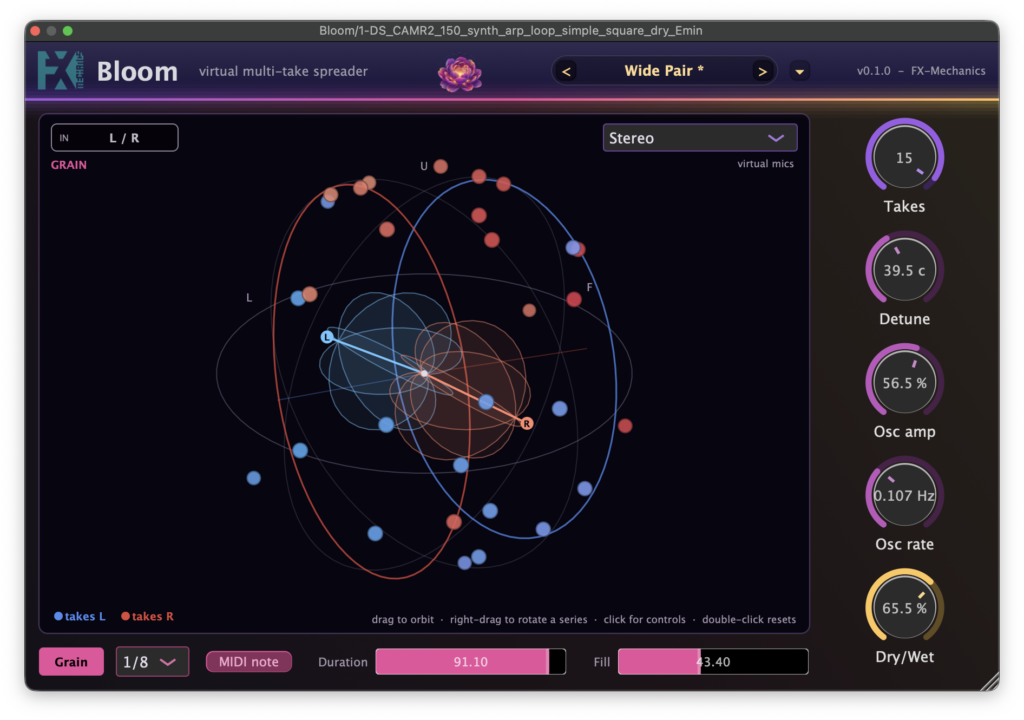
Bloom is a spatial granular plugin that transforms a single instrument take into multiple virtual takes, runs each one through an independent pitch shifter, and places them on a sphere surrounding the listener. The generated takes form two independent series — series L (blue) and series R (red) — each with its own azimuth, elevation, and spread.
The output can be rendered as stereo through a virtual microphone pair with selectable directivity patterns, or as a first- to third-order Ambisonics stream (AmbiX, ACN/SN3D). In Grain mode, each take captures slices of the incoming audio in round-robin fashion and loops them, and the grain steps can even be driven by held MIDI notes — play a chord and the cloud of takes turns into a pitch-locked oscillator bank voicing that chord.
The GUI features a 3D view you can rotate by dragging, with the two series displayed as color-coded discs and their spread caps shown as outlines.
Key Features
- Takes: sets the number of additional takes per series from 1–16 (up to 32 virtual takes in total). Each take is scaled by 1/√N, so the overall level stays constant no matter how dense you go
- Azimuth / Elevation / Spread: edited per series in the 3D view. By default, series L sits at 90 degrees (the listener’s left), series R at -90 degrees, and both spreads at 40%
- Dry/Wet: equal-power balance between the direct sound and the takes (0% = direct sound only, 100% = takes only)
- Detune: each take’s detune is spread across a range of ±a, adjustable from 0–100 cents
- Osc amp / Osc rate: each take swings sinusoidally around its average position, with the takes’ phases offset from one another
- Grain: Grain mode. Takes capture grains in round-robin at steps of 1/32 to 1/4 note of the host tempo. Equal-power half-sine crossfades produce seamless loops, and it can be treated as an automatable parameter
- Duration: sets the looped grain length as a percentage of the step (0–100%)
- Fill: sets how much of each grain is played back, from 0–100%. Below 100% you get a clearly audible grain train
- MIDI note: generates the grain steps from held MIDI notes instead of tempo-synced note values
- Mic L / Mic R: virtual microphone pair for stereo mode. First-order directivity (omni to figure-8), azimuth, and elevation can be set per mic
- Input routing switchable between L/R (true stereo), L, R, and L+R (mono)
Samples used in the video | Splice Sounds:
- DS_CAMR2_150_synth_arp_loop_simple_square_dry_Emin
- DS_DSP2_150_drum_full_loop_experiment
2. How to Download and Install Bloom
Bloom is easy to download and install from its GitHub releases page.
Summary
That wraps up the free giveaway of FX-Mechanics “Bloom” — a spatial granular plugin that multiplies a single take into up to 32 virtual takes around the listener.
Grab it for free from the GitHub releases page below.