

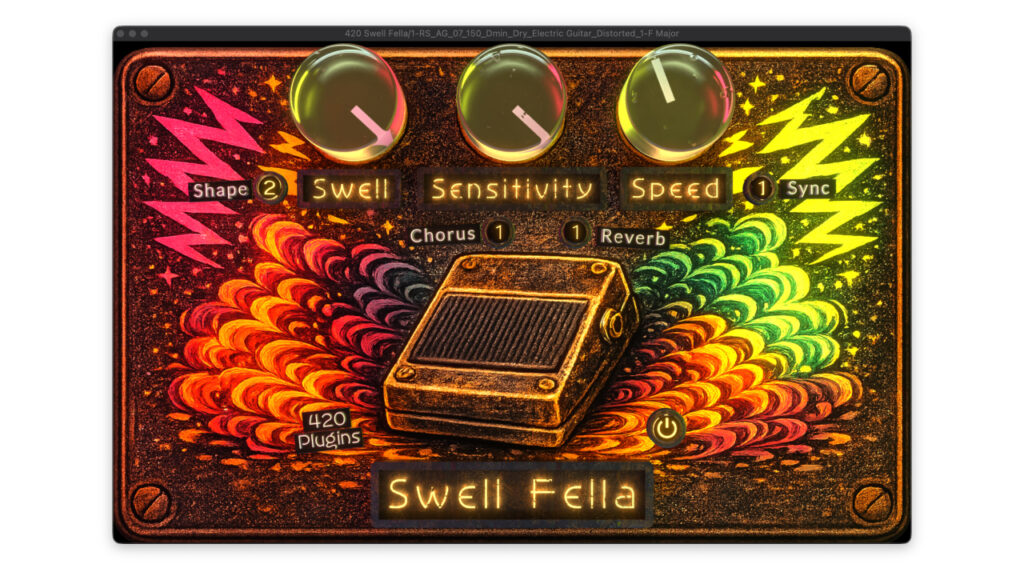
Swell Fella by 420 Plugins is a free auto swell effect plugin that transforms sharp, percussive attacks into smooth, musical volume swells. Whether you want to soften the pick attack on a guitar, transform a plucked instrument into an ambient texture, or add gentle movement to pads and drones, Swell Fella handles it in one step. It also comes bundled with a second free plugin — Opti Comp, a smooth, musical compressor for vocals, bass, and bus processing.
Key Features
Auto swell effect: Automatically converts hard transient attacks into smooth, gradual volume swells. Works in real time, reacting to the dynamics of your input signal without any manual automation needed.
Session tempo sync: The swell rate can be locked to your project’s BPM, allowing you to generate rhythmically precise swells that groove with the rest of your music. Ideal for creating pulsing, rhythmic ambient textures.
Input transient detection: Swell Fella can also respond to the envelope of the input signal directly, making each note trigger its own individual swell. This mode is ideal for live guitar performance, where each picked note gets its own smooth fade-in.
Versatile applications: Soften guitar or piano picking attacks, convert plucked instruments (guitar, harp, mandolin) into pad-like ambient textures, add smooth motion and breath to static pads and drones, or create gentle swelling leads from any sustained sound.
Minimal interface with glass knobs: The streamlined UI makes Swell Fella easy to use immediately. The glass knob design is both intuitive and visually clean, keeping focus on the sound rather than the controls.
Formats: VST3, AU, and AAX. Compatible with macOS and Windows.
Bonus Plugin: Opti Comp
Downloading Swell Fella also gives you access to Opti Comp, a smooth and musical compressor from 420 Plugins. Opti Comp is designed to work transparently across a wide range of sources including vocals, bass, and full mixes. The download email contains links to both plugins together.
How to Download Swell Fella & Opti Comp (Step by Step)
1. Visit the official 420 Plugins website at 420plugins.com
2. Click “Get Free Installers”
3. Enter your email address and submit
4. Check your inbox for an email containing download links for both Swell Fella and Opti Comp
5. Download and run the installer for your operating system (macOS or Windows)
6. After installation, rescan plugins in your DAW — both plugins will appear in your effects list
About 420 Plugins
420 Plugins is an independent plugin developer focused on creating beautifully designed, free-to-use audio tools for music producers and sound designers. Their philosophy centers on minimal interfaces, musical behavior, and making professional-quality processing accessible to everyone.