


• Skip to main content
  • Skip to primary sidebar
  • Skip to footer
  • HOME
  • Deals
    • DAW Deals
    • Plugin Deals
  • DAW
  • Plugins
    • Effects
      • Equalizer
      • Compressor
      • Mastering
      • Multi Effects
    • Instruments
      • Synthesizers
      • Bass
      • Drums
  • Samples
  • STORES
  • Distribution
daw-plugins-top-2023

DAWPLUGINS.net

Music Production Information Site

plugin-boutique free banar
You are here: Home / VST Plugins / Instrument Plugins (VST Instruments) / Synthesizer Plugins (VST Synths) / Free: MEY Audio Engineering “Robbie” 16-Voice Virtual Analog Synth with 613 Presets

Free: MEY Audio Engineering “Robbie” 16-Voice Virtual Analog Synth with 613 Presets

This post contains affiliate links.
Plugin Deals ListPlugin Deals ListUpdated daily · Every deal on one page →Plugin Deals FinderPlugin Deals FinderUpdated daily · Sort & filter every deal →

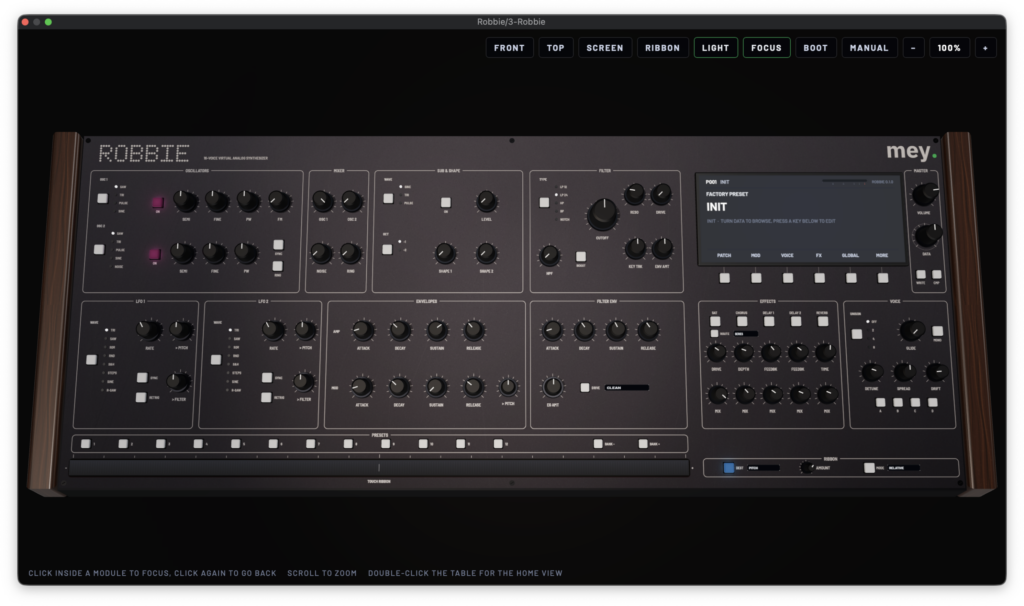
MEY Audio Engineering’s virtual analog synthesizer “Robbie” is available as a free download for a limited time, and the offer is ending soon. This article covers the download details and an overview of Robbie.

Get Robbie (Official Site)

What Is MEY Audio Engineering “Robbie”?

Robbie is a 16-voice virtual analog synthesizer with two oscillators, a sub oscillator, and a multimode filter. Every feature, including all 613 presets, is free to use, and no account registration or license key is required.

Key Features

  • 16 voices (with mono, legato, and glide support)
  • Two oscillators (saw, triangle, pulse, and sine waves; Oscillator 2 also offers noise) plus a sub oscillator, and a SHAPE control that continuously morphs the waveform
  • Hard sync, ring modulation, and FM from Oscillator 2
  • Multimode filter with 12 dB/24 dB low-pass, high-pass, band-pass, and notch modes (self-oscillation, key tracking, and 4 drive types), plus a high-pass filter with resonance
  • Three envelopes, two LFOs, Poly Mod, and a modulation matrix
  • Saturation, a chorus that doubles as a flanger/phaser, two delays (clean or BBD), and reverb
  • Play 4 parts at once on separate MIDI channels
  • 613 included presets
  • MIDI Learn support, with the manual built into the plugin
  • Supported formats: macOS (VST3/AU/Standalone) and Windows (VST3/Standalone)

Demo video sounds: Splice Sounds

How to Download and Install Robbie

Click “DOWNLOAD NOW · MACOS” or “DOWNLOAD NOW · WINDOWS” on the official page to download and install Robbie easily.

Download Robbie (Official Site)

Those were the details of the Robbie giveaway. Be sure to grab it before the free offer ends.

Primary Sidebar

More to See

Xfer Records SHRUB Free Download: Mini Serum Wavetable Synth for M-VAVE FM-1 (VST3 Beta)

November 15, 2026 By DAWPlugins.net

Sonic Academy JU-60 Free for a Limited Time: Juno-60 Chorus Plugin with 3 Modes

November 15, 2026 By DAWPlugins.net

Dyad: Solo Kalimba by In Session Audio FREE for a Limited Time – Kontakt Kalimba with Dual Pattern Players

November 15, 2026 By DAWPlugins.net

AudioFB All Good Free for a Limited Time: Multi-Effect Plugin with 10 Scenes, 30 Effects and 3 Faders (VST3/AU/AAX)

November 15, 2026 By DAWPlugins.net

Tags

iZotope

Footer

Text Widget

This is an example of a text widget which can be used to describe a particular service. You can also use other widgets in this location.

Examples of widgets that can be placed here in the footer are a calendar, latest tweets, recent comments, recent posts, search form, tag cloud or more.

Sample Link.

Recent

  • Splice Sounds Holiday Deal: Creator Plan 50% Off ($120/Year) & Splice INSTRUMENT $75
  • Xfer Records SHRUB Free Download: Mini Serum Wavetable Synth for M-VAVE FM-1 (VST3 Beta)
  • Sonic Academy JU-60 Free for a Limited Time: Juno-60 Chorus Plugin with 3 Modes
  • Dyad: Solo Kalimba by In Session Audio FREE for a Limited Time – Kontakt Kalimba with Dual Pattern Players
  • AudioFB All Good Free for a Limited Time: Multi-Effect Plugin with 10 Scenes, 30 Effects and 3 Faders (VST3/AU/AAX)

Search

Tags

iZotope

Copyright © 2026 · Magazine Pro on Genesis Framework · WordPress · Log in