

JAS-I is giving away Khorlo, a physical modeling synthesizer plugin, for free.
In this article we cover the giveaway details and an overview of what Khorlo actually is.
1. What Is JAS-I “Khorlo”?
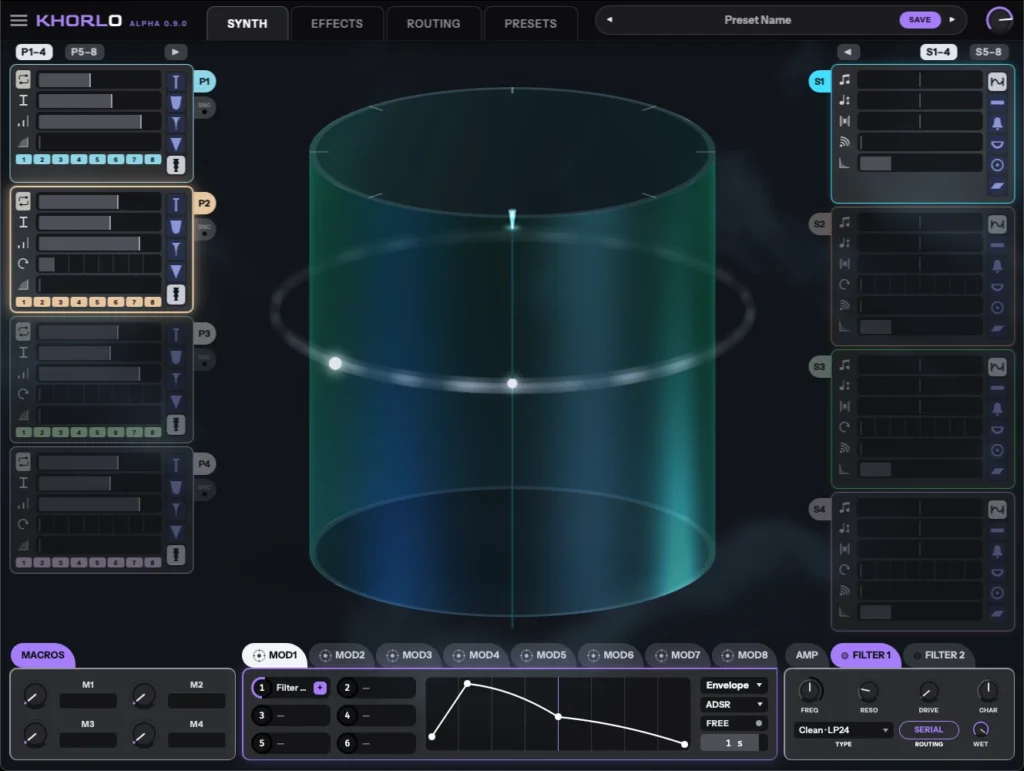
Khorlo is a plucked synthesizer built around an upright cylinder, with eight sounding objects and eight pluckers. Eight sounding objects stand on the surface of the cylinder, each at its own angle, and a ring of eight pluckers surrounds them at a fixed height. The cylinder itself does not rotate: instead, the contact point belonging to each plucker travels around the cylinder at the rate you set, and every time that contact point crosses a sounding object, the object is plucked. Rhythm is not something you program — it emerges from eight rates colliding with eight positions, so pluckers running at different rates drift apart and meet again in cycles of their own.
These eight sounding objects are called “String” in the plugin, but strings are not the only thing you can sound. Each one can be set to one of six types — Beam (bar), Bell, Bowl (singing bowl), Membrane (drum head), Plate (metal plate) or String — and there is no requirement for all eight to be the same type, so a patch that mixes strings, bells and drum heads is entirely possible.
Khorlo is currently released as an open beta.
Key Features
- Eight sounding objects (called “Strings”) standing around an upright cylinder, surrounded by a ring of eight pluckers
- Each String is modeled as a Karplus–Strong delay line with its own pitch, damping and physical properties
- “Position” (where an object stands around the cylinder) decides at which point in the loop it gets plucked
- The pluckers form a fixed-height ring, and each one has its own “Rate” for how fast its contact point orbits — this is what generates the polyrhythms
- The Exciter (how the object is grabbed at the moment of contact) determines most of the character of the sound
- Every voice (each key you hold) gets its own dedicated set of eight pluckers and eight sounding objects
- The icon on the outer edge of each slot card lets you choose what that object physically is, from six object types (always exactly one — never a blend — and the eight do not have to be the same type)
- String: a plucked string. This is the default, and patches made before the object feature was added are effectively eight of these in a row
- Beam: a struck bar (glockenspiel, marimba). Six partials spaced like those of a real uniform bar, with the top of the series stretching far away from the pitch
- Bell: eight partials tuned the way bell founders tune them (hum, prime, tierce, quint, nominal). Because the tierce is a minor third, it rings faintly minor even when played in a major key
- Bowl: a singing bowl, with five partials stretched even wider than the Beam
- Membrane: a drum head, whose partials do not form a harmonic series, so it has no definite pitch
- Plate: deliberately non-physical and dense. Eight partials packed close together, for when you want metallic texture rather than an instrument
- Changing the object never adds or removes controls: Stiffness stretches the partials apart from each other, and Decay handles per-partial decay (higher partials die away first, leaving the hum tone behind)
- Ten high-quality effects on board: chorus, compressor, delay, phaser, flanger, filter, distortion, reverb, EQ and limiter
- Each effect has its own dedicated display and can be reordered within the rack
- Sounding object and plucker properties, the effects, and even the other modulators themselves can all be modulated
- Six modulation shapers (envelope / LFO) that can be drawn in by hand
- Four renameable macros, plus dedicated slots for velocity, mod wheel and aftertouch
- A dedicated routing page for adjusting all of your modulation assignments in one place
- Preset browser with browsing by instrument category and filtering by tone, character, articulation and author
- Fully customizable scene: background color, fog, glass color and opacity, with individual colors for each part of the scene
- Hardware-accelerated 3D view, plus a performance mode for systems where the load is too heavy
- No account registration or activation required
2. How to Download and Install Khorlo
Download the open beta ZIP from “Download the beta” on the official site (or “Try the beta” on the top page). No email registration or account creation is required, and the macOS version (VST3 + AU + CLAP), Windows version (VST3 + CLAP) and Linux version (VST3 + CLAP) can all be downloaded directly. It does not come as an installer, so after unzipping you copy the files into your plugin folders manually. As of this open beta stage the build is not code-signed yet, so installation may be blocked on your system. The steps for getting around this on macOS are documented on the official download page, so check there if you run into it.
Windows
- VST folder: C:\Program Files\VSTPlugins
- VST3 folder: C:\Program Files\Common Files\VST3
macOS
- VST folder: Macintosh HD/Library/Audio/Plug-ins/VST/
- VST3 folder: Macintosh HD/Library/Audio/Plug-ins/VST3/
- AU folder: Macintosh HD/Library/Audio/Plug-ins/Components/
That is the free giveaway information for JAS-I Khorlo. If this sounds like your kind of instrument, grab the open beta from the official site below.