

Full Bucket Music is giving away FB3, a vintage-modelled software synthesizer, completely free of charge.
In this article we cover how to get FB3 and what the instrument has to offer.
What Is Full Bucket Music “FB3”?
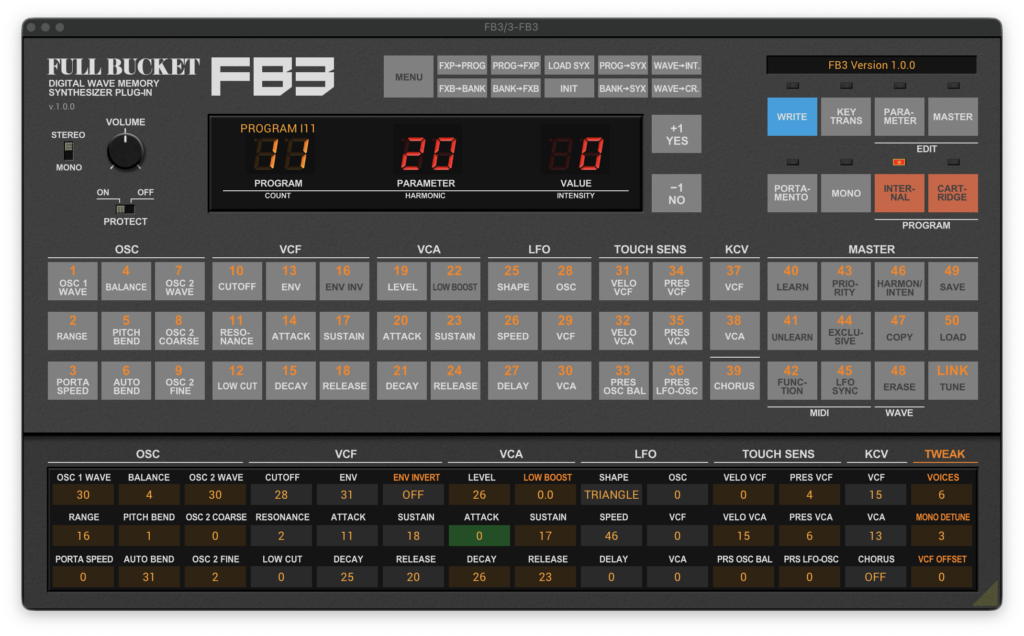
FB3 is a software instrument that simulates the Kawai K3 / K3m synthesizer, a classic released back in 1986. On top of emulating the original wave generator unit, it also ships with the original factory sounds.
The user interface reproduces the hardware control layout one to one, so switching presets does not work like the usual plugin browser. Instead, you pick a bank with the “INTERNAL” or “CARTRIDGE” button in the top right of the panel, then click one of the numbered 1–50 buttons along the bottom of the panel. On the real K3 you got 50 internal sounds plus another 50 from a cartridge, but in FB3 the developer treats the cartridge as permanently inserted, so all 100 programs (INTERNAL + CARTRIDGE) are available right from the start.
Note that the numbered buttons switch over to parameter selection while the “PARAMETER” button is held down. If your sound is not changing, check whether the INTERNAL or CARTRIDGE LED is lit.
Key Features
- Simulation of the original wave generator unit
- Includes the original factory sounds
- Up to 64-voice polyphony
- Edit a real K3 / K3m hardware unit straight from the plugin user interface
- SysEx and user wave import / export support
- Resizable user interface (except for the “N” versions)
- Dynamic microtuning via ODDSound MTS-ESP
- MIDI Learn support – every parameter can be controlled by MIDI CC
How to Download and Install FB3
FB3 is easy to grab and install – just pick the Mac or Windows format on the official Full Bucket Music page and download it.
That wraps up the free giveaway info for FB3. Keep an eye out – free releases like this one do not always stay free forever, so it is worth grabbing while it is available.