

• Skip to main content
  • Skip to primary sidebar
  • Skip to footer
  • HOME
  • Deals
    • DAW Deals
    • Plugin Deals
  • DAW
  • Plugins
    • Effects
      • Equalizer
      • Compressor
      • Mastering
      • Multi Effects
    • Instruments
      • Synthesizers
      • Bass
      • Drums
  • Samples
  • STORES
  • Distribution
daw-plugins-top-2023

DAWPLUGINS.net

Music Production Information Site

plugin-boutique free banar
You are here: Home / VST Plugins / Effect Plugins (VST Effects) / Saturation & Tape VST Plugins / Analog Obsession THEDI – Free DI Emulation Plugin That Tightens Lows and Adds Midrange Presence and Shine

Analog Obsession THEDI – Free DI Emulation Plugin That Tightens Lows and Adds Midrange Presence and Shine

Analog Obsession THEDI – Free DI Emulation Plugin That Tightens Lows and Adds Midrange Presence and Shine
This post contains affiliate links. plugin-boutique free banar

Analog Obsession’s DI emulation plugin THEDI is currently available as a free download!

In this article, we cover the giveaway details and give you an overview of THEDI.

We hope you find it useful.

1. What Is Analog Obsession “THEDI”?

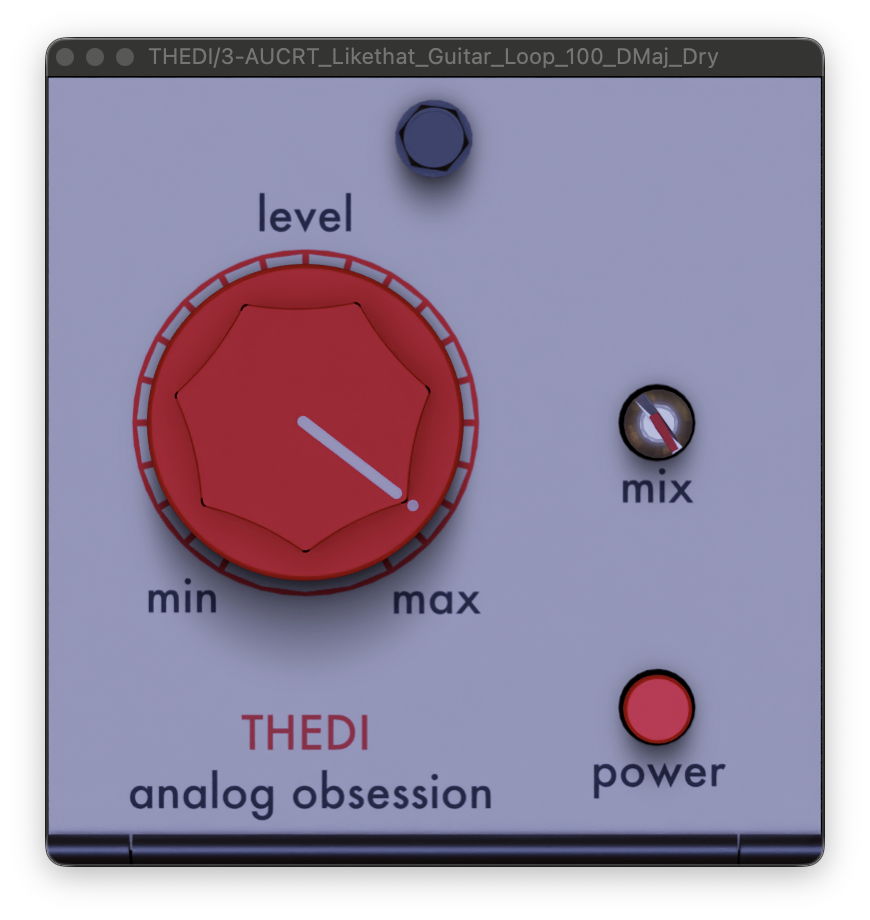
THEDI is a DI emulation plugin inspired by a famous color DI box. It tightens up the low end, emphasizes the midrange, and adds shine and sparkle to the top end. The layout is extremely simple — just LEVEL and MIX controls — making it easy to add an analog-like texture to your tracks. It is a lightweight design that uses built-in light antialiasing instead of oversampling.

Key Features

  • LEVEL: level control with gain compensation
  • MIX: blends the dry and wet signals
  • POWER: bypass
  • No oversampling — lightweight antialiasing built in
  • Resizable interface — adjustable from 50% to 200% via the handle in the bottom-right corner
  • Double-click the handle to return to the default size

Samples used in the demo video | Splice Sounds

  • DSC_RTS_100_drum_loop_classic_drums_dry
  • SC_DP_100_bass_picked_desire_Dmaj
  • AUCRT_Likethat_Guitar_Loop_100_DMaj_Dry
Check Out Splice Sounds

2. How to Download and Install THEDI

You can download THEDI from Analog Obsession’s official distribution page on Patreon — no registration required. Three downloads are available: Mac Installer, Windows Installer, and Windows Zip.

Download THEDI for Free (Patreon)

Summary

That wraps up the free giveaway info for Analog Obsession’s THEDI. If you are looking for a quick and easy way to add analog-style color and presence to your tracks, this lightweight DI emulation is well worth grabbing.

Analog Obsession THEDI – Official Page

Primary Sidebar

More to See

Renegade Audio “Launch Pad Series Vol 32 – Rootical Dub” FREE for a Limited Time – 118-Sound Modern Dub Sample Pack

August 28, 2026 By DAWPlugins.net

Pink Trombone by Steve Duda – FREE Vocal Tract Speech Synthesizer Plugin (AU/VST3)

August 28, 2026 By DAWPlugins.net

Medallo Doubler by Jesus Oyola – FREE 4-Voice Vocal Doubler Plugin With Per-Voice Control

August 28, 2026 By DAWPlugins.net

Rust Romance “BigBlockPre LE” FREE — Discrete Preamp Plugin Recreating the API 312-Style Signal Path

August 28, 2026 By DAWPlugins.net

Tags

iZotope

Footer

Text Widget

This is an example of a text widget which can be used to describe a particular service. You can also use other widgets in this location.

Examples of widgets that can be placed here in the footer are a calendar, latest tweets, recent comments, recent posts, search form, tag cloud or more.

Sample Link.

Recent

  • Limbus Spatial Stage Free Download: Limbus Audio Gives Away Its €49.90 Spatial Mixing System
  • Renegade Audio “Launch Pad Series Vol 32 – Rootical Dub” FREE for a Limited Time – 118-Sound Modern Dub Sample Pack
  • Pink Trombone by Steve Duda – FREE Vocal Tract Speech Synthesizer Plugin (AU/VST3)
  • Medallo Doubler by Jesus Oyola – FREE 4-Voice Vocal Doubler Plugin With Per-Voice Control
  • Rust Romance “BigBlockPre LE” FREE — Discrete Preamp Plugin Recreating the API 312-Style Signal Path

Search

Tags

iZotope

Copyright © 2026 · Magazine Pro on Genesis Framework · WordPress · Log in