

• Skip to main content
  • Skip to primary sidebar
  • Skip to footer
  • HOME
  • Deals
    • DAW Deals
    • Plugin Deals
  • DAW
  • Plugins
    • Effects
      • Equalizer
      • Compressor
      • Mastering
      • Multi Effects
    • Instruments
      • Synthesizers
      • Bass
      • Drums
  • Samples
  • STORES
  • Distribution
daw-plugins-top-2023

DAWPLUGINS.net

Music Production Information Site

plugin-boutique free banar
You are here: Home / VST Plugins / Effect Plugins (VST Effects) / Saturation & Tape VST Plugins / Hakunizer by Hakuna Audio – Free One-Knob Enhancer Plugin With 4 Programs

Hakunizer by Hakuna Audio – Free One-Knob Enhancer Plugin With 4 Programs

This post contains affiliate links. plugin-boutique free banar

Hakuna Audio has released Hakunizer, a one-knob enhancer plugin, and it is currently available as a free download. This article covers the giveaway details and an overview of the plugin.

What Is Hakuna Audio Hakunizer?

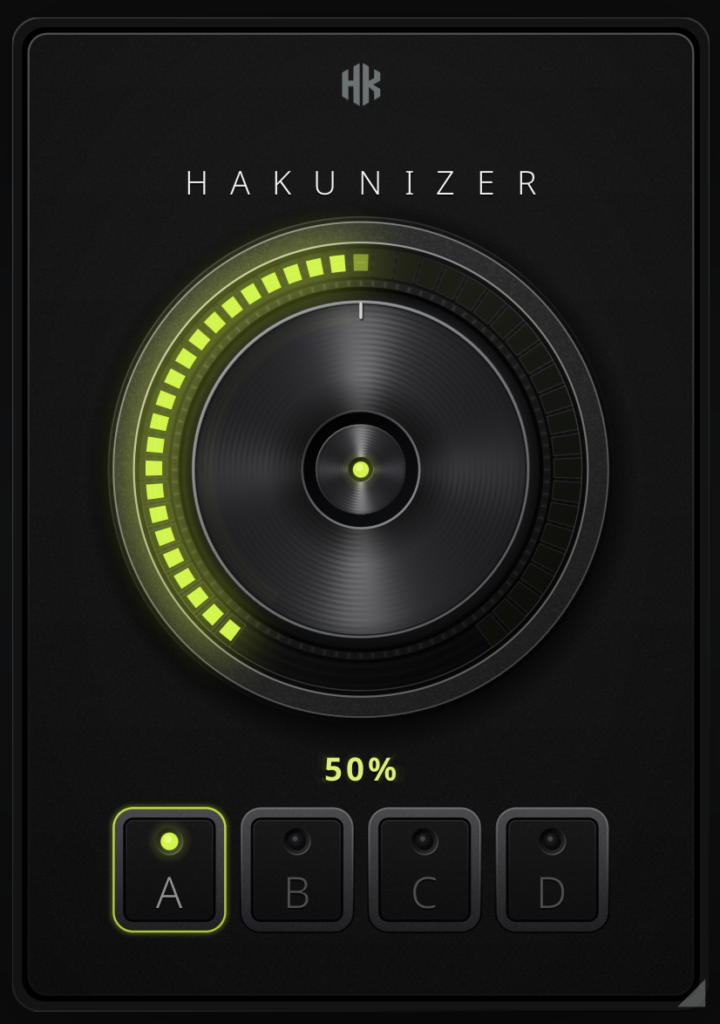
Hakunizer is a one-knob enhancer plugin that lets you choose one of four programs (A, B, C and D) and simply turn a large knob to make your sound thicker, bigger and denser. All four modes increase loudness and density, but each emphasizes different frequency ranges and has its own processing character. The Amount knob controls how much processing is applied: click the knob to bypass, hold Shift while dragging for fine adjustment, and double-click to return to 50%. Both Amount and Program selection can be automated.

Key Features

  • Program A: Boosts lows and highs over the mids and adds the strongest saturation, making it the most colorful option
  • Program B: Pushes the mids forward while leaving the low end almost unchanged
  • Program C: Lifts the entire spectrum evenly and applies the strongest compression without significantly changing tonal balance
  • Program D: Raises level with full-band dynamics processing and reduces dynamic range without intentionally altering tone, stereo image or coloration; the cleanest option
  • Amount knob adjusts processing depth (click to bypass, Shift+drag for fine control, double-click to reset to 50%)
  • Both Amount and Program are automatable
  • The interface can be scaled from 25% to 200%
  • One license covers up to 3 computers and does not expire

How to Install and Activate Hakunizer

To get Hakunizer, create a free Hakuna Audio account, obtain your license key from My Account, then download and install the plugin. Enter the license key when you launch the plugin to complete activation.

Get Hakunizer for Free (Hakuna Audio)

Primary Sidebar

More to See

Free Limbus Audio TuneFloyd Pro: Limited-Time Pitch Correction Plugin Giveaway (Natural to Robot Vocals)

October 11, 2026 By DAWPlugins.net

TugMidiSeq Free Download: Polyphonic Arpeggiator & Chord Lane Sequencer by Tuğrul Akyüz

October 11, 2026 By DAWPlugins.net

Free: Ovani Sound The Game Audio Sampler Pack – 50 Music Files + 144 Sound FX for Games (Limited Time)

October 11, 2026 By DAWPlugins.net

Free Techno Mega Pack by W.A. Production: 1,700+ Samples & 300+ Presets for Techno (Limited Giveaway)

October 11, 2026 By DAWPlugins.net

Tags

iZotope

Footer

Text Widget

This is an example of a text widget which can be used to describe a particular service. You can also use other widgets in this location.

Examples of widgets that can be placed here in the footer are a calendar, latest tweets, recent comments, recent posts, search form, tag cloud or more.

Sample Link.

Recent

  • [Free] Moonwave FX WIDR Dimension Expander Free for a Limited Time – Width & Depth Stereo Expander Plugin
  • Free Limbus Audio TuneFloyd Pro: Limited-Time Pitch Correction Plugin Giveaway (Natural to Robot Vocals)
  • TugMidiSeq Free Download: Polyphonic Arpeggiator & Chord Lane Sequencer by Tuğrul Akyüz
  • Free: Ovani Sound The Game Audio Sampler Pack – 50 Music Files + 144 Sound FX for Games (Limited Time)
  • Free Techno Mega Pack by W.A. Production: 1,700+ Samples & 300+ Presets for Techno (Limited Giveaway)

Search

Tags

iZotope

Copyright © 2026 · Magazine Pro on Genesis Framework · WordPress · Log in