

Turquoise Textures is giving away its ambient reverb plugin “Continuum Reverb” for free!
In this article, we introduce the Continuum Reverb giveaway details and an overview of the plugin.
Be sure to check it out.
1. What Is Turquoise Textures “Continuum Reverb”?
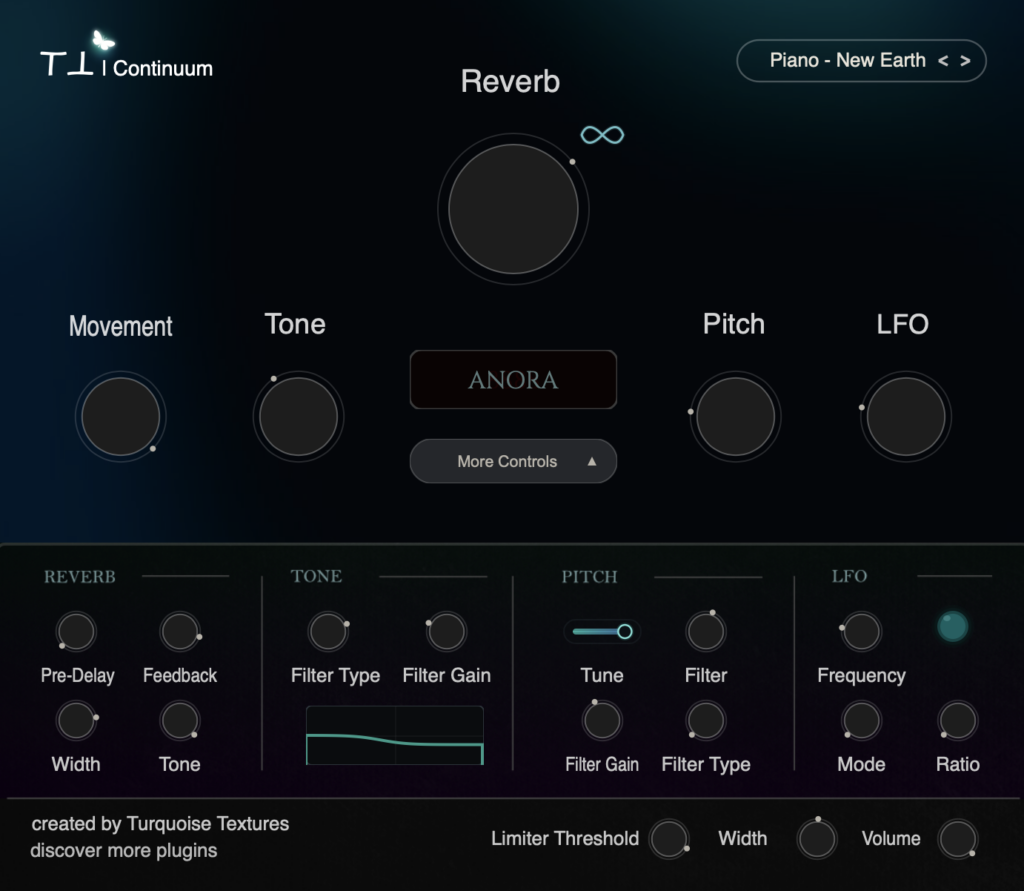
Continuum Reverb is an ambient reverb engine that turns simple sources into vast, atmospheric soundscapes. It features three spatial algorithms, an Infinity Freeze that locks the reverb tail, a parallel pitch shifter, and LFO modulation. It sits somewhere between an effect and an instrument: you can smooth out transients, layer pitch-shifted voices, or freeze the tail into a drone.
Key Features
- 3 spatial algorithms: Solaria, Lumina VII, and Anora
- Infinity Freeze: locks the reverb tail into an unbroken drone
- Movement Envelope: softens hard transients and pick attacks before they hit the reverb
- Parallel Pitch Generator: adds a pitch-shifted voice with fine tune, filter type, cutoff, and gain
- LFO Modulation Engine: adds movement and harmonic drift to the decay tail
- More Controls panel: Pre-Delay, Feedback, Stereo Width, Tail Tone, pre-filter EQ (with graph display), pitch chain, LFO settings, output limiter, master width, and volume
- 20 factory presets for ambient, cinematic, lo-fi, and film scoring
- Supported formats: VST3 and AU (64-bit); macOS 10.13 or later (Intel / Apple Silicon) and Windows 10/11
Samples used in the video | Splice Sounds
- EX_FF_120_Piano_Steady_Dry_Amin
- EX_HC_120_perc_balcony_railing_reverse_shaker_dry
- FL_RHP_120_Drum_Kick_Knock_Dry
2. How to Download and Install Continuum Reverb
On the official product page, click “Add to Cart” or “Download Now”, then enter your name and email address and complete checkout to download and install the plugin.